DeepSeek V4.1 Flash API: Preview Access and Harness Setup
What the reported DeepSeek V4.1 Flash preview model ID means, how to configure an authorized test in Harness, and which API and multimodal details remain unverified.
October 24 update: use the current API guide
This page preserves the September 8 preview report. For current setup, start with the October 17 Flash update and DeepSeek’s API quickstart (checked October 24, 2026). The quickstart now recommends deepseek-flash, served by DeepSeek-V4.1-Flash-1017. It says the legacy deepseek-v4-flash and deepseek-v4-flash-vision-exp names route to that newer model. The September preview ID below is historical evidence, not a current setup recommendation.
Using SandBase? Check the DeepSeek model page for its own model ID, supported inputs and price before configuring a call. DeepSeek’s direct API routing does not establish which model a third-party gateway serves. This update did not run an API request or verify SandBase’s underlying checkpoint.
The report below, including its availability statements, catalog checks and screenshots, records what was known on September 8, 2026. It is not a current model catalog.
September 8 preview report
The DeepSeek V4.1 Flash preview message claims five upgrades: a new model architecture, native multimodal support, stronger capabilities, faster responses and lower costs. These describe the intermediate test build according to the message; no public technical report or controlled comparison independently verifies them in the sources checked here.
The reported DeepSeek V4.1 Flash preview uses the model ID deepseek-v4.1-flash-expires-on-0910, but public access is not established. A preview message circulated on September 8 describes an intermediate test build. DeepSeek’s public API quickstart checked the same day still lists V4 Flash, V4 Pro and Flash Vision Exp. Developers should obtain account-specific access confirmation before treating the reported ID as a working API option.
The practical problem is familiar: an agent already works with V4 Flash, a screenshot names a new model, and changing one field looks enough to upgrade. That field can select a model your account cannot access—or a temporary route that disappears while the rest of the application remains unchanged. For this preview, keep the existing configuration and add a separate test entry.
Key takeaway
- The report describes an intermediate V4.1 Flash test, not a verified general release. Its group-message attribution has not been independently authenticated.
deepseek-v4.1-flash-expires-on-0910is the exact ID printed in that report. The suffix suggests a temporary window; no cutoff time or timezone is established.- The claims about a new architecture, native multimodality, stronger capabilities, lower costs and higher speed lack a public V4.1 specification or comparable test results in the sources checked here.
- Existing V4 Flash and Flash Vision Exp have documented API routes. Neither becomes V4.1 merely because a client displays a new name.
What the September 8 report actually shows
A report by cxuanAI, dated September 8, 2026, reproduces the preview message. The message is attributed to an account whose displayed name translates as “DeepSeek Assistant.” Its description of the model upgrades reads, translated from Chinese:
An intermediate version of DeepSeek V4.1 Flash is available for internal testing. You are welcome to try it. It uses a new model architecture, with native multimodal support, stronger capabilities, faster speed and lower costs.
The claim goes beyond a temporary identifier: it concerns architecture, supported inputs, capability, speed and cost. For a developer already using V4 Flash, the useful comparisons are whether previously unsuccessful tasks now complete, whether images can be supplied directly, and whether the same task takes less time and costs less. The message provides no such comparison results.
For access, it says to keep the base URL unchanged while replacing the model name.
It also states that current billing matches deepseek-v4-flash and that each account is limited to 20 concurrent requests. Those are claims made by the reproduced message. They are not a verified public price card or a service limit independently measured for this article.
The article then shows a DeepSeek Harness settings screen with an additional model entry and a chat response identifying itself as the preview. The settings screenshot demonstrates what the author entered. The response demonstrates what the assistant said. Neither establishes a generally available endpoint, a particular architecture, or a performance improvement.
That leaves several different questions with different answers:
| Question | What can be established from the checked material? |
|---|---|
| What identifier is being circulated? | deepseek-v4.1-flash-expires-on-0910, visible in the report. |
| Can every DeepSeek API account use it? | Not established by the screenshots or public quickstart. |
| Does V4.1 have a new architecture? | Claimed in the reproduced message; no technical description verified here. |
| What kinds of multimodal input does it accept? | Not established for this temporary ID. |
| Is it faster or cheaper than V4 Flash? | No comparable measurements or verified V4.1 price table available in this review. |
| Can it be called through SandBase? | No exact V4.1 match was returned by the catalog search performed for this article. |
Which DeepSeek models are publicly documented?
The official API quickstart lists https://api.deepseek.com as the OpenAI-compatible base URL. It names deepseek-v4-flash, deepseek-v4-pro and deepseek-v4-flash-vision-exp. Its note maps the Flash alias to Flash-0731 and the Pro alias to Pro-0813.
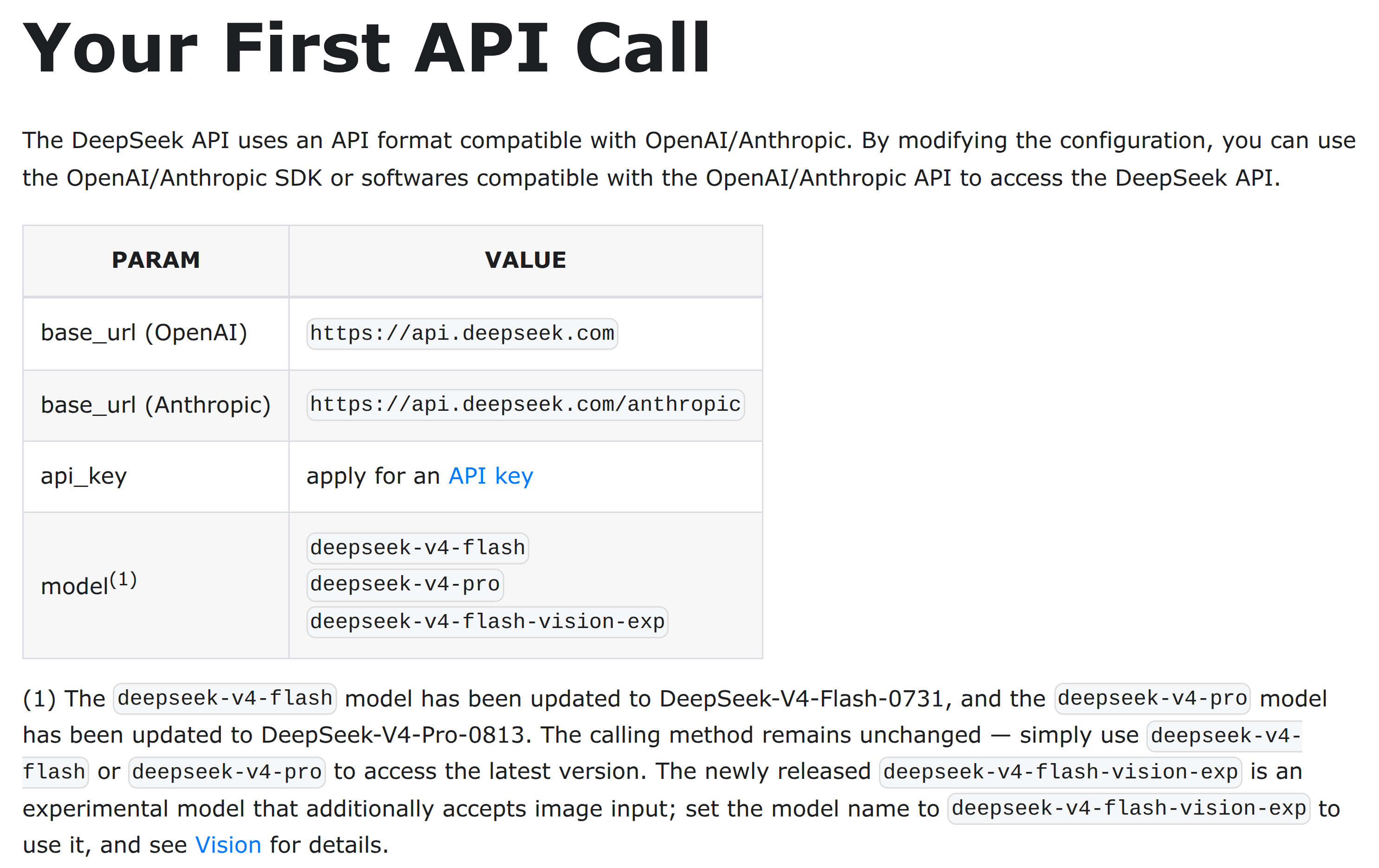
The public English quickstart lists the current API identifiers. Its model table is separate evidence from the circulated V4.1 preview message.
An absent entry does not prove that a private test does not exist. The temporary ID is not documented on that page. Its context window, license and open-weight availability remain unconfirmed; the current Flash specifications do not establish those details for V4.1.
For an application that must work today, preserve the route already verified with your own account. If your task is image understanding, check the documented vision model explicitly rather than assuming that any model whose name contains “Flash” accepts images.
How to configure an authorized preview in DeepSeek Harness
DeepSeek Harness is the application that manages the conversation and tools; the model provider is the service receiving its requests. The official Harness quickstart is the starting point for installation. The following preview setup is based on the settings flow visible in the report, not a claim that every installed version has identical controls.
Before editing, confirm two details through the account’s official access channel: whether the preview is enabled for that account, and which exact endpoint and model identifier it accepts. A screenshot forwarded from another account does not settle either question.
- Open Settings → Models and the existing DeepSeek provider entry.
- Keep a copy of the working provider configuration and preserve its current V4 Flash entry. Do not replace the only working model with a temporary name.
- In the custom model list shown in the report, choose Add model. Enter
deepseek-v4.1-flash-expires-on-0910as the identifier only if that is the ID confirmed for your account. A friendly display label can be shorter; it does not change the identifier sent to the API. - Keep the base URL only when it is the endpoint confirmed for that same provider and account. The report’s “unchanged” instruction does not mean that an arbitrary proxy automatically supports the preview.
- Apply the settings, explicitly select the added model, and begin with a small text-only request in a separate conversation.
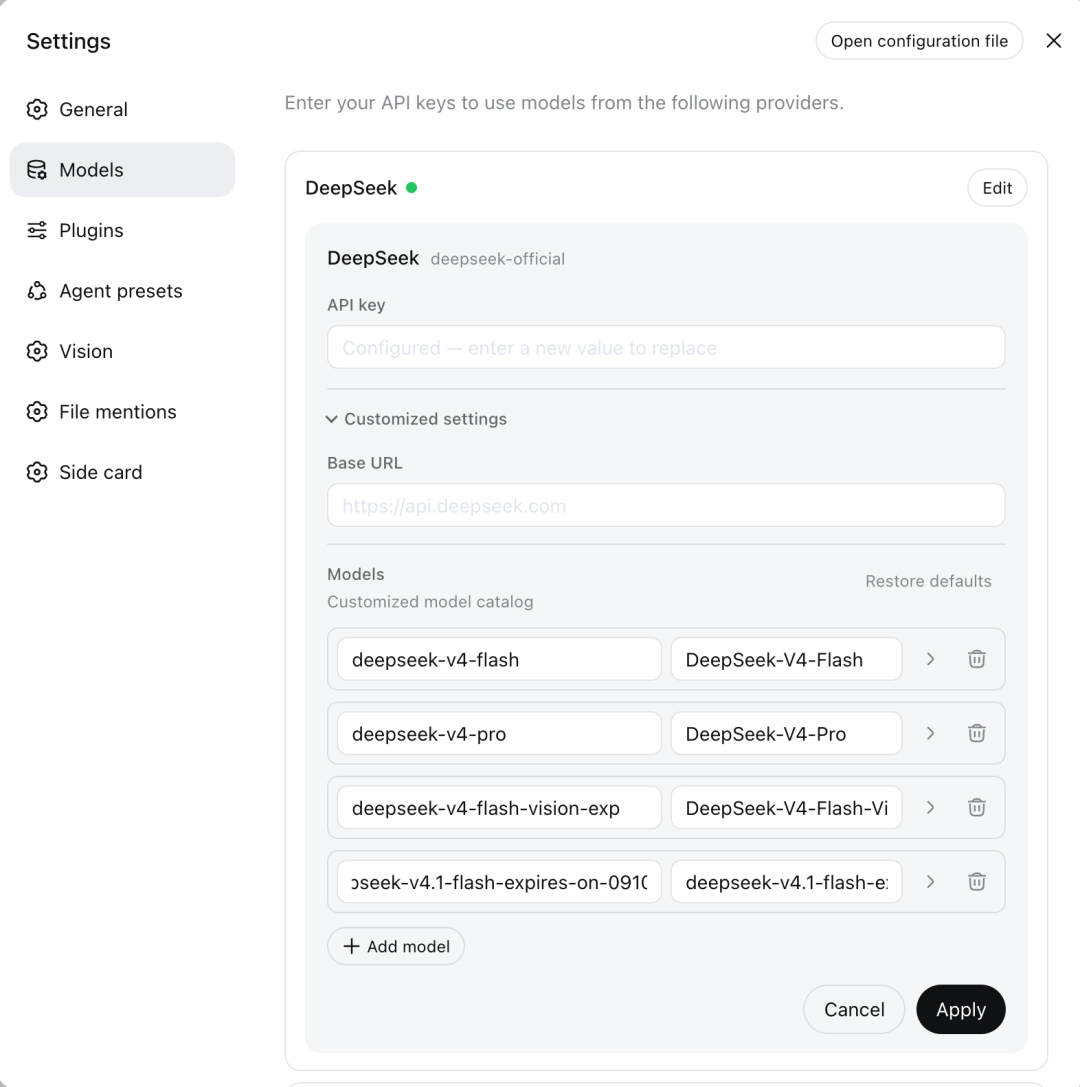
The screenshot accompanying the preview report shows the deepseek-official provider, Base URL, custom Models list, Add model and Apply controls. The preview ID is clipped inside the input; use the complete identifier in step 3. The settings screen shows configuration, not proof of a successful API call. Click the image to view its original size.
For a hand-added model, client-side input settings also matter. The Harness provider guide explains text-only defaults and per-model image declarations for its custom-provider adapter. Follow the settings for your installed adapter; declaring image input in the client does not make the server accept it.
Record the request’s model field, the endpoint, the returned status and any provider-supplied model metadata. Keep keys out of logs. A successful response provides evidence for that account and request at that time; it does not prove permanent availability. If the model is rejected, restore the known-working selection before investigating permissions and the test window.
Asking “What model are you?” is not a substitute for this check. An assistant can repeat a name from its prompt or client context. Even a returned model field should be interpreted alongside the provider’s routing documentation, rather than as an independent audit of the weights running behind the endpoint.
How to isolate a failed preview API request
The public DeepSeek documentation explains an OpenAI-compatible Chat Completions interface. That establishes the existing service format. It does not independently establish that a private model accepts every parameter or is enabled for a particular account.
For the reported preview, the meaningful configuration difference is the exact model identifier. Once the provider confirms access, start from its preview instructions and a minimal request. Add streaming, tool calls and image input separately, checking each response. Copying a long V4 request with several optional fields makes a failure harder to diagnose: an unsupported model and an unsupported parameter are different problems.
If you encounter an error, preserve its actual code and body. The official error-code documentation distinguishes authentication, balance, malformed requests, rate limits and server problems. A failed call does not automatically mean the preview has expired. Conversely, repeatedly retrying an unavailable model will not enable access.
No V4.1 API call or latency benchmark was executed for this article. Use the account-specific preview instructions and inspect your actual response before adding the route to a workflow.
Multimodal support: do not confuse two experimental names
The phrase “native multimodal” in the reproduced message is broad. It does not specify accepted file types, image count, resolution limits, video input or audio support. An architecture claim and a usable input schema are different pieces of information.
DeepSeek already publishes a Vision guide for deepseek-v4-flash-vision-exp. That documented experimental route accepts image input. It is a different identifier from the reported V4.1 preview.
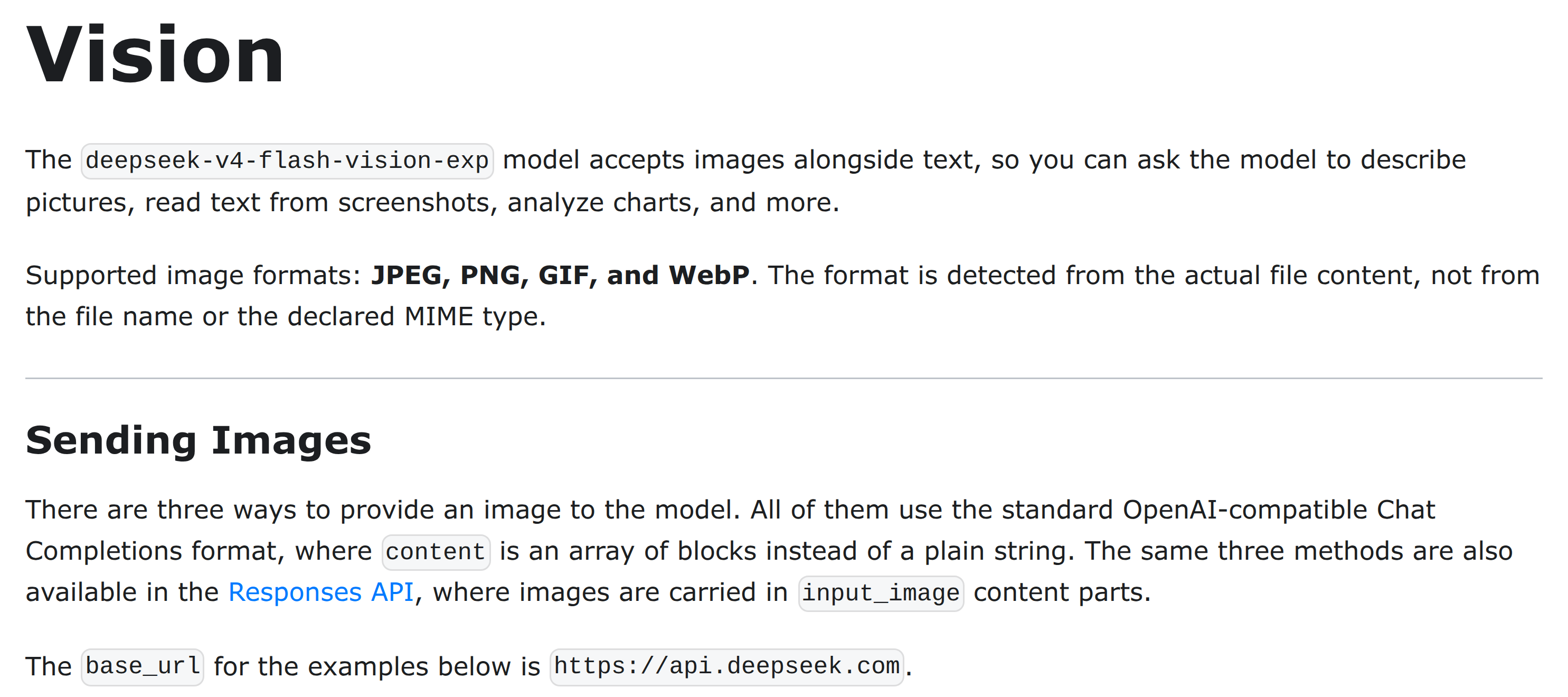
The Vision guide documents Flash Vision Exp. It should not be read as a V4.1 specification or proof of shared multimodal behavior.
For example, if your immediate task is reading a screenshot of a settings panel, start with a route whose image-input format is documented. If you later gain V4.1 preview access, repeat the same image task using the preview’s confirmed format. Do not infer video or audio support from a successful image request.
Pricing, concurrency and the short test window
The report contains two cost statements that should not be combined into a discount claim. Its message describes the new build as lower-cost, but also says current billing is the same as V4 Flash. Lower inference cost could refer to the provider’s implementation; it does not establish a lower price on a customer’s invoice.
Use the provider’s current billing instructions for the account being tested. DeepSeek direct prices and a gateway’s prices are separate offers. SandBase’s V4 Flash listing is not evidence for the price of an unlisted V4.1 route.
The reported “20 concurrent” limit means simultaneous requests, if that limit applies to the account; it does not mean 20 requests per second. A request that stays open continues to occupy a concurrent slot. Start with one request while confirming access and behavior, then test the concurrency actually needed by your application.
Finally, expires-on-0910 looks temporary, but the string alone does not establish a cutoff timezone, an automatic replacement, or continued access after September 10. Avoid putting it into an unattended production job. Keep a named fallback and record which route handled each result so that a fallback does not get mistaken for a V4.1 success.
Which SandBase model page is relevant now?
For text, coding and existing agent workflows, the DeepSeek V4 Flash model page provides the current SandBase model entry. For image understanding, use the separate DeepSeek V4 Flash Vision Exp page and its supported input format.
These are alternatives for current work, not V4.1 access links. The catalog query made for this article returned related V4 models rather than an exact V4.1 entry. Do not paste the temporary direct-provider ID into a gateway and assume it has been integrated. For broader setup context, see the existing Harness article.
FAQ
Has DeepSeek V4.1 Flash been officially released?
The September 8 report describes an intermediate private test. The public API quickstart checked for this article does not list that temporary model. General availability is not confirmed by the checked sources.
What is the reported V4.1 Flash model ID?
It is deepseek-v4.1-flash-expires-on-0910. Obtain confirmation that your provider and account accept it before changing an application. The name alone does not grant access.
Do I need to change the Harness base URL?
The reproduced message says to keep it unchanged. Apply that instruction only to the matching, confirmed provider configuration. It does not establish compatibility with a different gateway or API account.
Is V4.1 Flash cheaper and limited to 20 concurrent requests?
Those details come from the reproduced group message. It says current billing matches V4 Flash and mentions 20 concurrent requests per account. Neither is independently verified here as a public V4.1 service term.
Can I use V4.1 Flash through SandBase today?
No exact V4.1 entry was found in the catalog check for this article. The linked V4 Flash and Flash Vision Exp pages are different models. Check for an explicit supported entry before attempting the preview through SandBase.
Conclusion
The useful next step is account-level access confirmation, followed by a separate Harness test entry with the exact confirmed model ID. Keep the working V4 route available, test the capabilities you need, and record actual responses. The circulated screenshot identifies a preview to investigate; it does not yet justify a production migration or a speed-and-price comparison.