How to Use ChatGPT Sites: Build, Publish, and Understand Pricing
Learn how to use ChatGPT Sites to build and publish a website, check plan limits and custom domains, and choose model or image APIs for your own workflow.
To use ChatGPT Sites, open Work in ChatGPT on the web, describe the website you need, or mention @Sites; review the generated version, then choose its audience and publish. Sites creates and hosts websites, lightweight apps, and games. OpenAI lists it in public beta for eligible paid plans, with plan-specific limits.
For an independent developer or small-team website owner, it can handle a launch page due Friday, a portfolio, or a modest internal tracker. The practical questions are where to start, what the subscription covers, how to publish safely, and which tasks still need a separate tool. A polished storefront, for example, does not automatically include working checkout.
Key takeaway
- ChatGPT Sites creates, hosts, and updates websites, lightweight apps, and games. OpenAI lists it in public beta for Plus, Pro, Business, Enterprise, and Edu, subject to rollout and workspace controls.
- Sites supports durable database records, file storage, and authentication. It goes beyond generating a static page.
- OpenAI’s Field Day shopping demo includes a local cart and an animated basket. Its published brief explicitly excludes backend and checkout integration.
- Beta limits can affect both new builds and high-usage public sites. Evaluate a replacement against the traffic, data, and operating tasks your existing subscription handles.
Availability and documentation below were checked on September 8, 2026. Sources are OpenAI’s Sites guide, its Help Center, and the published showcase. This is a product analysis, not an independently timed build test.
How to use ChatGPT Sites and publish your first website
Sites combines creation with hosting. You describe a website, provide relevant files or visual references, inspect the preview, and request changes. The resulting website remains accessible through the Sites list after the conversation that created it ends.
On the web, OpenAI’s Help Center directs users to Work; in the desktop app, to Work or Codex. Include “website” in the request or mention @Sites. The Help Center checked September 8 lists the EEA, Switzerland, and UK as unavailable at launch; check current regional access.
Use this sequence for a first page:
- Open Work on the web, or Work / Codex in the desktop app. Describe the audience and page purpose; include “website” or
@Sites. - Attach the approved copy, logo, or reference image. Specify the behavior you need, such as a registration button linking to your existing form.
- Review the preview and request precise changes. Ask to save a version without deploying while you check it.
- Choose the intended audience in Share. Enterprise public publishing requires administrator permission.
- Publish the reviewed version, then open its URL as the intended visitor and check the links and access.
If you cannot see Sites, check the selected account, plan, region, rollout, and workspace permissions. If an existing site cannot remain public, also check beta usage limits.
The workflow has two distinct publishing steps. Saving a version creates a deployable candidate. Deploying a version makes that version live. OpenAI says every deployment URL is a production URL, although the audience may be restricted. A request to “save a version without deploying” is therefore useful when someone else needs to review a change first.
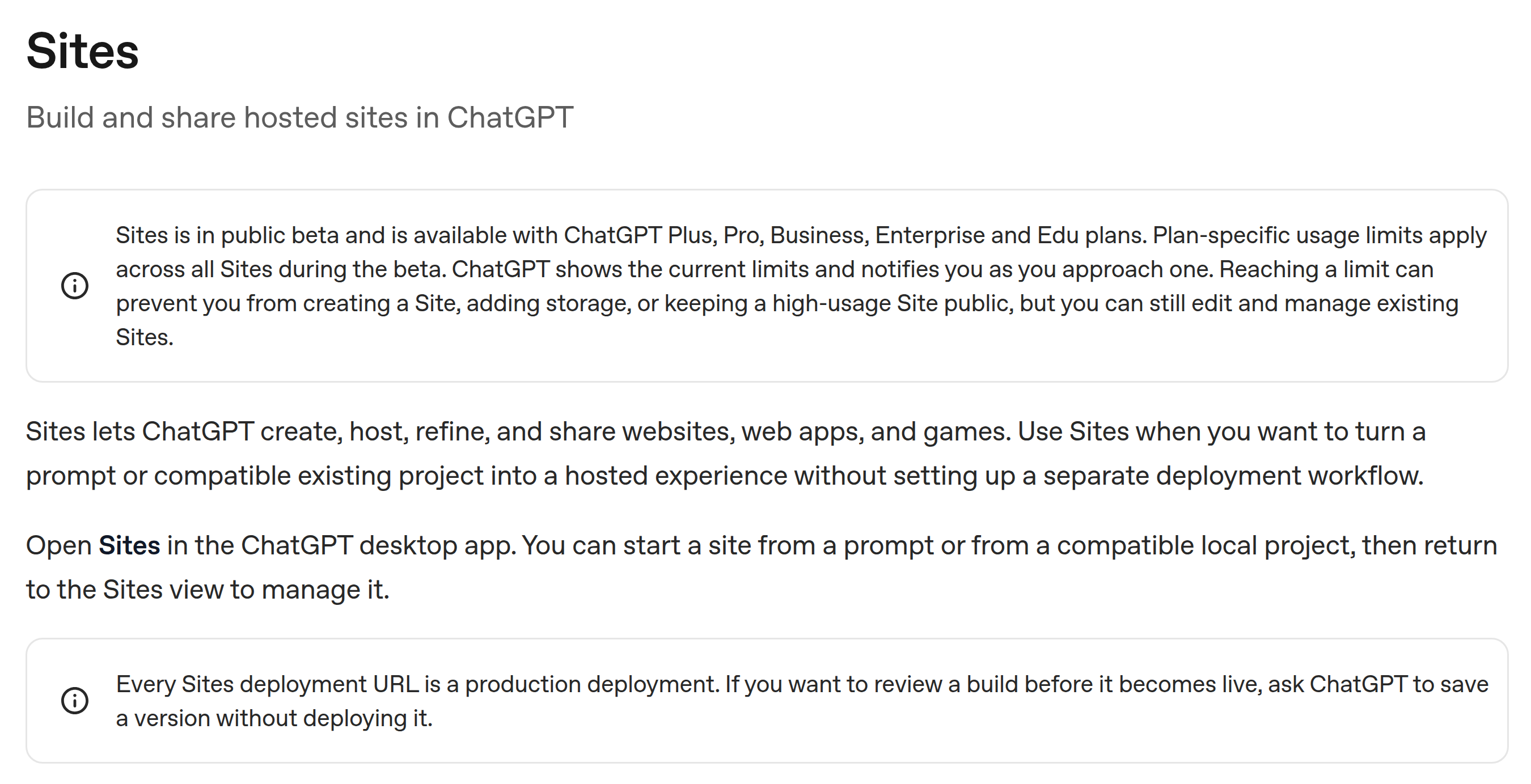
OpenAI’s English Sites guide lists public-beta access and separates saving a version from deploying it.
Jeremy Caplan’s September 7 Fast Company article describes sponsorship pages, book-group pages, and music games. He reports roughly 10–15 minutes depending on complexity; that is his experience, not a completion guarantee.
Sites is a product feature, not a model name. The two OpenAI Sites guides cited here do not establish one fixed underlying model for every build. The model attached to an individual showcase should be read separately from the hosting product. That distinction matters when choosing between generating a website in ChatGPT and calling a coding model from your own application.
ChatGPT Sites pricing: is it free?
The Sites guide lists Plus, Pro, Business, Enterprise, and Edu. The Help Center says Free and Go are unsupported at launch. Beta usage is included up to the limits for your plan; the account interface shows those limits, which may change. There is no universal unlimited-hosting allowance to assume.
Reaching a beta limit can stop new Sites, additional storage, or high-usage public availability. Domain registration and external services also need their own budget. Model API usage is separate from ChatGPT subscription access: buying API calls does not provide a Sites subscription or hosting allowance.
The picnic store shows both the opportunity and the remaining work
OpenAI’s Field Day showcase, identified in its project metadata as built with Codex + GPT-5.6, provides a concrete example. Its brief asks for a picnic-supply storefront with product filters, a local cart, a gift-set builder, and an illustrated basket. Products should fly into the basket, and visitors should be able to use touch gestures or an accessible Add button.

The live Field Day demo shows its storefront design. This screenshot records the page appearance, not a payment or cart test.
The final showcase describes 13 products and several revisions: improving the sprites, adjusting gestures and landing positions, and removing a gift-set item limit. These are recognizable frontend tasks. A person commissioning the page can discuss the experience they want instead of specifying every CSS rule or animation callback.
The brief also includes this sentence:
“No backend or checkout integration is required.”
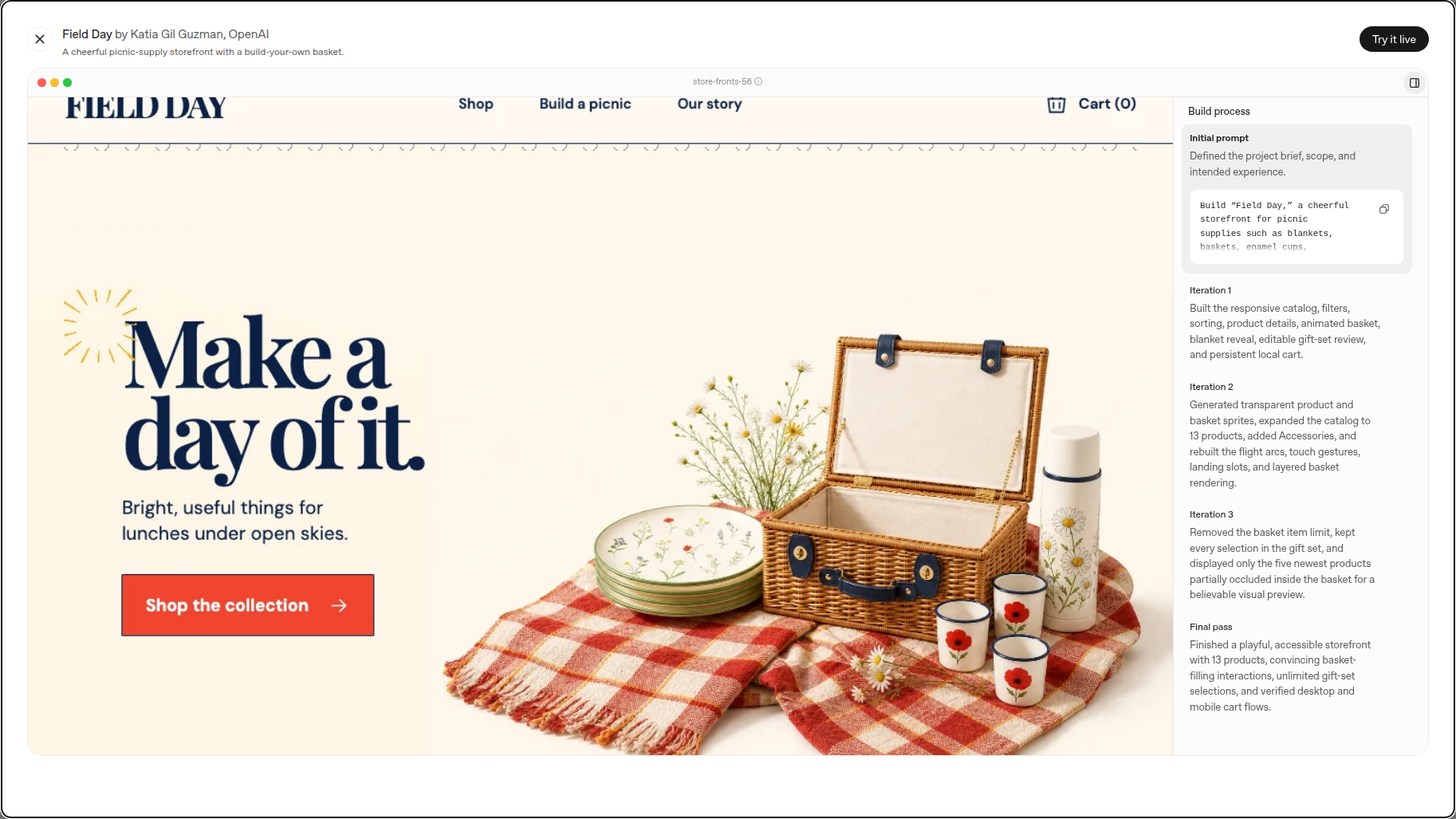
OpenAI’s showcase lists the revisions and final pass. The initial prompt is only partly visible in this view; the full linked brief specifies the backend and checkout exclusions.
A cart can remember a selection locally without creating an order in a merchant’s system. An attractive basket animation does not show that money was collected, stock was reserved, or a refund was recorded. Those are separate behaviors that a working shop needs.
For a developer, the lesson is practical: request the exact interactions, accessibility alternatives, and device checks you need. Field Day’s prompt asks for desktop and mobile verification and no console errors. The showcase reports that work; it does not establish the quality of a different, newly generated site. Your site still needs its own checks.
Sites can remember data and identify users
Calling Sites “just a frontend generator” misses capabilities in OpenAI’s current documentation. Its supported site shapes include:
| What visitors need | Documented Sites component | A useful acceptance check |
|---|---|---|
| Saved requests, progress, or scores | D1, a relational database for structured records | Create a record, reopen the app, and confirm it remains |
| Uploaded images or documents | R2, object storage for files | Upload a file and confirm the intended user can retrieve it |
| Searchable uploaded files | D1 metadata plus R2 file contents | Change a title and verify that search shows the updated record |
| A workspace-only internal app | Workspace-authenticated identity | Open it as an authorized member and as an unauthorized visitor |
| A public app with personal features | An authentication-enabled Site | Check both signed-out behavior and access to each person’s records |
The guide specifies 10 GB of D1 storage per Site and no fixed R2 storage limit. Neither removes the separate plan-specific beta usage limits. Sites can also provide traffic analytics, currently excluding Enterprise-owned Sites, with unique visitors and page views over time.
For an internal request tracker, these building blocks can remove a substantial amount of setup. They do not define your business rules. “People can sign in” leaves unanswered whether Alice can read Bob’s request or whether only a manager can approve a budget. OpenAI explicitly tells builders to keep authorization decisions in server-side code—the code running on the server, rather than checks a visitor can change in their browser.
A public Site’s audience setting and its own sign-in feature are separate. You might allow anyone to read a guide but require sign-in to save progress. Treat those as two requirements when prompting and reviewing the app.
Which subscription is a sensible replacement candidate?
Start with the job you currently pay for. SaaS means software supplied as an online service; a subscription may include much more than the page editor you see most often.
| Your current job | How to evaluate Sites |
|---|---|
| Publish a portfolio, launch page, or resource guide | A strong trial candidate: verify layout, links, domain needs, and the publishing workflow |
| Maintain a small internal request tracker | A plausible candidate if the supported data model, permissions, and runtime fit |
| Demonstrate a store or interactive product concept | A good prototype candidate; label simulated behavior and specify which integrations are absent |
| Operate a shop with refunds, tax, fulfillment, and support | Compare the complete order workflow; a generated storefront only covers part of it |
| Run a service with contractual residency requirements or unsupported infrastructure | Check requirements before rebuilding; Sites documents residency and runtime limitations |
Payment support deserves particular care because OpenAI’s documentation currently differs. The Help Center page checked on September 8 explicitly permits selling goods or services through a third-party payment processor. It makes the merchant responsible for connecting and maintaining that processor, fulfillment, refunds, support, and taxes. The Sites developer guide retrieved the same day still lists enabling financial transactions among unsupported uses. Confirm the applicable Sites terms and current product guidance before launching commerce. Neither page turns the Field Day demo into a completed checkout integration.
The economics are similarly specific. If an existing ChatGPT subscription covers the small page you need, a separate page-builder subscription may become unnecessary. You still need to count domain registration, any external services, time spent reviewing generated changes, and the cost of fixing an outage. There is no universal saving to calculate from a launch demo.
A first project you can evaluate without migrating your business
Choose a page whose content you already know: a public resource guide, a portfolio, or an event page. Avoid starting by copying the whole customer database into a new app.
Here is an illustrative prompt, not a claimed test result:
@Sites Build a website for developers attending our one-day workshop.
Use the attached approved agenda and speaker bios as the only event facts.
Show the schedule, venue directions, and session descriptions.
Make the schedule readable on a narrow phone screen.
Use our existing registration URL for the registration button.
Do not create a new registration form or store visitor submissions.
Give every interactive control a keyboard-accessible alternative.
Save a version for review without deploying it.
This is deliberately more precise than “make an event website.” The source of the event facts is explicit. The registration destination already exists. The requested page has no new participant database to maintain.
Review the candidate as a visitor: tap the registration button, navigate with a keyboard, inspect the smallest phone layout, and compare the date and venue against the supplied agenda. Then ask for a targeted change, such as moving the venue above the schedule on mobile. Confirm that the change did not break the original links.
When ready, choose the audience and deploy the reviewed version. Open the resulting URL in the intended visitor context. If you need your own domain, Sites documents custom-domain setup where available; you must own the domain and change its DNS records, the entries that point a name to its host. Custom domains are not available in Enterprise workspaces at launch.
Need a code-generation API or website images?
Use Sites when you want the hosted website workflow inside ChatGPT. If you are building your own generator or preparing assets separately, these specific SandBase pages provide the relevant starting points:
- Generate or revise code in your own application: the GPT-5.6 Sol model page includes a playground, model access details, and API examples. Supply the page requirements and review the returned code in your build process. This is a separate workflow; the Field Day metadata identifies GPT-5.6 without specifying Sol.
- Create an original hero image or illustration: the GPT Image 2 API page documents text prompts, aspect ratios, and asynchronous image generation. For example, prepare a 16:9 illustration for the workshop page, review the result, then add the image to the site.
These APIs handle code or assets; Sites handles its own hosting. API usage is billed separately. Keep API keys in server-side runtime settings, and verify the generated result before publishing. The AI agent stack explainer explains how models, API gateways, and execution environments fit together.
FAQ
Is ChatGPT Sites free?
OpenAI’s Sites guide lists Plus, Pro, Business, Enterprise, and Edu. Its Help Center says Free and Go are unsupported at launch. Beta usage is included up to plan-specific limits, which can change; check the limits shown in your account rather than assuming unlimited hosting.
Is ChatGPT Sites powered by GPT-6 Astra?
Sites is the website-building and hosting feature. The official Sites guides cited here do not specify GPT-6 Astra as the fixed model behind every Site. For example, OpenAI identifies Field Day as built with Codex + GPT-5.6. Check the model information for the specific creation workflow or example.
Can it build an online shop and accept payments?
It can generate a storefront. The current Help Center allows third-party payment processors and assigns payment integration and merchant operations to the site owner. The developer guide still contains conflicting transaction restrictions, so confirm current terms before a commercial launch. Field Day itself explicitly excludes checkout integration.
Can a Site use a database or a custom domain?
Yes, the guide documents D1 for structured records and R2 for files. Custom domains are available in supported accounts, require domain ownership and DNS changes, and are unavailable in Enterprise workspaces at launch. Check account-specific availability before planning a migration.
How do I use ChatGPT Sites to publish a website?
Open Work on the web or Work/Codex in the desktop app, mention @Sites, and describe the site. Review and save a version, choose who can visit it, and publish that version. Open the resulting production URL to confirm that the intended audience can access it. Enterprise public publishing requires administrator permission.
A useful replacement starts with one completed job
ChatGPT Sites makes a separate page builder harder to justify when the job is a small website with clear content and modest operating needs. Its database, storage, and identity support also make some internal tools realistic candidates.
Pick one such job, publish a reviewed version, and compare the actual ongoing work with your existing subscription. A working replacement is a page or app your intended users can rely on—not simply the first preview that looks finished.