AI Video Generation API Benchmark 2026: Veo 3.1 vs Kling
AI video generation API benchmark: Veo 3.1, Gemini Omni Flash, Kling O3 Pro, Seedance and Wan 3.0 on 3 product-clip prompts. Cost per clip, wait, failures.
Seedance 2.5 was the most expensive model in our test, at $1.53 billed for a 5-second clip. In its first clip of the robot vacuum prompt, it drove the vacuum under a kitchen chair and never brought it back out. Veo 3.1 Lite cost $0.12 for a 4-second clip and finished in about half a minute. Its vacuum made it around the chair, nearly out the far side before the clip ended, but it didn’t move the camera when asked.
We ran this AI video generation API benchmark 2026 for an e-commerce agent that turns product briefs into short clips. Eight text-to-video models on SandBase got the same three prompts on 2026-10-04 (UTC): a sale sign with exact text, a drink pour, and a robot vacuum passing behind a chair. We scored every clip on a fixed rubric and recorded what each one was billed. Every model produced usable drafts. They differed far more in price per second and in wait time than in rubric score.
Key takeaway
- All 8 models spelled the on-screen text “SALE 30%” correctly. Text in short video clips was the easy part. Veo 3.1 Fast also printed gibberish on the bottle label, in both of its prompt-1 clips.
- On our 24-point rubric, Gemini Omni Flash ($0.65 for 5 s, 45 s median wait) and Wan 3.0 ($0.50 for 5 s, 147 s) tied for the top score at 23. All eight scored between 19 and 23.
- Billed price per second of video ran from $0.03 (Veo 3.1 Lite) to $0.30 (Seedance 2.5), a 10x spread. Median wait ran from 35 s (Veo 3.1 Lite) to 273 s (Seedance 2.5).
- None of the five Veo clips we made of the pour prompt moved the camera, though the prompt asked for a dolly. Both Seedance models broke object continuity on the vacuum prompt in at least one clip.
- Scope: 3 prompts, one clip per model per prompt plus 5 repeat clips, default settings, one session. Read it as a shortlist, not a ranking.
Setup: 8 models, one endpoint
Every clip went through the same Unified Run endpoint, POST https://api.sandbase.ai/v1/run. All 29 submits came back 202 with "status": "pending". We polled GET /v1/run/{id} every 5 s until the run finished, then downloaded outputs[0].url right away, because those URLs are temporary. All eight models were enabled: true in GET https://api.sandbase.ai/v1/models/<id> at 00:10 UTC on 2026-10-04, just before the run. That endpoint, and GET /v1/tasks/<id>/cost below, need the same Authorization: Bearer key as the calls. The public model pages show the prices without one.
We picked settings per model from its schema. We used 720p and 16:9 where the schema has those options, and 5 s where the model allows it. Veo only allows 4, 6 or 8 s, so Veo ran at 4 s. Veo’s generate_audio defaults to on and raises the price by 50% to 100% depending on the tier (2x on Veo 3.1), so we turned it off. Every other model kept its audio default. That leaves Seedance, Omni Flash and Wan with an audio track, and Veo and Kling without one. We didn’t score audio.
| Model (SandBase id) | Settings sent | List price | Billed / clip | Billed / s of video | Output (ffprobe) | Median wait |
|---|---|---|---|---|---|---|
google/veo3.1 | 4 s, 720p, audio off | $0.80 | $0.80 | $0.20 | 1280×720, 24 fps, no audio | 45.2 s |
google/veo3.1/fast | 4 s, 720p, audio off | $0.40 | $0.40 | $0.10 | 1280×720, 24 fps, no audio | 49.9 s |
google/veo3.1/lite | 4 s, 720p, audio off | $0.12 | $0.12 | $0.03 | 1280×720, 24 fps, no audio | 35.3 s |
google/gemini-omni-flash | 5 s (no resolution option) | $0.65 | $0.65 | $0.13 | 1280×720, 24 fps, audio track | 45.3 s |
kwaivgi/kling-video/o3/pro/text-to-video | 5 s (no resolution option), audio default off | $0.56 | $0.56 | $0.11 | 1920×1080, 24 fps, no audio | 123.9 s |
bytedance/seedance/2.5/text-to-video | 5 s, 720p, audio default on | $1.80 | $1.53 | $0.30 | 1280×720, 24 fps, audio track | 273.4 s |
bytedance/seedance/2.0/fast/text-to-video | 5 s, 720p | $1.00 | $0.85 | $0.17 | 1280×720, 24 fps, audio track | 106.9 s |
alibaba/wan/3.0/video | 5 s, 720p, audio default on | $0.50 | $0.50 | $0.10 | 1920×1080, 30 fps, audio track | 147.1 s |
List prices come from each model card’s price_formula with our settings. Billed is cost from GET /v1/tasks/<id>/cost, and every clip of a model billed the same amount. Billed per second divides that by the measured duration: 4.0 s for Veo, 5.01 to 5.09 s for the rest. Median wait is submit to finished, over the three first-round clips. All eight models ran in parallel from one machine, each working through its three prompts in turn. First-round submits went out from 00:12 to 00:21 UTC, repeat submits until 00:30, and the last clip finished at about 00:34. One observation: Wan 3.0 returned 1920×1080 at 30 fps even though we asked for 720p.
Seedance 2.5 billed below list because its model page showed a discount that day. Seedance 2.0 Fast’s billed $0.85 is also 15% under its $1.00 list. We didn’t capture that model’s page.
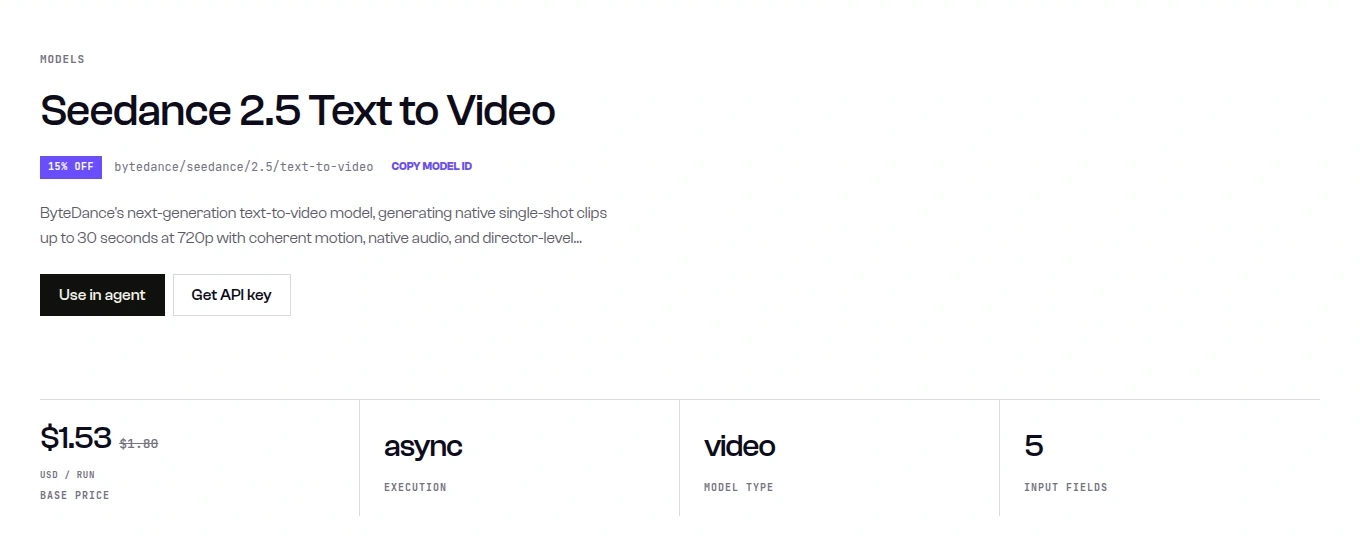
Caption: The Seedance 2.5 model page showed 15% off, $1.53 instead of $1.80, matching the $1.53 billed for each of its 4 clips (captured 2026-10-04).
Three product-clip prompts and the rubric
Every model got the same English prompt text, all fictional products:
P1 (on-screen text): Product commercial shot of a matte white skincare bottle standing on a pastel pink podium in a bright studio. Behind the bottle, a large bold sign shows the exact text "SALE 30%". The camera slowly pushes in toward the bottle. The text "SALE 30%" stays sharp, correctly spelled and readable for the whole clip. No other text anywhere.

P2 (physics and camera): A hand lifts a green glass bottle of sparkling lemon soda and pours it into a tall clear glass filled with ice cubes on a wooden bar counter. The liquid level rises, bubbles and a thin layer of foam form, and a few drops splash. The camera dollies slowly from left to right. Realistic physics, soft daylight.

P3 (object permanence): A bright modern kitchen with one wooden dining chair standing in the middle of the tiled floor. A round black robot vacuum glides across the floor, reaches the chair, steers around its legs, passes briefly behind them and reappears on the other side, continuing in the same direction. Static wide camera, no people, realistic lighting.
Each prompt has four scored elements, worth 0 (not met), 1 (partly) or 2 (fully met). A clip can score 8, and a model’s three clips 24.
| Prompt | Elements scored |
|---|---|
| P1 | product (white bottle, pink podium); text (every visible character of “SALE 30%” right; 1 if the frame edge cuts it; the bottle covering a letter is fine, since the prompt puts the sign behind it); push-in; no extra text |
| P2 | scene (hand, green bottle, iced glass, wooden counter); pour (stream into the glass, level rises, ice stays); fizz (bubbles plus foam or splash); dolly (camera moves left to right) |
| P3 | scene (kitchen, one chair, a round vacuum, wide, no people); path (around or behind the legs, no clipping); permanence (the same vacuum comes out the far side, same direction); static camera |
We scored from four frames per clip, at 10%, 37%, 63% and 90% of its length. P1 and P2 were scored from those frames alone. For P3 we also looked at nine frames per clip, because a vacuum can pass behind a chair leg between two frames.
Results: everyone can spell, few follow the camera
| Model | P1 text | P2 pour | P3 vacuum | Total (24) | Billed / clip | Repeat clip |
|---|---|---|---|---|---|---|
| Gemini Omni Flash | 8 | 7 | 8 | 23 | $0.65 | none |
| Wan 3.0 | 8 | 7 | 8 | 23 | $0.50 | none |
| Kling O3 Pro | 8 | 6 | 7 | 21 | $0.56 | none |
| Veo 3.1 | 7 | 5 | 8 | 20 | $0.80 | P2: 6 |
| Veo 3.1 Fast | 6 | 6 | 8 | 20 | $0.40 | P1: 5 |
| Veo 3.1 Lite | 7 | 6 | 7 | 20 | $0.12 | P2: 6 |
| Seedance 2.0 Fast | 7 | 7 | 6 | 20 | $0.85 | P3: 4 |
| Seedance 2.5 | 8 | 5 | 6 | 19 | $1.53 | P3: 7 |
The totals cover the first clip of each model and prompt. After that round, $3.70 bought five repeat clips for the cases we wanted to recheck. They’re shown in the last column and aren’t counted in the total. With one clip per cell, a 1 or 2 point gap between models is within what a second clip can change. The repeats show it: Seedance 2.5 went from 6 to 7 on P3, and Seedance 2.0 Fast went from 6 to 4.
On-screen text. Every model put “SALE 30%” on the sign with no wrong character visible. Veo 3.1 lost a point because the frame edge cut off the top of “SALE”. The miss that matters for ads was text nobody asked for. Both Veo 3.1 Fast clips printed a fake label on the bottle, with “SALE” and lines of pseudo-words. The Veo 3.1 Lite clip from our sample run, further down, had small label text too. If your agent publishes clips unreviewed, that’s the failure to catch.
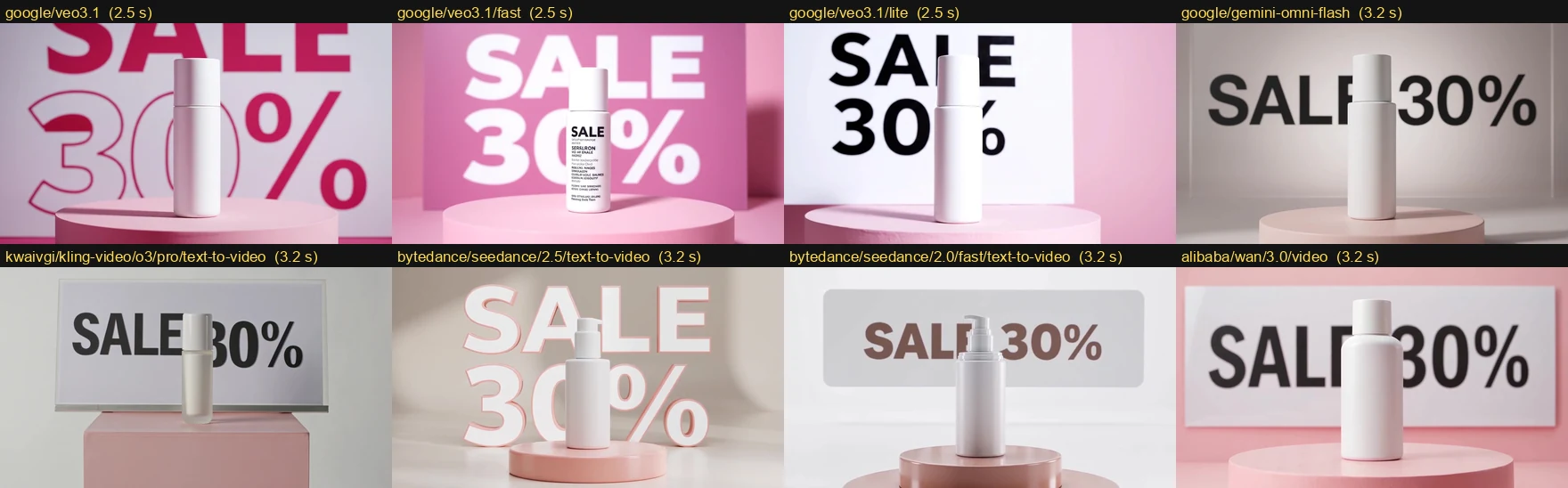
Caption: Prompt 1 outputs generated on 2026-10-04 by all eight models, one frame each at 63% of the clip. Every sign reads SALE 30%; only the Veo 3.1 Fast bottle (top row, second) adds text.
Pour and camera. Seven of the eight poured convincingly: the stream went into the glass and the level rose. The weak element was the camera. We asked for a left-to-right dolly, and all five Veo clips of this prompt, across three tiers and two rounds, kept the camera still. The other models moved a little at most, so 1 point was the best camera score anyone got. Two clips drifted from the brief in other ways. Kling’s drink came out amber with a thick head, closer to beer than lemon soda. In Seedance 2.5’s clip the soda turned milky white and the ice cubes faded out of the glass.
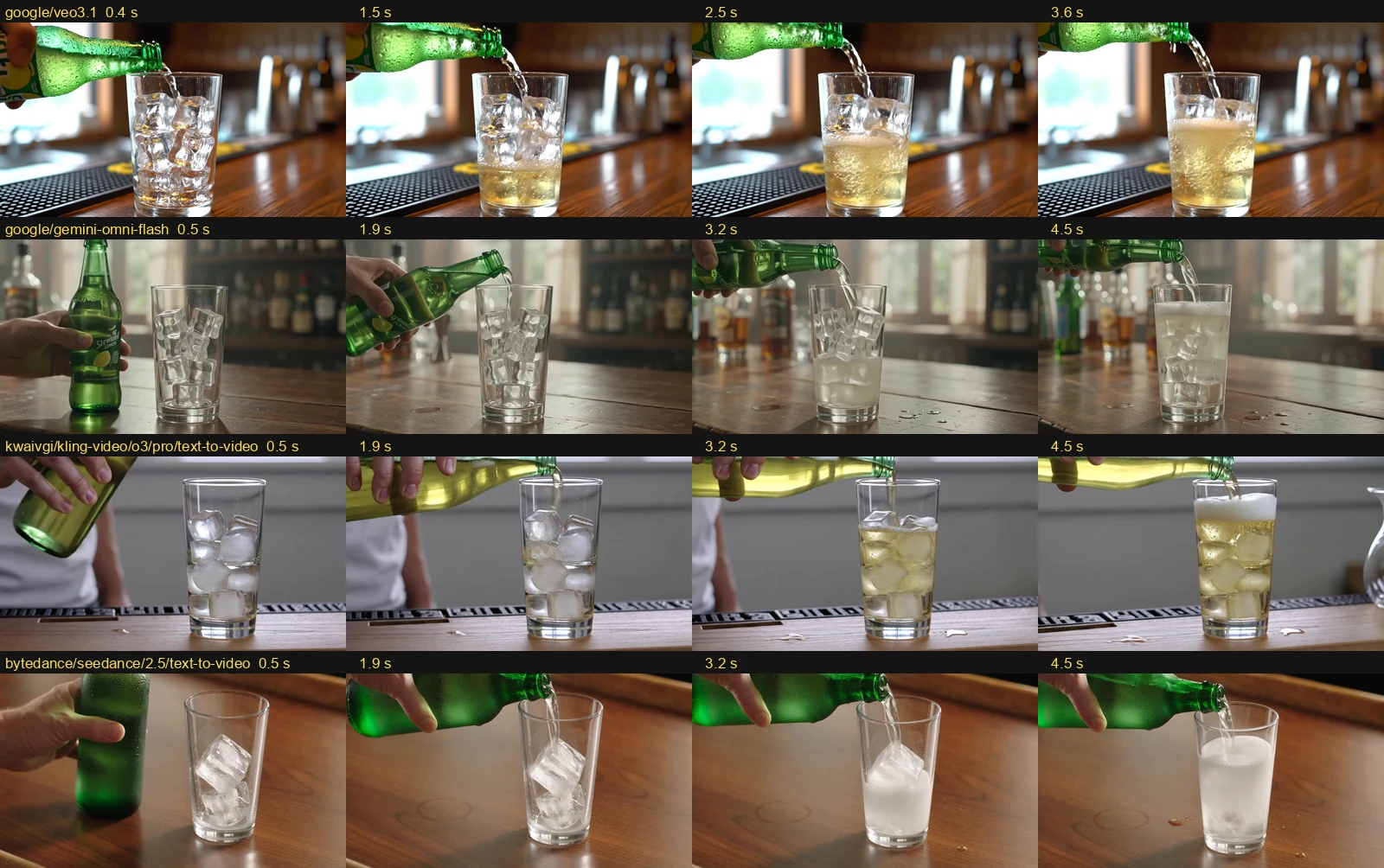
Caption: Prompt 2 outputs generated on 2026-10-04 by google/veo3.1, google/gemini-omni-flash, kwaivgi/kling-video/o3/pro/text-to-video and bytedance/seedance/2.5/text-to-video. Veo’s framing never moves; Kling’s drink looks like beer; Seedance’s ice fades out.
Object permanence. This prompt separated the models. Veo 3.1, Veo 3.1 Fast, Omni Flash and Wan 3.0 drove the vacuum behind the chair legs and out the far side, still heading the same way. Veo 3.1 Lite got it most of the way, but its 4 s clip ended before the vacuum fully came out. Seedance 2.5’s first clip parked the vacuum under the chair for good. Its repeat got it out. Seedance 2.0 Fast reversed direction in its first clip. In the repeat, the vacuum jumped back and forth between 2.16 s and 2.52 s, a visible jump across the frame in under half a second. Kling and the Seedance 2.5 repeat also used a floor-level close shot instead of the wide shot we asked for, with the top of the chair out of frame. Kling and the Seedance 2.0 Fast repeat added furniture nobody requested: extra legs, then a table.
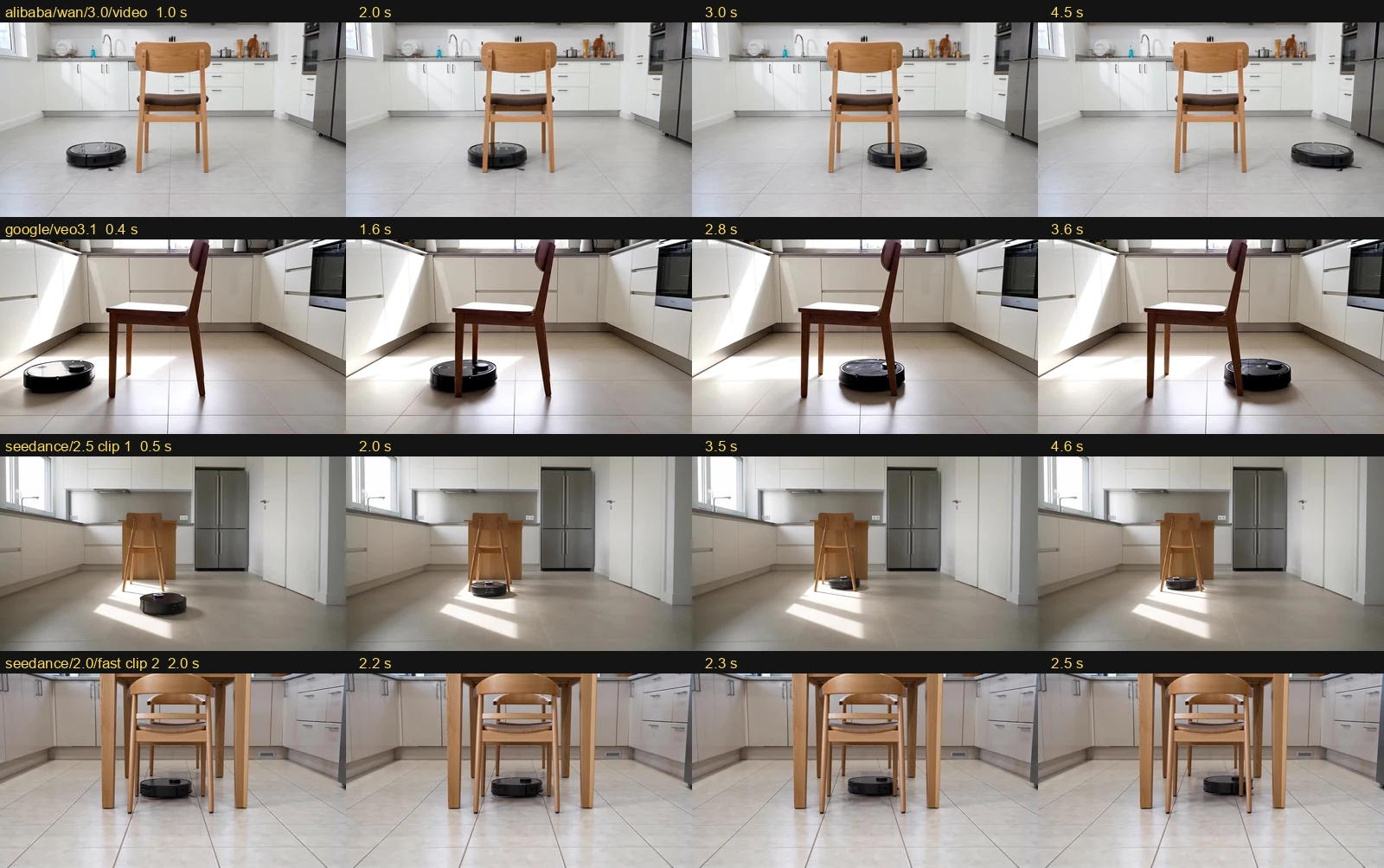
Caption: Prompt 3 outputs generated on 2026-10-04 by alibaba/wan/3.0/video, google/veo3.1, bytedance/seedance/2.5/text-to-video (clip 1) and bytedance/seedance/2.0/fast/text-to-video (clip 2, frames 0.18 s apart). Frame times are printed on each frame.
Can a vision LLM do the scoring?
One of the two we tried could. We gave two judges the same frame sheets and rubric, one call per clip, through the OpenAI-compatible Chat Completions endpoint.
| Judge | Usable replies | Element scores equal to ours | Within 1 point | Cost, 24 calls |
|---|---|---|---|---|
openai/gpt-6.1-sol | 24/24 | 79/96 | 96/96 | $0.087 |
google/gemini-3.8-flash | 23/24 | 17/92 | 92/92 | $0.195 |
GPT-6.1 Sol caught the failures that matter. It zeroed the Veo 3.1 Fast label text, gave the Seedance 2.5 vacuum 0 for permanence and said Veo 3.1 didn’t dolly. In 14 of its 17 disagreements with us it was more lenient, and 7 of those were camera motion: it gave 2 for a “subtle rightward move” where we gave 1. The other 3 were stricter, all on the vacuum’s path or permanence. Gemini 3.8 Flash scored every element of every clip 1, even when its own note named the failure. One of its replies hit the 1,500-token cap before finishing. Each Sol call cost about a third of a cent, so it’s cheap enough to screen every clip, as long as a person looks at camera-motion scores.
How to choose
| If you need | Start with | Watch for |
|---|---|---|
| Cheap drafts and many variants | Veo 3.1 Lite: $0.12 per 4 s clip, 35 s median | Static camera on P2 in both clips; label text in our sample run |
| Best rubric score at mid price, fast | Gemini Omni Flash: 23/24, $0.65 per 5 s, 45 s | No resolution parameter; 720p out |
| Best rubric score, lowest price per second at that score, 1080p | Wan 3.0: 23/24, $0.50 per 5 s, 1080p 30 fps | 147 s median wait; returned 1080p when we asked for 720p |
| 1080p without audio, 5 s | Kling O3 Pro: 21/24, $0.56 | Drink came out beer-like; floor-level framing on P3 |
| Native audio on every clip | Seedance 2.5, Wan 3.0 or Omni Flash | Seedance 2.5 was the slowest (273 s) and priciest ($0.30/s), with a P3 failure |
For a product-clip agent, the cheapest setup that worked here has three steps. Draft with Veo 3.1 Lite. Re-render the keepers with Omni Flash or Wan 3.0. Screen everything with a vision judge plus a check for text you didn’t ask for. If a shot depends on camera motion, budget for retries, whichever model you use.
Run one clip yourself
The program below does one clip of the loop above. It submits with POST /v1/run and polls GET /v1/run/{id} every 5 s. It downloads outputs[0].url and checks the byte count. It reads duration, size, frame rate and audio streams with ffprobe, then gets the billed cost from GET /v1/tasks/{id}/cost. It raises if the run fails or times out, if the download is incomplete, or if the cost doesn’t settle. It warns if the duration is more than 0.5 s off the request. It uses Veo 3.1 Lite, the cheapest clip in the test.
"""Generate one product clip on SandBase, download it, check it with ffprobe and record the billed cost.

Usage: SANDBASE_API_KEY=... python3 video_clip_check.py
Needs ffprobe (part of FFmpeg) on PATH.
"""
import json
import os
import subprocess
import time

import requests

BASE = "https://api.sandbase.ai/v1"
HEADERS = {"Authorization": f"Bearer {os.environ['SANDBASE_API_KEY']}"}
MODEL = "google/veo3.1/lite"
PARAMS = {"duration": 4, "resolution": "720p", "aspect_ratio": "16:9", "generate_audio": False}
PROMPT = ('Product commercial shot of a matte white skincare bottle standing on a pastel pink podium in a bright studio. '
          'Behind the bottle, a large bold sign shows the exact text "SALE 30%". The camera slowly pushes in toward the bottle. '
          'The text "SALE 30%" stays sharp, correctly spelled and readable for the whole clip. No other text anywhere.')
FINISHED = ("completed", "failed", "timeout", "cancelled")


def generate(timeout_s: int = 900) -> dict:
    """Submit with POST /v1/run, then poll GET /v1/run/{id} until the run finishes."""
    resp = requests.post(f"{BASE}/run", headers=HEADERS, json={"model": MODEL, "prompt": PROMPT, **PARAMS}, timeout=120)
    resp.raise_for_status()
    run, start = resp.json(), time.time()
    while run.get("status") not in FINISHED:
        if time.time() - start > timeout_s:
            raise TimeoutError(f"{run['id']} still {run.get('status')} after {timeout_s}s")
        time.sleep(5)
        poll = requests.get(f"{BASE}/run/{run['id']}", headers=HEADERS, timeout=60)
        poll.raise_for_status()
        run = poll.json()
    if run["status"] != "completed" or not run.get("outputs"):
        raise RuntimeError(f"{run['id']}: {run['status']} {run.get('error')}")
    run["seconds_to_done"] = round(time.time() - start, 1)
    return run


def download(url: str, path: str) -> None:
    """Output URLs are temporary, so save the file right away and check the byte count."""
    resp = requests.get(url, timeout=300)
    resp.raise_for_status()
    expected = int(resp.headers.get("content-length", len(resp.content)))
    if len(resp.content) != expected:
        raise IOError(f"incomplete download: {len(resp.content)} of {expected} bytes")
    with open(path, "wb") as fh:
        fh.write(resp.content)


def probe(path: str) -> dict:
    """Duration, size, frame rate and audio streams, read with ffprobe."""
    out = subprocess.run(["ffprobe", "-v", "error", "-show_streams", "-show_format", "-of", "json", path],
                         capture_output=True, text=True, check=True).stdout
    info = json.loads(out)
    video = next(s for s in info["streams"] if s["codec_type"] == "video")
    num, den = video["avg_frame_rate"].split("/")
    return {"duration_s": round(float(info["format"]["duration"]), 2), "width": video["width"], "height": video["height"],
            "fps": round(int(num) / int(den), 2), "audio_streams": sum(s["codec_type"] == "audio" for s in info["streams"])}


def billed_cost(task_id: str) -> float:
    """GET /v1/tasks/{id}/cost returns what this task was charged; it can take a few seconds to settle."""
    for _ in range(6):
        cost = requests.get(f"{BASE}/tasks/{task_id}/cost", headers=HEADERS, timeout=60).json()
        if cost.get("settled"):
            return float(cost["cost"])
        time.sleep(5)
    raise RuntimeError(f"cost for {task_id} not settled: {cost}")


if __name__ == "__main__":
    run = generate()
    path = "clip.mp4"
    download(run["outputs"][0]["url"], path)
    info = probe(path)
    cost = billed_cost(run["id"])
    if abs(info["duration_s"] - PARAMS["duration"]) > 0.5:
        print(f"WARNING: asked for {PARAMS['duration']} s, got {info['duration_s']} s")
    print(f"run id         {run['id']}")
    print(f"model          {MODEL}")
    print(f"submit->done   {run['seconds_to_done']} s")
    print(f"video          {info['width']}x{info['height']}, {info['fps']} fps, {info['duration_s']} s, audio streams: {info['audio_streams']}")
    print(f"billed         ${cost:.4f}  (${cost / info['duration_s']:.4f} per second of video)")
Tested on 2026-10-04 (UTC). We ran the program above verbatim once, from 00:41:32 to 00:42:04 UTC. The input was prompt 1, a fictional product, with no third-party content. The request was POST https://api.sandbase.ai/v1/run with {"model": "google/veo3.1/lite", "prompt": "<prompt 1>", "duration": 4, "resolution": "720p", "aspect_ratio": "16:9", "generate_audio": false}. The final GET /v1/run/{id} returned this object. We omitted only the url key inside outputs[0], because it is a temporary download link:
{"id": "90588389-7c5e-4509-91f2-9b265ad8abaf", "status": "completed",
 "model": "google/veo3.1/lite",
 "outputs": [{"content_type": "video/mp4"}]}
GET /v1/tasks/90588389-7c5e-4509-91f2-9b265ad8abaf/cost returned this, with the usage key omitted (all zero for a video task):
{"id": "90588389-7c5e-4509-91f2-9b265ad8abaf", "status": "completed", "settled": true,
 "currency": "USD", "cost": "0.120000", "estimated_cost": "0.120000"}
The program printed:
run id         90588389-7c5e-4509-91f2-9b265ad8abaf
model          google/veo3.1/lite
submit->done   28.1 s
video          1280x720, 24.0 fps, 4.0 s, audio streams: 0
billed         $0.1200  ($0.0300 per second of video)
We checked the clip by eye. The sign read SALE 30%, with the bottle partly covering the 0, and the bottle carried small label text the prompt didn’t ask for. The fields the program reads (id, status, outputs[0].url, settled, cost) are the ones we saw in these responses. Treat them as observed, not as a documented guarantee for every model.
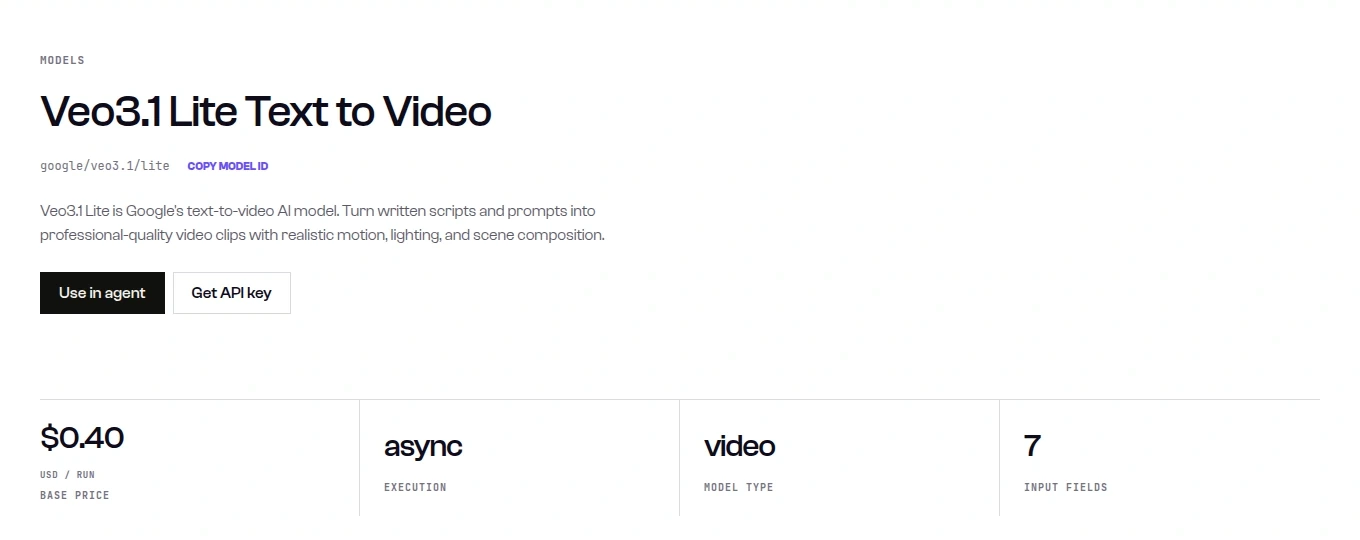
Caption: The Veo 3.1 Lite model page shows $0.40 per run, which is the default 8 s with audio. Our 4 s, audio-off request was billed $0.12, as its price formula gives (captured 2026-10-04).
The headline price on a model page is the default configuration, so check the formula for your own settings. Kling O3 Pro’s $0.56 is its 5 s default without audio, the exact clip we ran.
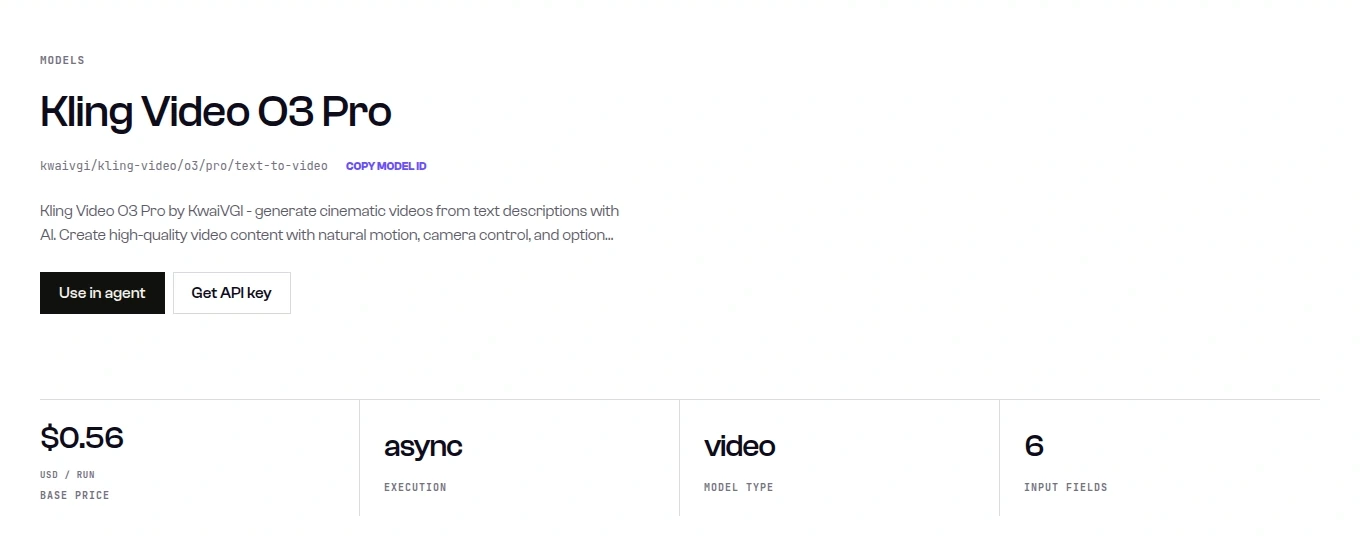
Caption: Kling O3 Pro’s page lists $0.56 per run, the same as each of its three billed 5 s clips (captured 2026-10-04).
Parameters for each model are on its model page, for example Veo 3.1 Lite. The others are in the SandBase model catalog. Get a SandBase API key to run the same check on your own product briefs.
Scope of the data: every prompt describes a fictional product, and every frame shown is our own generated output. The prompts, rubric, per-model scores, prices and spend are all in this article. The clips, frame sheets and judge replies are kept internally. For a feature-level view of these vendors, see best AI video generation APIs. For more on one of the two top scorers, see the Gemini Omni Flash deep dive. The same exact-text approach for still images is in our image text rendering benchmark.
What the test cost
| Item | Basis | Cost |
|---|---|---|
| 24 first-round clips | Sum of GET /v1/tasks/<id>/cost | $16.23 |
| 5 repeat clips | Same | $3.70 |
| Two vision judges, 48 calls | Same | $0.28 |
| Sample program run | Same | $0.12 |
| Model-page captures, 4 | Capture tool’s reported cost | $0.02 |
| Total | $20.35 |
FAQ
Which AI video generation API is best for product clips in 2026?
On our three product prompts, Gemini Omni Flash and Wan 3.0 tied at 23/24. Omni Flash was faster (45 s median) and Wan 3.0 was cheaper ($0.50 for 5 s, delivered at 1080p). With one clip per prompt, treat the eight models as close and choose on price, wait time and resolution.
Veo 3.1 vs Kling: which is better?
In our test, Kling O3 Pro scored 21/24 at $0.56 per 5 s clip in 1080p. Veo 3.1 scored 20/24 at $0.80 per 4 s clip in 720p, with audio off. Veo was faster (45 s vs 124 s median) and kept the wide kitchen shot on the vacuum prompt. Kling handled the text shot cleanly but turned the soda into something like beer.
Can AI video models render exact on-screen text?
For a short string like “SALE 30%” on a large sign, yes: all eight got it right. The real risk is extra text the prompt didn’t ask for. Veo 3.1 Fast made up a bottle label in both of its prompt-1 clips.
How much does an AI-generated product video cost per second?
Billed prices on 2026-10-04, at our settings, ranged from $0.03 per second (Veo 3.1 Lite, 720p, no audio) to $0.30 per second (Seedance 2.5, 720p with audio, after a 15% discount). Turning on Veo’s audio adds 50% to 100% depending on the tier.
Is Gemini Omni Flash good for video?
It tied for the top rubric score and was among the fastest models here, at a 45 s median and $0.65 for 5 s. It has no resolution parameter, and it returned 720p with an audio track.
Limitations
This was 3 prompts with one clip per model per prompt, plus 5 repeats, generated in one session on 2026-10-04 with default settings and 16:9. A 1 to 2 point difference is within what a second clip changes, as the Seedance repeats showed. Scores come from one reviewer looking at 4 frames per clip, 9 for P3. That can miss motion artifacts between frames, and we didn’t score audio, lip sync or anything past 5 s. Durations weren’t identical: Veo ran 4 s, the others 5 s, so compare per-second prices. Wait times depend on queue load and our client. All models ran in parallel from one machine. Prices and discounts are a 2026-10-04 snapshot. Run your own product briefs before you pick a default.