Kling 4.0 API: Four Endpoints, Real Costs, and the Gaps
Kling 4.0 API guide: text-to-video, image-to-video, reference-to-video and video edit on SandBase, with per-second pricing, live run costs, wait times, and what the API does not expose yet.
Our first Kling 4.0 text-to-video call took 339 seconds to return a 5-second clip. The same prompt, as a 4-second clip with audio off, finished in 51 seconds on Veo 3.1. None of the launch posts we read mention that, and it is the first number that matters if an agent is waiting on the result.
This is a working guide to the Kling 4.0 API as it appears on SandBase today: four endpoints (text-to-video, image-to-video, reference-to-video, video-edit), what each one accepts, what it costs per second, and what came back when we ran each of them once on 2026-10-23 (UTC). It is for developers who want to put Kling 4.0 behind an agent or a batch job and need to know the request shape and the bill before they write the retry logic.
Key takeaway
- SandBase lists four Kling 4.0 endpoints, all released on the catalog on 2026-10-21. Generation is billed per output second: $0.157 at 720p and $0.235 at 1080p. A 30-second 1080p clip lists at $7.05.
- Video edit bills both the source and the output seconds, at $0.094/s (720p) or $0.141/s (1080p). Our 5-second 720p edit was billed $0.948.
- Every clip we generated carried a two-channel AAC audio track with real sound. The SandBase schema has no switch to turn audio off.
- Kuaishou’s announcement mentions up to 10 keyframes, Omni Reference with up to 15 assets, 10-bit HDR and 4K. The SandBase endpoints currently expose start and end frames, up to 10 images and 5 videos as references, and 720p or 1080p output. Nothing more.
- Scope: one run per endpoint, 720p, one session. Wait times and quality will vary. Treat ours as a first reading, not a benchmark.
What Kling 4.0 is, briefly
Kling 4.0 is Kuaishou’s latest Kling AI video model. Kuaishou’s press release says it officially launched on October 15, 2026. It focuses on steadier large motion and complex camera work, native single-pass clips of up to 30 seconds, and “Omni Reference”, which combines up to 15 reference assets and up to 10 keyframes. A lighter Kling 4.0 Flash went to some paid subscribers on September 28. Reporting from Wallstreetcn via Longbridge and TokenPost dates the official API launch to October 21, with access opening gradually to enterprises and developers.
That is the provider layer. The SandBase layer is narrower: four model IDs you can call with one SandBase key through the Unified Run API, billed from your SandBase balance. SandBase doesn’t train or host the model. It routes the request and returns the output. If you want the story behind the launch, we covered that in Kling 4.0 launch: what shipped and what didn’t. If you want to know how it stacks up against other models, read the same-prompt comparison.
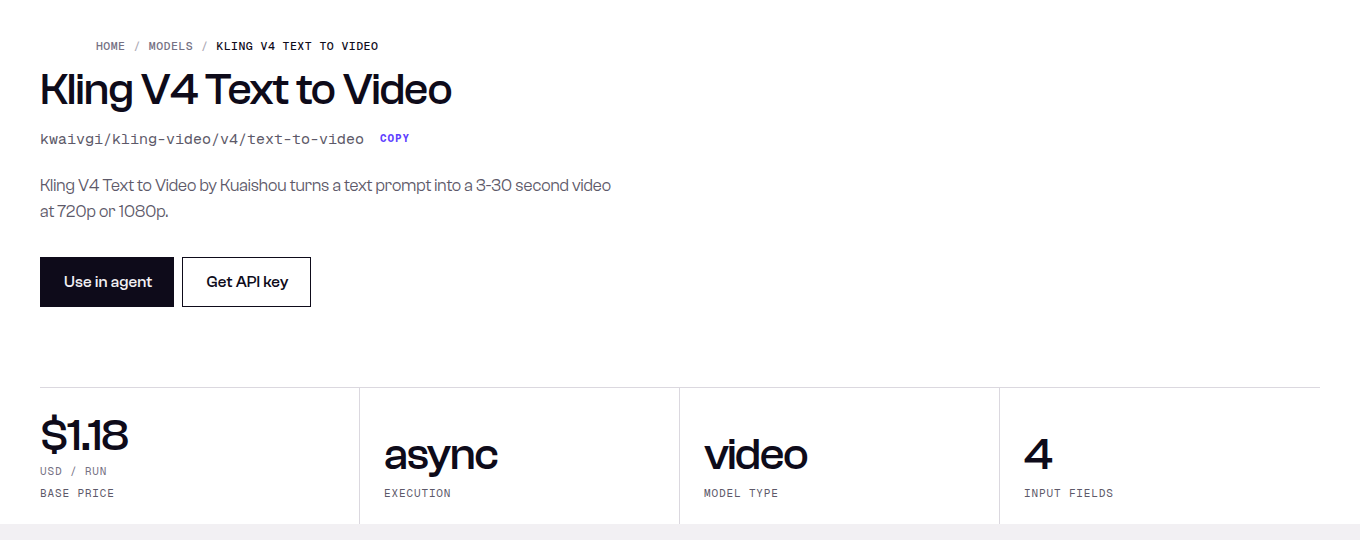 SandBase catalog, 2026-10-23: the $1.18 “base price” is the default 5-second 1080p run (5 × $0.235). It is not a flat fee.
The four Kling 4.0 API endpoints
All four are async. You submit, you get a run ID, you poll. The table is built from the model pages and sandbase_inspect schemas as of 2026-10-23.
| Endpoint | Required input | Optional input | Duration | Price basis |
|---|---|---|---|---|
kwaivgi/kling-video/v4/text-to-video | prompt (≤2,500 chars) | aspect_ratio 16:9 / 9:16 / 1:1 / 21:9, resolution 720p / 1080p | 3–30 s, default 5 | $0.157/s 720p, $0.235/s 1080p |
kwaivgi/kling-video/v4/image-to-video | prompt, image (first frame, ≥300×300, aspect 0.4–2.5) | end_image, resolution | 3–30 s | same as text-to-video |
kwaivgi/kling-video/v4/reference-to-video | prompt | images (≤10), videos (≤5, 30 s combined), aspect_ratio incl. auto | 3–30 s | images only: same as text-to-video; with videos: $0.094 / $0.141 per s of output plus input |
kwaivgi/kling-video/v4/video-edit | prompt, video (3–30 s, ≥700×700, ≤300 MB) | images (≤10), resolution | output = source length | $0.094 / $0.141 per s, counted on input plus output |
Two things in that table catch people out.
First, the default resolution is 1080p. If you leave resolution out, you pay $0.235/s, not $0.157/s. For a 30-second clip that is $7.05 against $4.71. Set it on purpose.
Second, image-to-video has no aspect_ratio field. The frame shape comes from your start image. If your agent crops product photos to 1:1 and expects 16:9 video, the crop is where to fix it.
What the video edit bill actually counts
The video-edit and video-reference pricing works differently from generation, and it is the part most likely to surprise a budget.
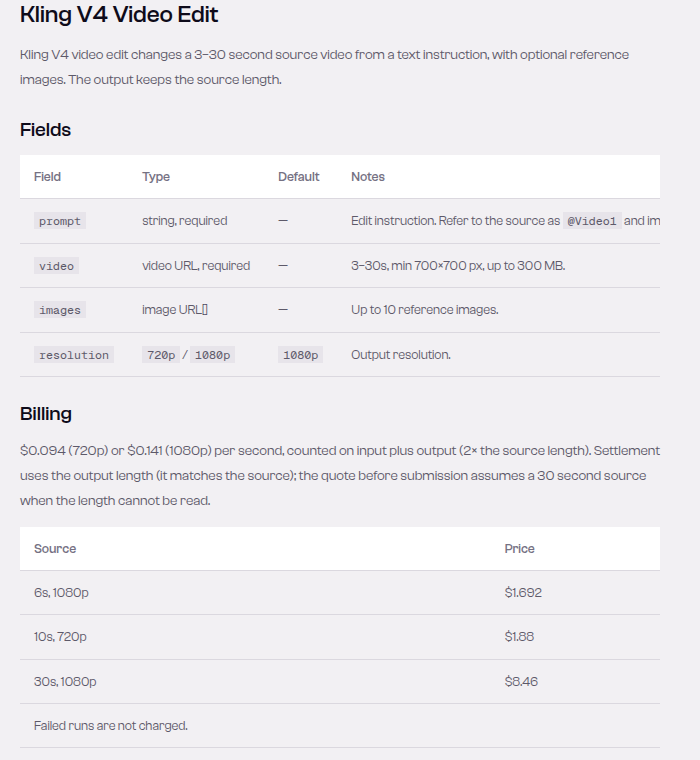 The Video Edit model page, 2026-10-23: the output keeps the source length, so a 30 s 1080p edit counts 60 s at $0.141, which is $8.46. That figure is also why the catalog lists this endpoint at $8.46 “per run”.
The rate per second is lower than generation, but it is charged twice: once for the source and once for the output. Since the output matches the source length, the effective price is $0.188/s at 720p and $0.282/s at 1080p of finished video. That is about 20% more per finished second than generating from scratch.
We checked this against a real bill. Our source clip probed at 5.04 s. The edit came back at 5.04 s and was billed $0.947833, which is $0.094 × 10.08 s to within rounding. Settlement uses the measured length, not a rounded 5 s.
One more detail from the page: if SandBase can’t read the source length before submission, the pre-submission quote assumes 30 seconds. On a tight balance, a short edit can be blocked by a quote sized for 30 seconds, even though settlement later uses the real length.
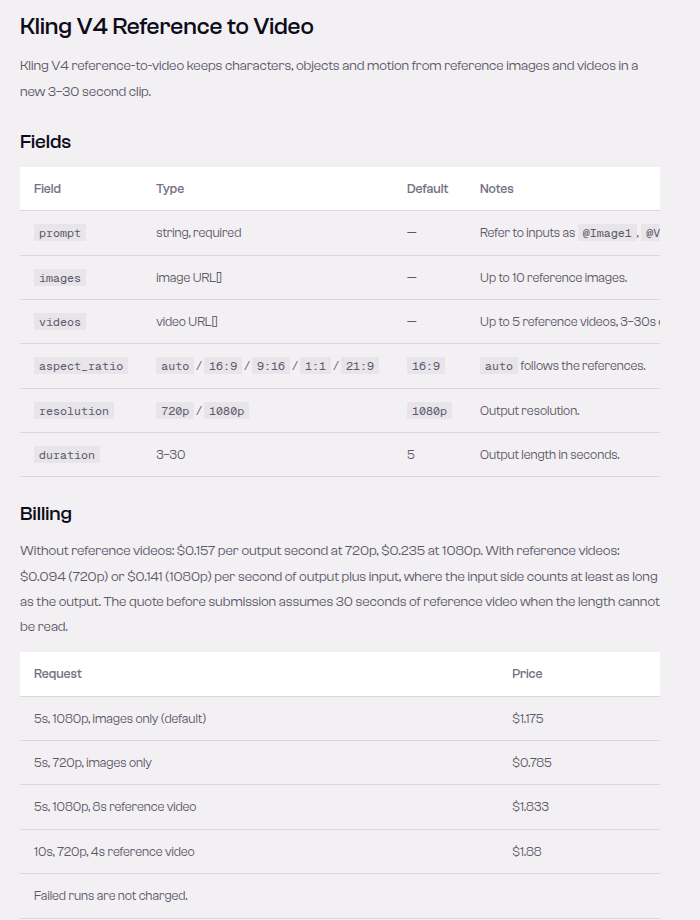 Reference to Video on 2026-10-23: image-only references bill like text-to-video, and adding any reference video switches to the input-plus-output rate, where the input counts at least as long as the output.
The same switch applies to reference-to-video. If you send images only, you pay generation prices. Add a single reference video and the request moves to the input-plus-output rate, with the input side counted at no less than the output length. A 5-second 1080p clip with an 8-second reference video lists at $1.833, versus $1.175 with images only.
Calling the Kling 4.0 API from Python
Video models on SandBase use POST /v1/run with the model ID and inputs in a flat JSON body, then GET /v1/run/{id} until the status is completed, failed or timeout. The finished file is at outputs[0].url. That URL is temporary, so download it right away. This is a trimmed version of the harness we used for the runs below:
import os, time, requests

BASE = "https://api.sandbase.ai/v1"
HEADERS = {"Authorization": f"Bearer {os.environ['SANDBASE_API_KEY']}"}
FINISHED = {"completed", "failed", "timeout", "cancelled"}

def run_kling4(endpoint: str, inputs: dict, timeout_s: int = 1800) -> str:
    """Submit one Kling 4.0 job and return the temporary output URL."""
    resp = requests.post(f"{BASE}/run", headers=HEADERS,
                         json={"model": f"kwaivgi/kling-video/v4/{endpoint}", **inputs},
                         timeout=120)
    resp.raise_for_status()
    run, start = resp.json(), time.time()
    print("submitted", run["id"])          # log the id before polling, so a crash can resume
    while run.get("status") not in FINISHED:
        if time.time() - start > timeout_s:
            raise TimeoutError(f"{run['id']} still {run.get('status')}")
        time.sleep(5)
        try:
            poll = requests.get(f"{BASE}/run/{run['id']}", headers=HEADERS, timeout=60)
        except requests.RequestException:
            continue                         # transient TLS/network errors: keep polling
        if poll.status_code >= 500:
            continue
        poll.raise_for_status()
        run = poll.json()
    if run["status"] != "completed" or not run.get("outputs"):
        raise RuntimeError(f"{run['id']} ended {run['status']}: {run.get('error')}")
    return run["outputs"][0]["url"]

url = run_kling4("text-to-video", {
    "prompt": "A skateboarder in a yellow jacket carves down an empty coastal road at sunset...",
    "duration": 5,
    "resolution": "720p",        # default is 1080p, which costs 50% more per second
    "aspect_ratio": "16:9",
})
The try/except around the poll isn’t decoration. During our session, one poller died on a TLS EOF error while its 30-second Kling job was still running server-side. We had logged the run ID, so we resumed polling and recovered the clip. Without the ID, that job would have been billed and lost.
For the other endpoints, only the inputs change:
# image-to-video: the first frame sets the look and the aspect ratio
run_kling4("image-to-video", {"prompt": "She pushes off and rides toward the camera...",
                              "image": START_FRAME_URL, "duration": 5, "resolution": "720p"})

# reference-to-video: name each reference in the prompt
run_kling4("reference-to-video", {"prompt": "The skateboarder from @Image1 rides through a rainy neon street...",
                                  "images": [START_FRAME_URL], "duration": 5, "resolution": "720p"})

# video-edit: say what changes and what stays
run_kling4("video-edit", {"prompt": "Change the jacket in @Video1 from yellow to bright red. "
                                    "Keep the rider, the road, the camera move and the lighting unchanged.",
                          "video": SOURCE_VIDEO_URL, "resolution": "720p"})
One small schema inconsistency: the reference-to-video page’s sample request says @Element1 and @Element2, while the field docs say @Image1 and @Video1. We used @Image1 and it worked. We didn’t test @Element.
What came back: one run per endpoint
We ran each endpoint once at 720p. The text-to-video clip was the source for the other three: its frame at t=0.5 s became the start image and the reference image, and the whole clip went in as the edit source.
| Endpoint | Settings | Wall-clock wait | Billed | Output (ffprobe) |
|---|---|---|---|---|
| text-to-video | 5 s, 720p, 16:9 | 339 s | $0.785 | 1280×720, 24 fps, 5.04 s, stereo AAC |
| image-to-video | 5 s, 720p | 248 s | $0.785 | 1280×720, 24 fps, 5.04 s, stereo AAC |
| reference-to-video | 5 s, 720p, 1 image | 153 s | $0.785 | 1280×720, 24 fps, 5.04 s, stereo AAC |
| video-edit | 5.04 s source, 720p | 69 s | $0.948 | 1280×720, 24 fps, 5.04 s, stereo AAC |
| text-to-video (long) | 30 s, 720p, 16:9 | ~498 s | $4.71 | 1280×720, 24 fps, 30.04 s, stereo AAC |
Billed amounts came from GET /v1/tasks/{id}/cost and match the list rates exactly. Kling 4.0 had no promotional discount on the catalog that day.
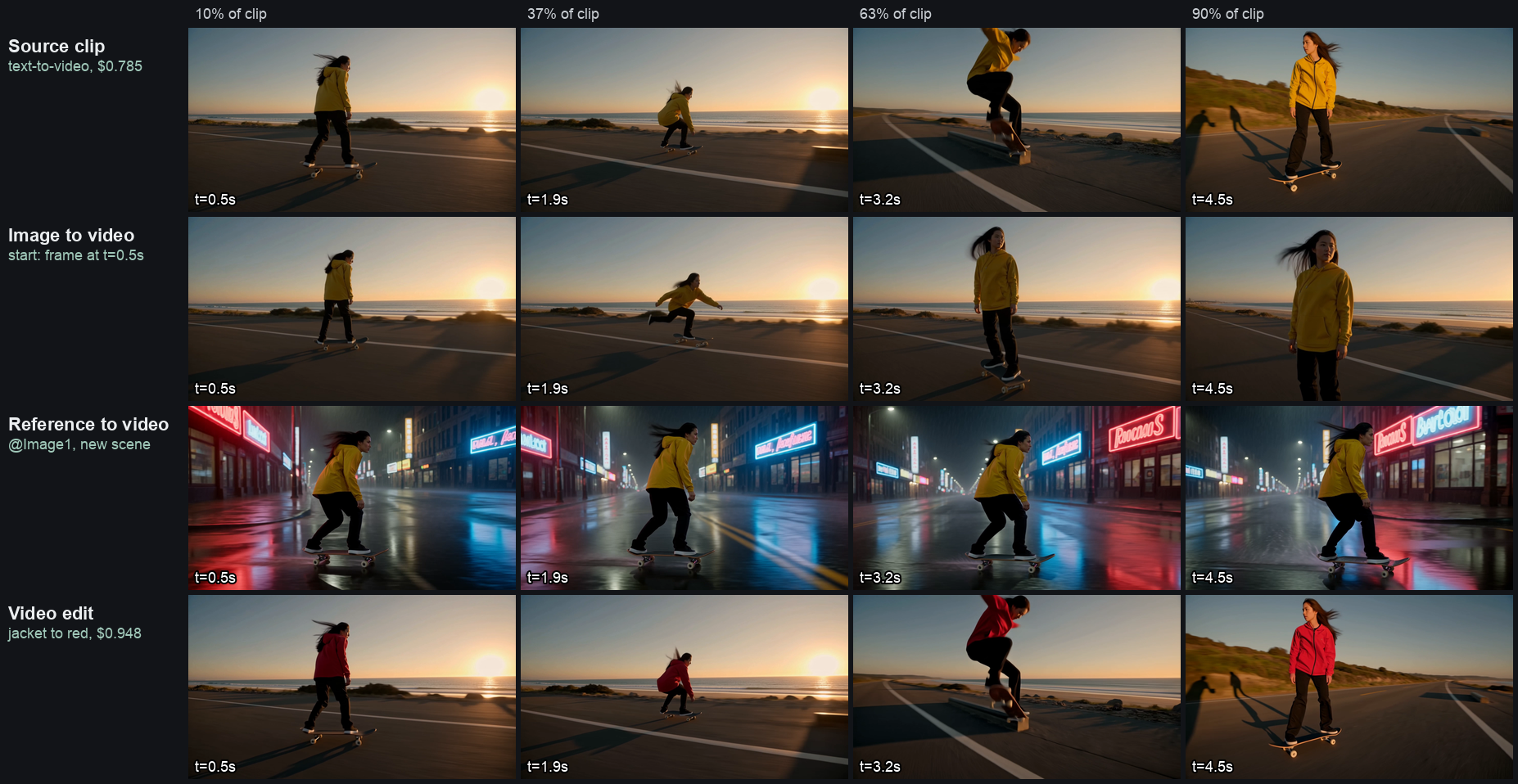 Our own outputs, 2026-10-23, one clip per endpoint. In the edit row the jacket changes from yellow to red in every sampled frame, while the road, the ollie and the camera path match the source.
What the frames show, and what they don’t:
- Video edit did the narrowest job best. The jacket is red in all four sampled frames. Pose, camera path, road markings and lighting line up with the source frame for frame. It also kept the source’s flaws: two stray human shadows on the left at t=4.5 s appear in both.
- Reference-to-video kept the rider’s yellow jacket, dark trousers and long hair, and moved her to a wet neon street at night as asked. The neon signs are invented, near-English words. Don’t use this mode for legible signage without checking.
- Image-to-video started on the exact frame we supplied and moved the rider toward the camera. By t=4.5 s she fills the frame and the board is cropped out. That matches the prompt loosely. A stricter “keep the full body in frame” instruction would be the next thing to try.
- Text-to-video landed the ollie and swung the camera around the rider, which was the hard part of the prompt. After the orbit, the ocean ends up behind the camera instead of on her right. That’s arguably correct for a half orbit, but worth knowing if you check outputs with a vision model against the prompt.
The audio surprised us. Kling 4.0 has no generate_audio field on SandBase, and we expected silent files. All five clips came back with a 44.1 kHz stereo AAC track. On the 5-second clip, volumedetect measured a mean of −21 dB and a peak at 0 dB, so this is real sound, not an empty stream. That fits fal’s description of Kling 4.0’s native stereo audio. If your pipeline lays its own music over the video, strip the track with ffmpeg -an. You can’t turn it off at request time.
What the API doesn’t expose yet
This next part matters more than the price table. Kling 4.0’s headline creative controls aren’t in the SandBase schema, at least not today.
| Announced for Kling 4.0 (Kuaishou release, fal page) | In the SandBase Kling 4.0 schema (2026-10-23) |
|---|---|
| Up to 10 keyframes along the timeline | Start frame and optional end frame only (image, end_image) |
| Omni Reference, up to 15 assets incl. 7 “elements” and voices | Up to 10 images and 5 videos. No elements, no voice references |
| Multi-shot with per-shot prompts | Single prompt only. No multi_prompt (Kling 3.0 Pro on SandBase has one) |
| 10-bit HDR, 4K | resolution is 720p or 1080p. Kuaishou’s own release uses future tense for 4K |
| Native audio | Always on in our outputs. No toggle, no dialogue or voice controls |
| Seed, negative prompt | Not present |
We can’t tell from outside whether these are missing from Kling’s API itself or just not mapped yet on SandBase. Reporting says the official API is rolling out gradually. Expect the schema to grow, and check sandbase_inspect before you rely on a field. Until it does, multi-beat timing has to come from the prompt itself. That worked in our 30-second test: Kling hit four timed beats in one take (details in the comparison). But a prompt is a weaker contract than a keyframe.
Choosing an endpoint
- You have only a brief:
text-to-video. Start at 720p and 5 s while you tune prompts. A 1080p render of the keeper costs 1.5× per second. - You have an approved product shot or key art:
image-to-video. The first frame is locked, andend_imagepins where the shot lands. - You need the same character or product across many scenes:
reference-to-videowith images only. It costs the same as text-to-video. In our one test it carried the rider’s outfit and hair into a new scene. We didn’t measure how far that holds across many scenes. - You have footage and want one change:
video-edit. It is the fastest of the four in our run (69 s) and the most predictable, but it costs about 20% more per finished second. On a 30 s 1080p source it’s $8.46. - You need cheaper drafts: Kling 4.0 has no draft mode on SandBase. Kling 3.0 or another model can serve as the sketch pass. See the Kling 3.0 tier guide and our cost model explainer.
FAQ
How much does the Kling 4.0 API cost? On SandBase as of 2026-10-23: $0.157 per output second at 720p and $0.235 at 1080p for text, image and image-reference generation. Edits and video-reference requests cost $0.094 or $0.141 per second, counted on input plus output. Failed runs aren’t charged, according to the model pages.
How long does a Kling 4.0 generation take? In our single session, 69 s for a 5 s edit, 153–339 s for 5 s generations, and about 498 s for a 30 s clip. Build for minutes, not seconds, and poll asynchronously.
Can I turn off Kling 4.0 audio? Not through the current SandBase schema. Every clip we made had a stereo audio track. Remove it after download if you don’t need it.
Does the API support Kling 4.0’s 10 keyframes? Not on SandBase today. You get a start frame and an optional end frame. We’ll update this guide when the schema changes.
Do I need a Kling account? No. The SandBase model pages say one SandBase API key and balance covers it.
Bottom line
The Kling 4.0 API on SandBase is usable now for the four jobs it names. Its pricing is easy to predict once you remember two things: the 1080p default, and that edits are charged on both sides. Its weak spots for agent builders are latency, the always-on audio, and the missing keyframe, multi-shot and HDR controls that headline the launch. Start with the text-to-video page, or go straight to video edit if you already have footage. Run your own prompts at 720p before you commit a budget to 1080p.