Instagram Profile Research API Tutorial | SandBase
Build an Instagram profile-research workflow: read a public profile, pull recent posts, and page the feed — one SandBase key, no Instagram login, no SDK.

If you research creators or brands on Instagram, you want a repeatable loop: read a public profile for the headline signals, pull recent posts, and page the feed to see how engagement trends. This Instagram Profile Research API tutorial wires that loop with two SandBase endpoints so an agent can run it end to end. It builds on the Instagram public data API hub; read that first for the big picture.
Everything here is public, read-only data. There is no Instagram login and no SDK — a SandBase API key is still required to authenticate. The endpoint API reference is the source of truth for parameters and the response envelope. The reference guarantees only that envelope; the payload field names below come from calls I ran (tested on 2026-09-28, UTC) and are illustrative, observed-only — not documented guarantees — so confirm them against a live response.
Key takeaway
- Two endpoints form the loop:
user-profile(headline signals) →user-posts(recent feed).- Each call is
POST /v1/api/instagram/v3/<path>with ausername, oneSANDBASE_API_KEY.- Page the feed with the returned
next_max_id. Public, read-only data only.- Read fields defensively — the envelope is guaranteed, business fields are observed-only.
SandBase vs. the official Instagram API
| Your need | Use |
|---|---|
| Public, read-only profiles and posts | SandBase Instagram public-data API |
| Post, act as an account, or use the Graph API | Instagram’s official platform |
| Private or account-only data | Neither public workflow |
The workflow at a glance
- Read the profile with
instagram/v3/user-profileusing ausername. - Pull recent posts with
instagram/v3/user-postsusing the sameusername, paging withnext_max_id.
Each endpoint returns the shared envelope — an id, a status, the model, and the payload on a completed run under outputs[0].data.
 The Instagram endpoints on SandBase — user-profile and user-posts drive this loop.
Step 0: one helper for every call
import os
import requests

API = "https://api.sandbase.ai/v1/api"
HEADERS = {
    "Authorization": f"Bearer {os.environ['SANDBASE_API_KEY']}",
    "Content-Type": "application/json",
}

def call(path: str, payload: dict) -> dict:
    resp = requests.post(f"{API}/{path}", headers=HEADERS, json=payload, timeout=60)
    resp.raise_for_status()
    body = resp.json()
    if body.get("status") != "completed":
        raise RuntimeError(body.get("error", {}).get("message", f"{path} did not complete"))
    # Envelope can vary: prefer a top-level `output`, else `outputs[0].data`.
    output = body.get("output")
    if output is None and body.get("outputs"):
        output = body["outputs"][0].get("data", {})
    return output or {}
Step 1: read the profile
profile = call("instagram/v3/user-profile", {"username": "nasa"})
print(profile.get("full_name"), "|", profile.get("follower_count"), "followers")
print("bio:", profile.get("biography"))
In the response I captured (user-profile run id c52039c0-5a64-4b87-93c2-1b7a6995c23d, tested on 2026-09-28, UTC), the payload carried full_name, biography, category, follower_count, following_count, media_count, and is_verified — illustrative, observed-only fields. Read each with .get() and confirm against a live response.
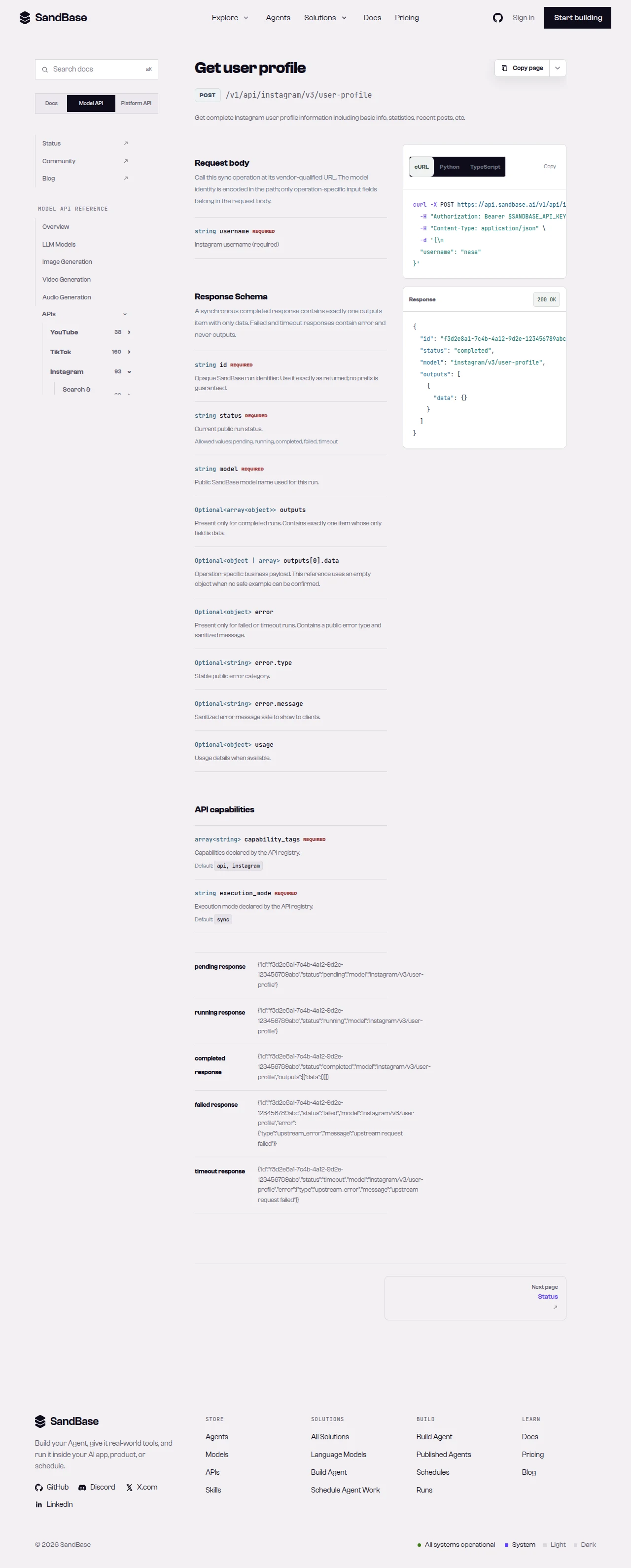 The user-profile reference — the source of truth for the
 username parameter and response path.
Step 2: pull recent posts
feed = call("instagram/v3/user-posts", {"username": "nasa"})
posts = feed.get("items", []) or feed.get("data", [])
next_max_id = feed.get("next_max_id")
for p in posts[:5]:
    print(p.get("like_count"), "likes,", p.get("comment_count"), "comments -", p.get("shortcode"))
In my run (user-posts run id 4e058e6d-1e9e-4dd1-8f08-412258df9a7a), the payload carried items (each with caption_text, like_count, comment_count, view_count, is_video, shortcode, and taken_at), a count, and a next_max_id for paging. To page, resend user-posts with the returned next_max_id — confirm the exact parameter name against the reference.
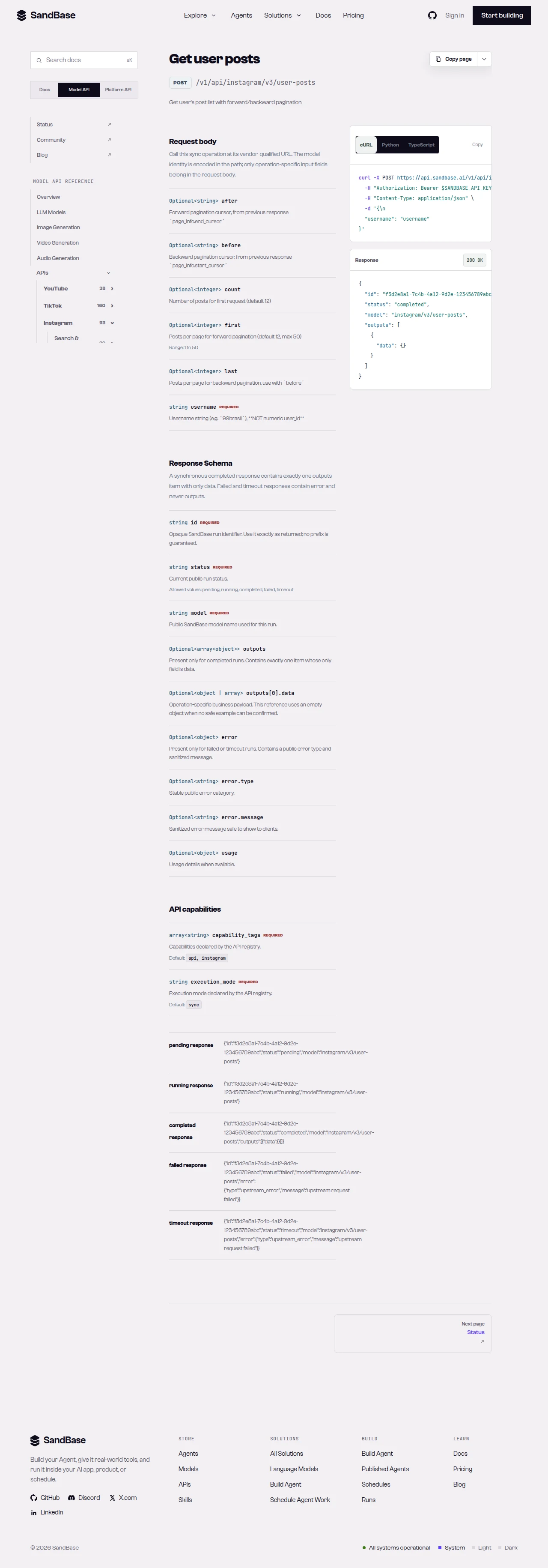 The user-posts reference — pass a
 username; page with the returned next_max_id.
Putting it together
def research(username: str):
    profile = call("instagram/v3/user-profile", {"username": username})
    feed = call("instagram/v3/user-posts", {"username": username})
    posts = feed.get("items", []) or feed.get("data", [])
    engagement = [
        {"shortcode": p.get("shortcode"), "likes": p.get("like_count"), "comments": p.get("comment_count")}
        for p in posts if isinstance(p, dict)
    ]
    return {
        "followers": profile.get("follower_count"),
        "media_count": profile.get("media_count"),
        "recent": engagement,
    }
Because both endpoints share the same envelope and the same username, the loop stays flat: one status check in call(...) and one .get() pattern across profile and posts.
Common use cases
Creator vetting
Read a creator’s profile for follower count and category, then pull recent posts to gauge real engagement (likes and comments) rather than follower count alone. Input: a username. Output: profile signals plus a recent-post engagement sample. Endpoints: user-profile, user-posts.
Competitor content tracking
Poll a competitor’s user-posts on a schedule and diff by shortcode to catch new posts and track their engagement over time. Input: a username. Output: successive post pages. Endpoint: user-posts.
Audience and niche research
Compare several profiles’ category, follower_count, and posting cadence to map who leads a niche. Input: a set of usernames. Output: comparable profile signals. Endpoint: user-profile.
Engagement-rate estimation
Combine the two endpoints to approximate an engagement rate: pull recent posts, average their like_count and comment_count, and divide by the profile’s follower_count. This gives a rough, comparable signal across creators that follower count alone hides — a small account with high engagement can outperform a large one. Read every field defensively and treat the result as an estimate, since observed fields and post samples vary. Input: a username. Output: an engagement-rate estimate. Endpoints: user-profile, user-posts.
Practical notes
- Envelope can vary. The reference documents
outputs[0].data; read either shape (preferoutput, fall back tooutputs[0].data). - Page with
next_max_id. Resenduser-postswith the returned value while more posts exist. - Business fields are observed-only. Treat
follower_count,like_count,caption_text, and the like as observed and confirm live. - Public, read-only data only. No posting, no private/account-only data. Authenticate with a SandBase API key.
- Be a good client. Retry with backoff on transient errors such as HTTP 429; page rather than hammering.
FAQ
Do I need an Instagram/Facebook developer app or login?
No. You authenticate to SandBase with your SANDBASE_API_KEY. These read endpoints need no Instagram account or OAuth on your side.
What identifies a profile?
A username. Both user-profile and user-posts take the same username.
How do I page through more posts?
The user-posts payload carries a next_max_id; resend user-posts with it. Confirm the exact parameter against the reference.
Can I read private accounts? No. The API returns public data only. Private and account-authorized content are out of scope.
Wrap up
Two endpoints, one envelope, one username — that is the whole profile-research loop. For the full endpoint catalog, see the Instagram public data API hub. When you are ready: