GPT Image 2.6 API: Flare vs Sunburst Pricing & Tests (2026)
GPT Image 2.6 Flare and Sunburst are live on SandBase: four /v1/run endpoints, per-image prices from $0.01, curl examples and same-prompt test runs.
The first poster we sent to GPT Image 2.6 came back with every word spelled correctly. The date line was in the wrong place. We had asked Flare for “Available Nov 12” in a bottom band, and it printed the date on the tin instead, as if it were part of the packaging. Sunburst, given the same prompt, put it exactly where we asked. We ran each model once, so this is a single observation. Details like that one still decide which model you call.
The GPT Image 2.6 API arrived on SandBase on November 5, 2026, one day after OpenAI announced Images 2.6. There are four endpoints, Flare and Sunburst, each with text-to-image and edit, all called through POST /v1/run and billed per image. This post is for developers who already generate images in a product or an agent and need to decide whether to switch from 2.5, which variant to call, and what a month of usage costs.
Key takeaway
- Four GPT Image 2.6 models are live on SandBase via
/v1/run(sync and async):openai/gpt-image-2.6-flare,openai/gpt-image-2.6-flare/edit,openai/gpt-image-2.6-sunburstandopenai/gpt-image-2.6-sunburst/edit. - SandBase prices are per image. Text-to-image runs from $0.01 (low, 1K) to $0.27 (high, 4K). Edit runs from $0.025 to $0.285 with one input image, plus $0.015 for each extra input. Failed runs are not charged.
- Those per-image prices match GPT Image 2.5 on SandBase at low, medium and high. On SandBase, 2.6 offers only those three quality levels; 2.5 also has
xhighandmax. - OpenAI positions Flare for fast iteration and better layout on posters and product imagery, and Sunburst for higher detail and more consistency across edits at medium or high quality.
- GIF output, SVG export, markup-guided edits and the new
complexitycontrol from OpenAI’s announcement are not available on SandBase yet.
What OpenAI announced on November 4
OpenAI introduced Images 2.6 on November 4, 2026, for ChatGPT, Codex and the API. In the API it ships as two models, gpt-image-2.6-flare and gpt-image-2.6-sunburst, the same two-variant split that 2.5 introduced.
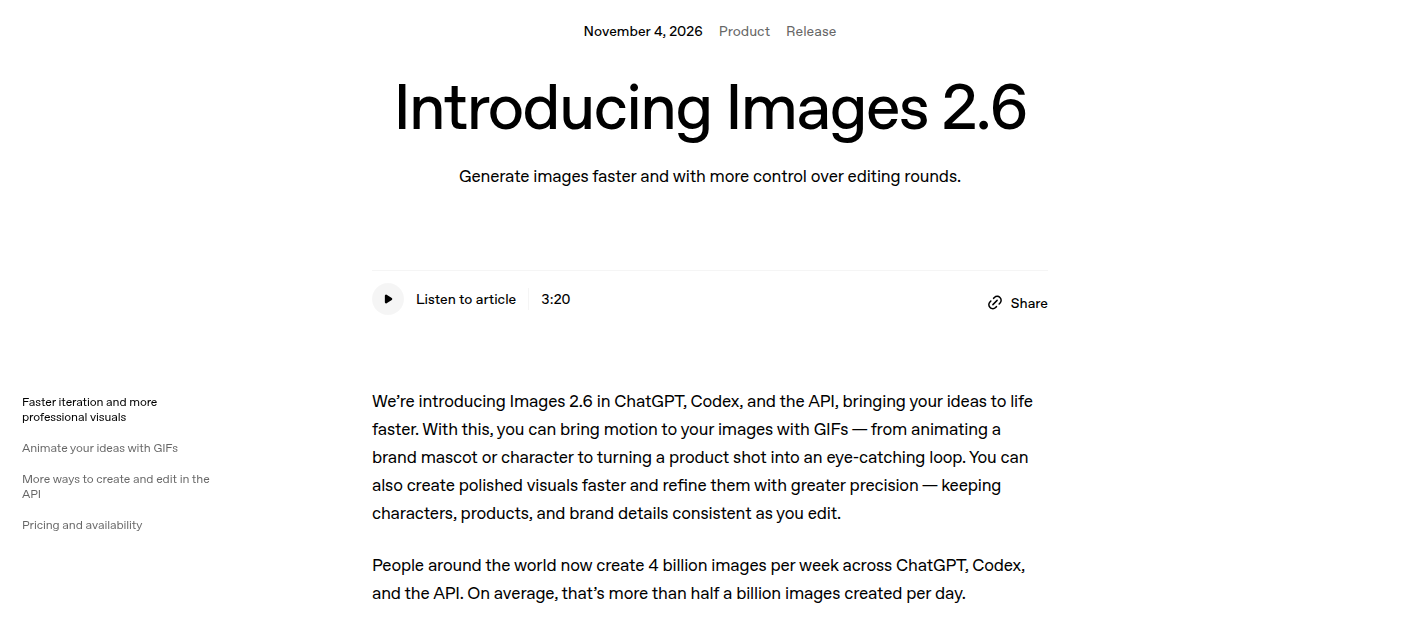
OpenAI’s Images 2.6 announcement, captured November 5, 2026. The page dates the release November 4.
OpenAI gives each variant a distinct job. Flare is for fast iteration, and it improves layout quality for posters, product imagery and other professional visuals. Sunburst brings higher-detail generation and more consistency across edits when quality is set to medium or high.
OpenAI’s pricing page lists identical Standard token rates for both 2.6 variants, and they match 2.5: $5 per million text input tokens, $8 per million image input tokens and $30 per million image output tokens. As with 2.5, the variant name does not change the rate.
The announcement also introduces GIF output, SVG export, image markup in the API and a complexity parameter that controls how much planning the model does before rendering. Those are OpenAI API features. None of them is exposed on SandBase today. The SandBase schemas for all four endpoints list six fields at most, and none of them is complexity or a GIF/SVG output format. If your workflow depends on animated output or vector export, call OpenAI directly for now.
What is live on SandBase
Each variant has a text-to-image endpoint and an edit endpoint. The edit endpoints accept up to 16 input images, so they also cover multi-image composition: a product shot plus a background plate plus a logo, for example.
| Endpoint | Input | Positioning | SandBase model page |
|---|---|---|---|
openai/gpt-image-2.6-flare | Prompt | Fast iteration, improved layout | Flare text-to-image |
openai/gpt-image-2.6-flare/edit | Prompt + 1 to 16 images | Fast edits | Flare edit |
openai/gpt-image-2.6-sunburst | Prompt | Higher detail | Sunburst text-to-image |
openai/gpt-image-2.6-sunburst/edit | Prompt + 1 to 16 images | More consistency across edits at medium/high | Sunburst edit |
The parameters are the same across all four, apart from images on the edit routes:
| Field | Values | Default |
|---|---|---|
prompt | Required, up to 32,000 characters | none |
quality | low, medium, high | high |
resolution | 1k, 2k, 4k | omit for 1K |
aspect_ratio | 1:1, 1:2, 2:1, 2:3, 3:2, 3:4, 4:3, 4:5, 5:4, 9:16, 16:9, 9:21, 21:9 | 1:1 for text-to-image; edit follows the first input image |
output_format | jpeg, png, webp | png |
images (edit only) | Array of image URLs, up to 16 | none |
Each request returns one image. If you need four variations, send four requests.
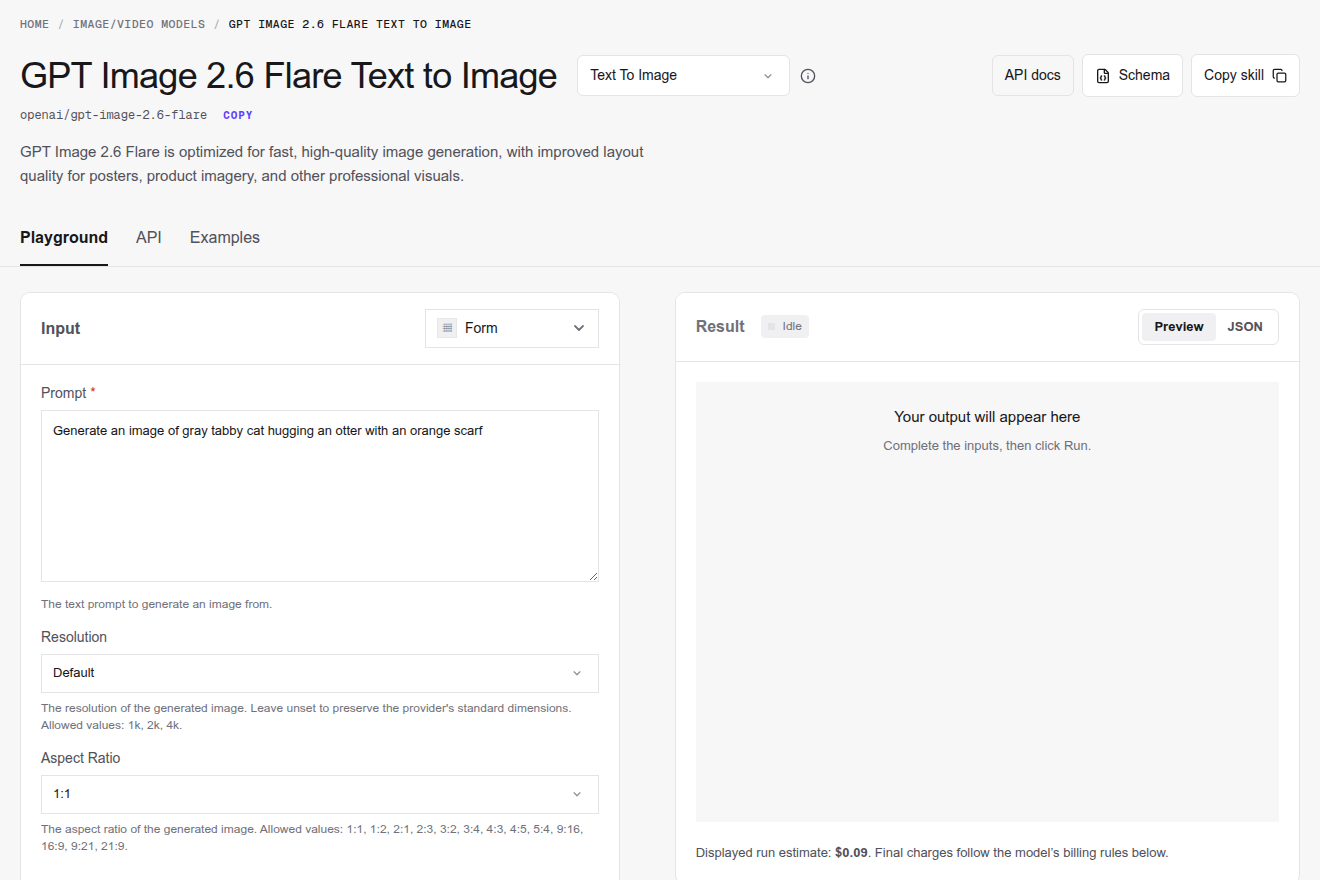
The SandBase Flare text-to-image page on November 5, 2026. The $0.09 estimate is the default high-quality 1K price.
Note the default. quality is high unless you set it, and high is the most expensive tier. An agent that forgets the field pays $0.09 per 1K image instead of $0.01. When drafting, set quality explicitly.
Pricing: per image, same as 2.5 at matching settings
SandBase bills these models per output image, not per token. Text-to-image is the same price on Flare and Sunburst:
| Quality | 1K | 2K | 4K |
|---|---|---|---|
| low | $0.01 | $0.02 | $0.03 |
| medium | $0.024 | $0.04 | $0.07 |
| high (default) | $0.09 | $0.15 | $0.27 |
Edit is also identical across the two variants. The table is for one input image, and each extra input adds $0.015:
| Quality, 1 input | 1K | 2K | 4K |
|---|---|---|---|
| low | $0.025 | $0.035 | $0.045 |
| medium | $0.039 | $0.055 | $0.085 |
| high (default) | $0.105 | $0.165 | $0.285 |
A three-image composition at high quality and 2K therefore costs $0.165 + 2 × $0.015 = $0.195.
These are the same per-image prices as GPT Image 2.5 Flare on SandBase at low, medium and high. The 2.5 endpoints add xhigh and max (for example $0.16 and $0.36 at 1K text-to-image), which 2.6 does not offer on SandBase. If your pipeline currently sends quality: "max" to 2.5, switching the model ID alone will fail validation on 2.6. Map xhigh and max to high and decide whether a 2K or 4K resolution recovers the detail you were paying for.
A month of poster work, priced out
Here is a hypothetical but realistic workload for a small marketing team running an image agent:
| Step | Model and settings | Volume | Unit price | Monthly |
|---|---|---|---|---|
| Draft layouts | Flare, low, 1K | 300 | $0.01 | $3.00 |
| Finals | Sunburst, high, 2K | 30 | $0.15 | $4.50 |
| Revisions with brand logo as second input | Sunburst edit, high, 1K, 2 images | 60 | $0.12 | $7.20 |
| Total | 390 images | $14.70 |
The draft stage is 77% of the images and 20% of the spend. The revisions cost more than the finals only because there are twice as many. Per image, a two-input 1K revision ($0.12) is cheaper than a 2K final ($0.15). That ratio is worth checking in your own logs before you optimize anything else.
Same prompt, both variants: what came back
We ran one prompt through both text-to-image endpoints on November 5: a 4:5 poster for a fictional tea brand, with four exact text strings (“NORTHLIGHT TEA”, “Autumn Blend”, “NORTHLIGHT” on the tin label, and “Available Nov 12” in a bottom band). Settings were quality: "medium", default 1K resolution, PNG output. Both returned 1024 × 1280 images.
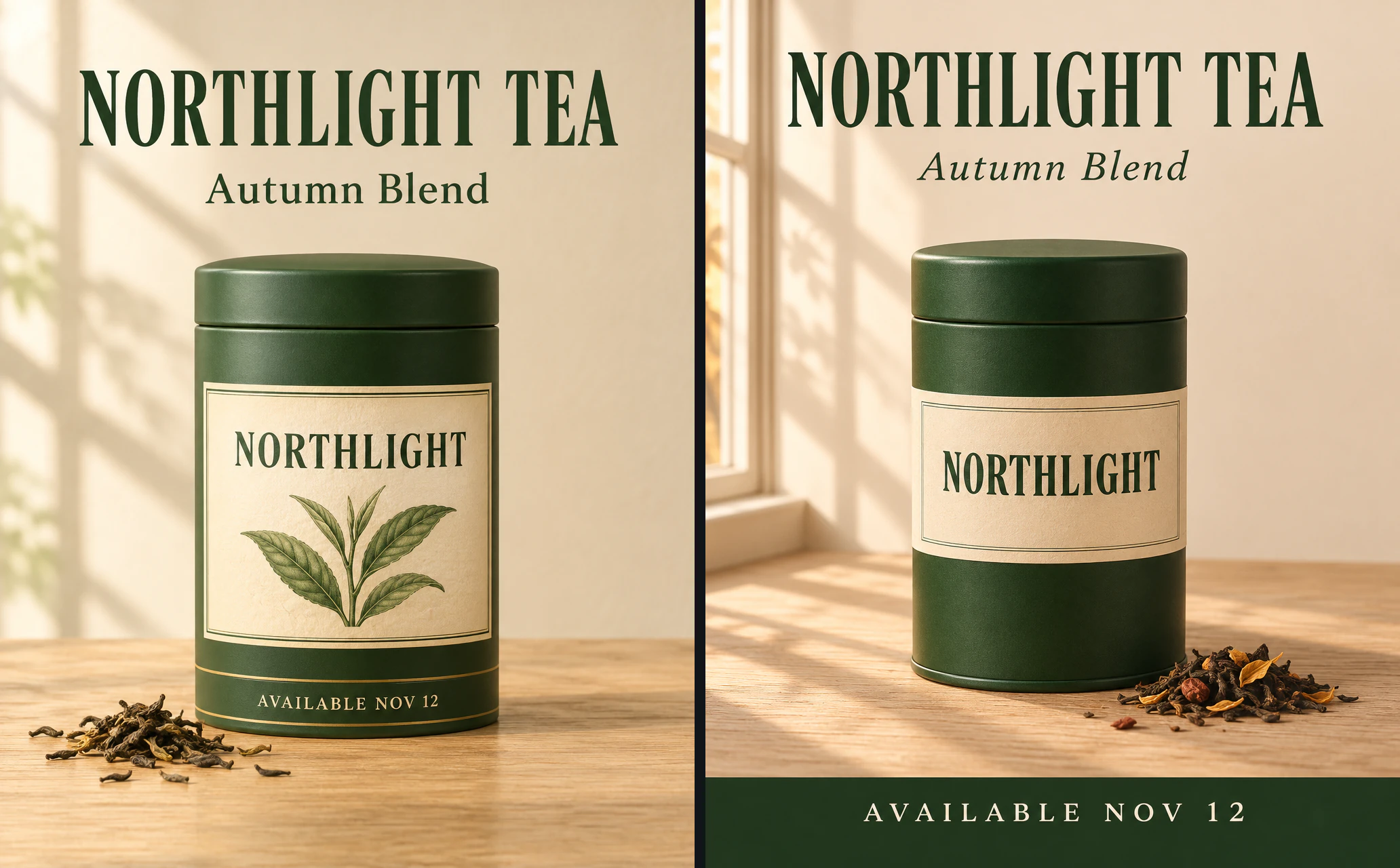
Left: Flare. Right: Sunburst. Same prompt and settings, one run each, original 1024 × 1280 outputs placed side by side without resizing. Shown as a WebP preview.
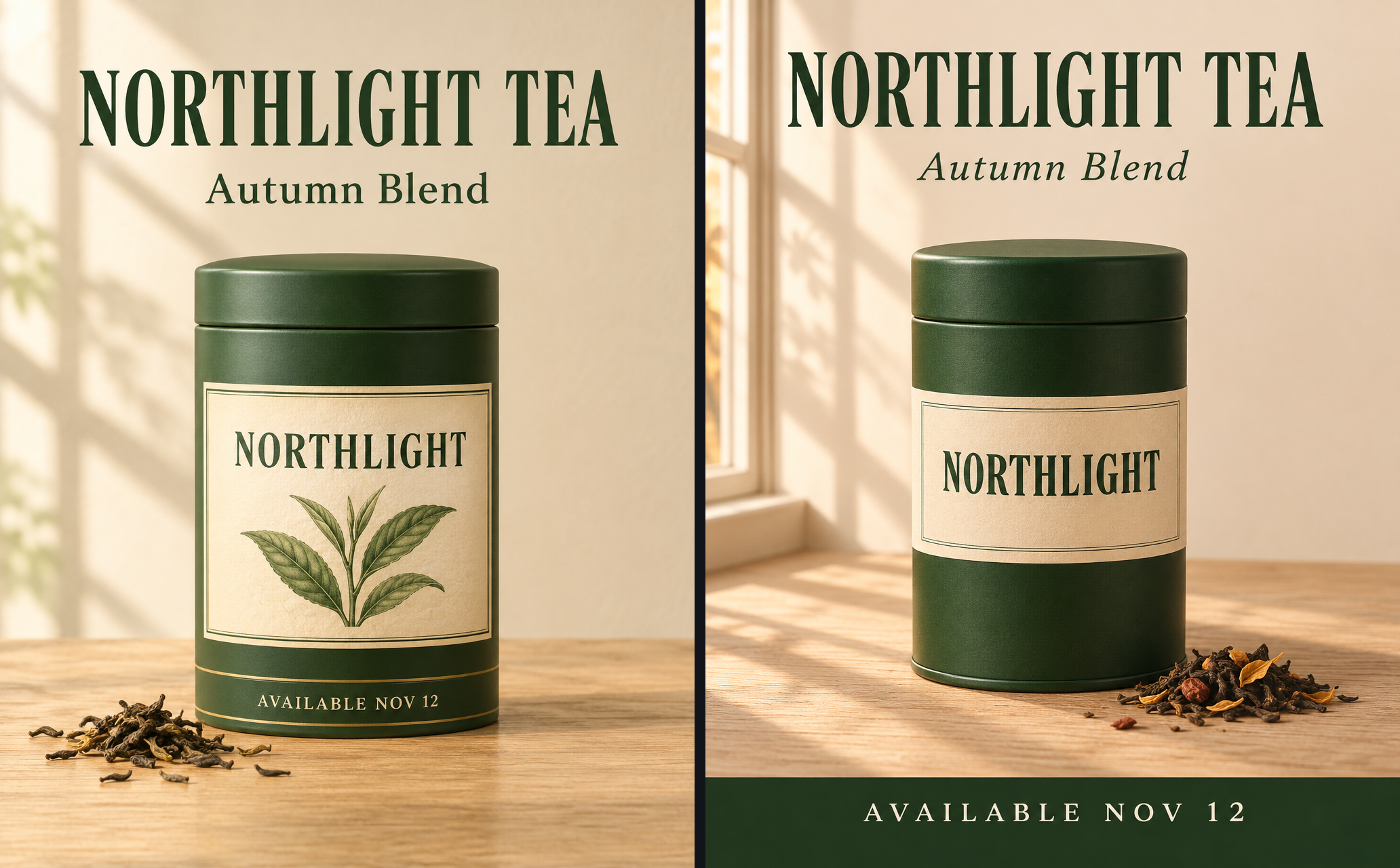
Both models spelled all four strings correctly. That was the part we expected to fail, and it did not.
Placement differed. Sunburst put the date in a full-width dark band across the bottom of the poster, which is what “bottom band” meant. Flare printed it on a ring near the bottom of the tin. Flare also added a botanical leaf illustration to the label that the prompt did not request; Sunburst kept the label text-only and added flower petals to the loose tea. Neither result is wrong as an image. Only one followed the layout instruction literally.
This does not show that Sunburst follows layout better in general. It is one prompt and one sample per model. What it does show is that “improved layout quality” in Flare’s positioning is a claim about visual polish, and it does not guarantee that an element lands where your template expects it. If your pipeline crops, overlays or OCR-checks a specific region, check it on every output.
Edit test: change two things, keep everything else
Next we used the Flare poster as the base image and sent the same edit prompt to both edit endpoints. The prompt asked for two changes: recolor the tin from deep green to burgundy, and change “AVAILABLE NOV 12” to “AVAILABLE NOV 19”. It then listed everything that had to stay: headline, subtitle, label text, leaf illustration, gold lines, tin shape and position, loose tea, table, wall, light and framing. Settings were quality: "medium", aspect ratio omitted so the output follows the input, PNG.
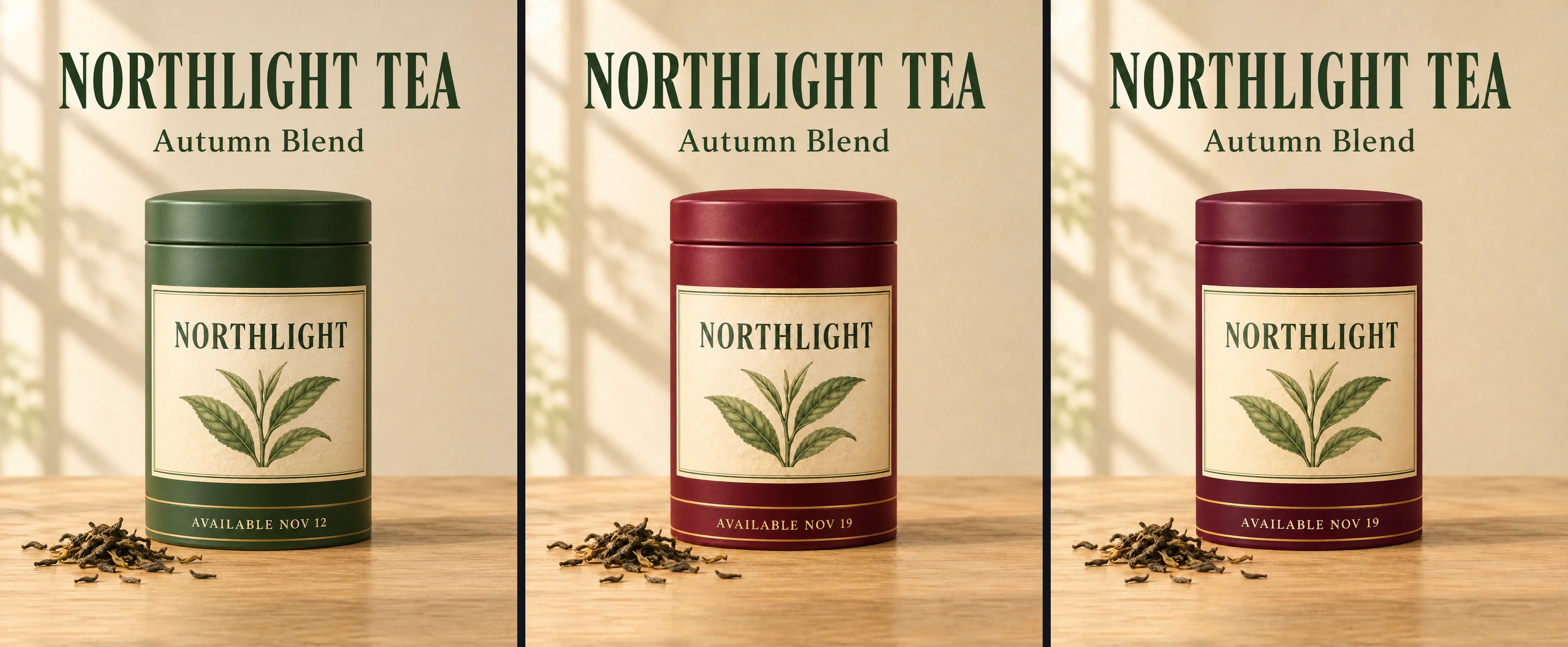
Left: base image from Flare text-to-image. Middle: Flare edit. Right: Sunburst edit. All three are original 1024 × 1280 outputs, shown as a WebP preview.
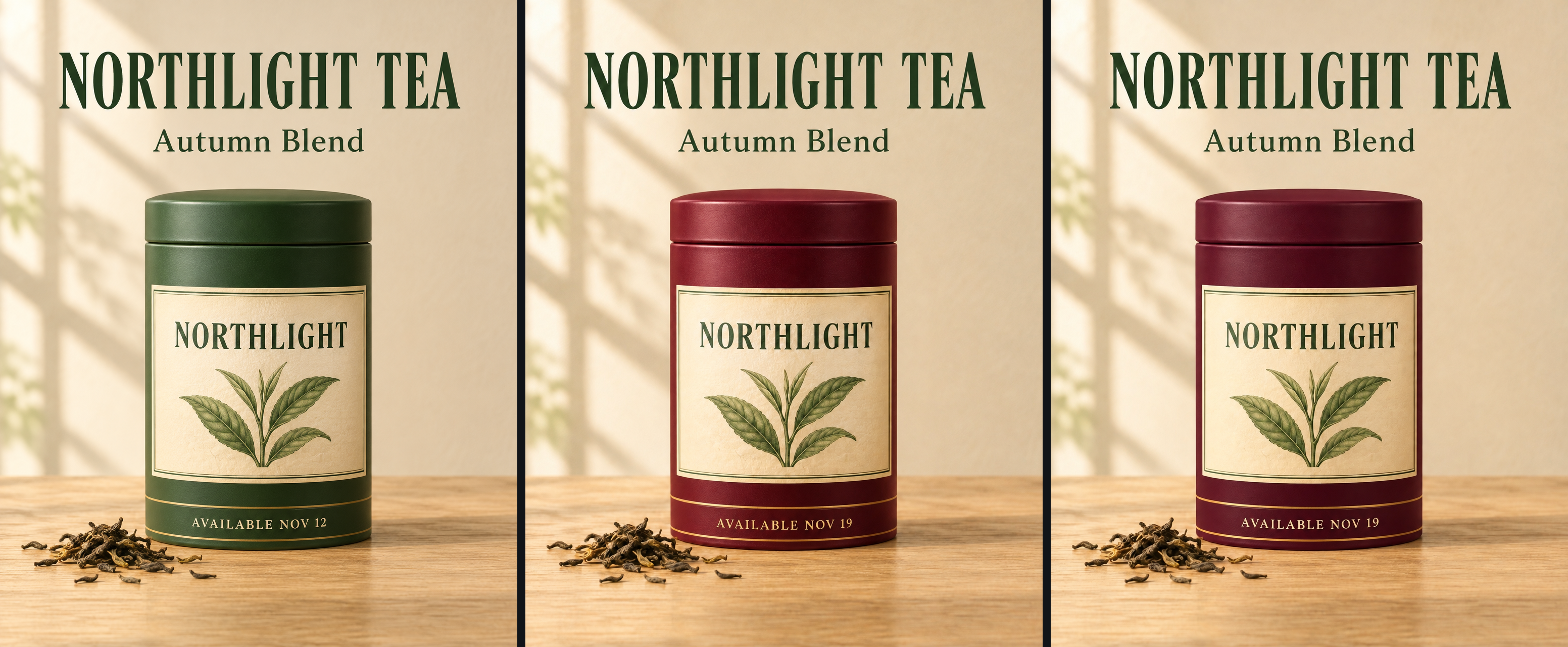
Both edits made both changes and kept the composition. The headline, label, leaf drawing and tea leaves are visibly the same in all three frames.
To get past “looks the same,” we diffed each edit against the base outside the tin, where nothing should have changed. On a 0 to 255 scale, the mean per-pixel change in that region was 3.84 for Flare and 3.48 for Sunburst. Pixels that moved by more than 30 levels made up 0.91% of the region for Flare and 0.65% for Sunburst. Sunburst disturbed slightly less of the untouched area. The gap is small, and with one sample per model it could reverse on the next run.
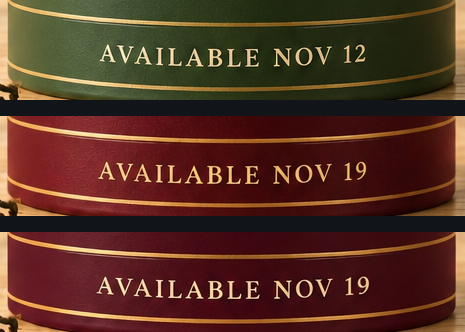
The date band at native pixels. Top: base. Middle: Flare edit. Bottom: Sunburst edit. The crops are not upscaled.
The text edit is clean in both. The serif typeface, letter spacing and gold rules survived. One small difference: Flare rendered the new date in a noticeably warmer gold than the base, while Sunburst stayed close to the original cream tone. At the 95th percentile of the text pixels, Flare’s blue channel dropped about 30 levels and Sunburst’s moved by less than 8. The background diff above cannot catch drift like this, so a brand asset with a specified text color still needs a human check of the text itself.
How long the runs took
Wall time below is measured from our client, from sending the synchronous POST /v1/run until the completed response arrived. Image download is not included. Each row is a single run. Treat the numbers as a rough order of magnitude.
| Run on Nov 5, 2026 | Settings | Output | Wall time |
|---|---|---|---|
| Flare text-to-image | low, 1K, 16:9 | 1792 × 1008 | about 21 s |
| Sunburst text-to-image | low, 1K, 1:1 | 1K square | about 24 s |
| Flare edit | low, 1K | follows input | about 19 s |
| Sunburst edit | low, 1K | follows input | about 36 s |
| Flare text-to-image (tea poster) | medium, 1K, 4:5 | 1024 × 1280 | 15.0 s |
| Sunburst text-to-image (tea poster) | medium, 1K, 4:5 | 1024 × 1280 | 25.0 s |
| Flare edit (tea poster) | medium, 1K | 1024 × 1280 | 18.5 s |
| Sunburst edit (tea poster) | medium, 1K | 1024 × 1280 | 28.3 s |
The low-quality runs were charged $0.01 for text-to-image and $0.025 for edit, matching the price tables. Sunburst was slower than Flare in every pairing here, by 3 to 17 seconds. The low-quality text-to-image pair used different aspect ratios, so read that 3-second gap loosely.
These numbers include the SandBase round trip and a synchronous wait, and each is a single sample. For an agent, end-to-end time is what sets your timeouts. Budget roughly 15 to 40 seconds per image. If a tool call cannot block that long, hand the image job to a background worker. If the response comes back pending or running, the worker stores the run id and polls GET /v1/run/{id}, as shown below.
Calling GPT Image 2.6 from curl
Parameters go at the top level of the JSON body, next to model. There is no input wrapper.
Text-to-image with Flare, low quality for drafting:
curl -s https://api.sandbase.ai/v1/run \
  -H "Authorization: Bearer $SANDBASE_API_KEY" \
  -H "Content-Type: application/json" \
  -d '{
    "model": "openai/gpt-image-2.6-flare",
    "prompt": "A 4:5 product poster for a fictional tea brand. Headline \"NORTHLIGHT TEA\", subtitle \"Autumn Blend\", bottom band \"Available Nov 12\". Deep green tin on a pale oak table, soft window light.",
    "quality": "low",
    "aspect_ratio": "4:5",
    "output_format": "png"
  }'
A completed run returns status: "completed" and the image at outputs[0].url. Download it promptly and keep your own copy; the returned URL is meant for delivery.
Edit with Sunburst, using two input images:
curl -s https://api.sandbase.ai/v1/run \
  -H "Authorization: Bearer $SANDBASE_API_KEY" \
  -H "Content-Type: application/json" \
  -d '{
    "model": "openai/gpt-image-2.6-sunburst/edit",
    "images": [
      "https://your-bucket.example/poster-base.png",
      "https://your-bucket.example/brand-logo.png"
    ],
    "prompt": "Image 1 is the base poster. Place the logo from Image 2 in the top-right corner at about 10% of the poster width. Do not change the headline, the tin, the table or the lighting.",
    "quality": "high",
    "resolution": "2k",
    "output_format": "png"
  }'
That request costs $0.165 + $0.015 = $0.18. The two image URLs are placeholders for your own publicly reachable files.
If the response comes back with status set to pending or running, keep the id and poll until it finishes:
curl -s https://api.sandbase.ai/v1/run/$RUN_ID \
  -H "Authorization: Bearer $SANDBASE_API_KEY"
Stop polling on completed, failed or timeout, and read error on failure. Failed runs are not charged, so a retry after a failure does not double-bill you.
Choosing between Flare and Sunburst
Prices are identical, so the decision comes down to time and how strictly the output must match a spec.
| Situation | Start with | Why |
|---|---|---|
| Exploring layouts, many variations | Flare, low or medium | Faster in every run above, cheapest drafts at $0.01 |
| Final poster with a fixed template | Sunburst, high | OpenAI positions it for detail; it followed the layout instruction in our one test |
| Several rounds of edits on an approved image | Sunburst edit, medium or high | OpenAI’s consistency claim applies at medium/high; in our test it changed slightly less of the untouched area and kept the text color |
| Interactive tool where the user is waiting | Flare | 15 to 21 s versus 24 to 36 s in these runs |
| Animated GIF or SVG output | OpenAI API directly | Not available on SandBase yet |
Two caveats. First, with matching per-image prices, the only extra cost of Sunburst is time, which makes it easy to over-use. If Flare already passes your review step, Sunburst adds latency without a measurable payoff. Second, our tests are a handful of single runs on one prompt. Run your own prompts through both before you route production traffic.
If you are coming from 2.5, the GPT Image 2.5 Flare vs Sunburst comparison covers the same split for the previous generation, and the Images 2.5 editing overview explains the previous generation’s edit features.
FAQ
Is GPT Image 2.6 available through the SandBase API?
Yes. Since November 5, 2026, four endpoints are live through POST https://api.sandbase.ai/v1/run: Flare and Sunburst, each with text-to-image and edit. They support sync and async runs and use the same SandBase API key as other models.
How much does GPT Image 2.6 cost per image on SandBase?
Text-to-image costs $0.01 to $0.27 per image depending on quality and resolution, and is the same for Flare and Sunburst. Edit costs $0.025 to $0.285 with one input image, plus $0.015 per additional input. The default quality is high, which is $0.09 at 1K, so set the field when you want cheaper drafts.
Is GPT Image 2.6 more expensive than 2.5?
Not on SandBase at matching settings. Low, medium and high cost the same per image on 2.6 and 2.5. 2.5 additionally offers xhigh and max, which 2.6 does not have on SandBase. OpenAI’s own token rates for 2.6 are also identical to 2.5.
Can I generate GIFs or SVGs with GPT Image 2.6 on SandBase?
No, not yet. GIF output, SVG export, markup-guided edits and the complexity parameter are part of OpenAI’s API announcement, but SandBase’s 2.6 endpoints currently accept only jpeg, png and webp output and have no complexity field.
Which is faster, Flare or Sunburst?
Flare, in every paired run we made on November 5: about 15 to 21 seconds against 24 to 36 seconds for Sunburst. These are single runs through SandBase, not a controlled benchmark, and your times will vary with resolution, quality and load.
For most teams the cheapest experiment is to keep the prompt you already use on 2.5, swap the model ID to a 2.6 endpoint with an explicit quality, and compare outputs side by side for a day. Start on the Flare model page or the Sunburst model page, where the playground shows the price of each setting before you run it.