GPT Image 2.5 Flare vs Sunburst: Differences, Pricing and Which to Choose
GPT Image 2.5 Flare vs Sunburst: compare speed, editing precision, quality settings and official pricing, with a headphone recoloring example showing what a local edit preserves.
GPT Image 2.5 Flare and Sunburst look like an easy product split: choose the fast, inexpensive model for everyday work and pay more for the premium one. OpenAI’s pricing table complicates that story. Their Standard token rates are identical.
For a designer producing social posts, product imagery and client revisions, that changes the question. The choice is less about affording a higher price tier and more about whether the current job needs another idea quickly or a more carefully controlled change to an image that is already approved.
Key takeaway
- OpenAI recommends Flare as the default for most applications, emphasizing faster image generation and editing.
- Sunburst targets detailed creative work and tighter control across edits, with longer generation times.
- Their Standard token rates match. Actual consumption can still produce different per-request bills.
Based on that positioning, Flare is the reasonable starting point for routine images. Sunburst deserves consideration when changes to a product’s shape, a person’s features or an established composition would make the revision unusable. This is a comparison of official documentation checked on September 9, 2026, not a head-to-head generation test.
What is the difference between GPT Image 2.5 Flare and Sunburst?
In the launch announcement, OpenAI describes Flare as the default for most applications. Its examples include creator content, rapid image prototyping and high-volume generation. Sunburst is positioned for premium visual workflows that need tighter control across edits, including campaign creative and polished product imagery.
That is a distinction in how an image gets made, not a rule that one model can only produce drafts while the other produces finished work.
| Question | Flare | Sunburst |
|---|---|---|
| Official emphasis | Fast, high-quality everyday image generation | Detailed creative work and editing precision |
| Text-to-image generation | Supported | Supported |
| Reference-image editing | Supported | Supported |
| Quality settings | low, medium, high, xhigh, max, auto | The same six settings |
| Standard image output rate | $30 per million tokens | $30 per million tokens |
| Suggested starting task | Exploring ideas and generating variations | Revising an established image with demanding preservation requirements |
The Flare and Sunburst model pages describe separate models, each with its own quality options. Sunburst is not a switch that turns Flare into a higher-resolution model.
Flare at max remains Flare; Sunburst at low remains Sunburst. Matching setting names do not establish matching visual quality, completion time or consumption. They identify configuration choices, not measured equivalence between the models.
This matters when choosing between seemingly adjacent options such as Flare at max and Sunburst at high. The documentation does not provide a direct result for that pairing. A settings ladder cannot substitute for a comparison of the actual images.
Change the earcups, not the headphones
To make that distinction visible, we generated a silver headphone product image in the ChatGPT image interface, then asked for a single revision: turn the two earcup shells burgundy. There was one initial generation and one edit, with no retries.
The original brief specified brushed silver shells, light-gray cushions, a dark-gray headband pad, a three-quarter view and two small round buttons on the nearer earcup. The original downloaded PNG is below.
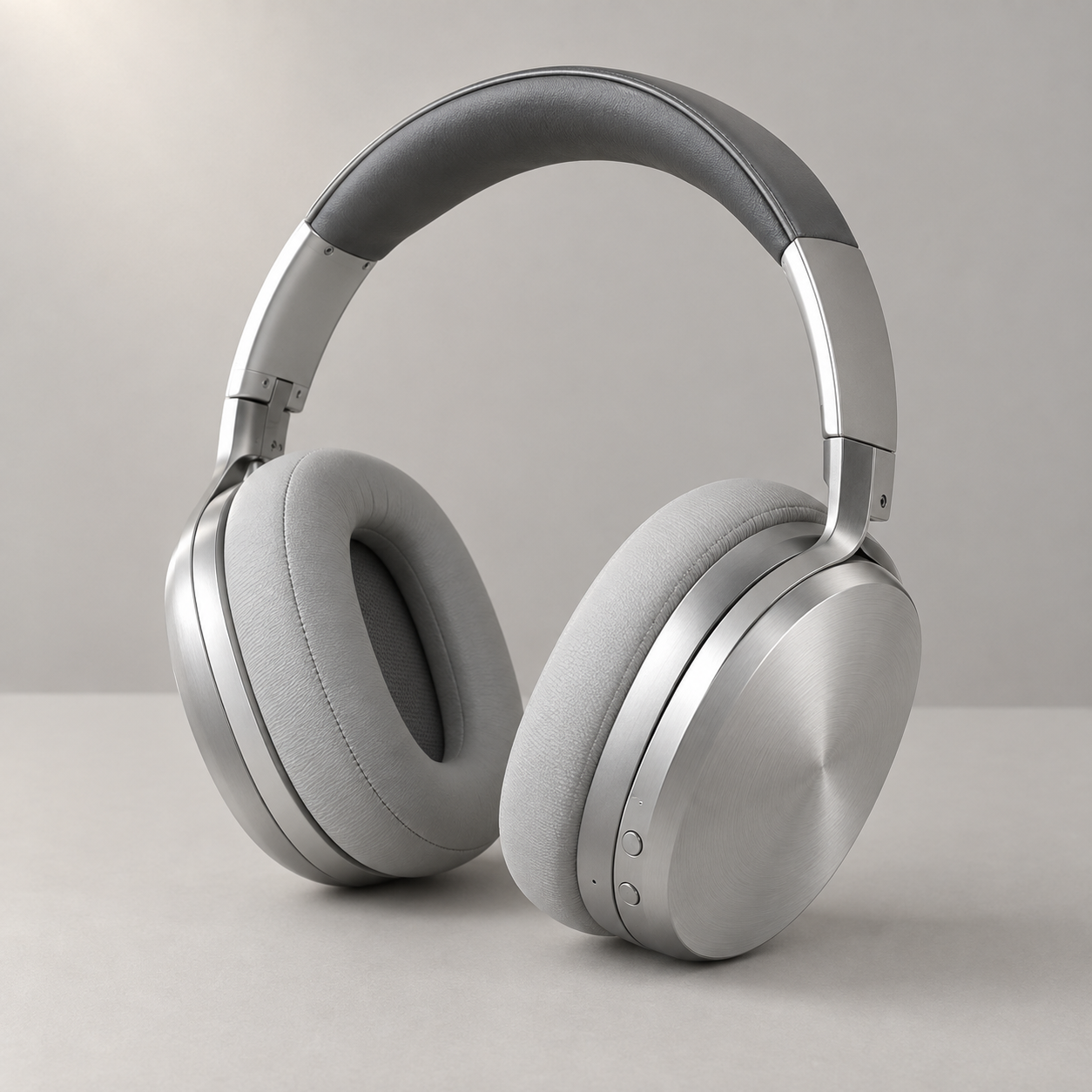 Before: the original 1254 × 1254 PNG of the silver headphones.
The next request changed only the shell color and listed what had to stay. An abridged translation of the Chinese prompt:
Change only the silver metal shells of both earcups to dark burgundy, preserving their brushed-metal texture. Keep the light-gray cushions, dark-gray headband pad, silver headband and metal supports unchanged. Keep both round buttons silver, with the same shape, number and position. Preserve the silhouette, angle, size, placement, table, background, lighting and shadows.
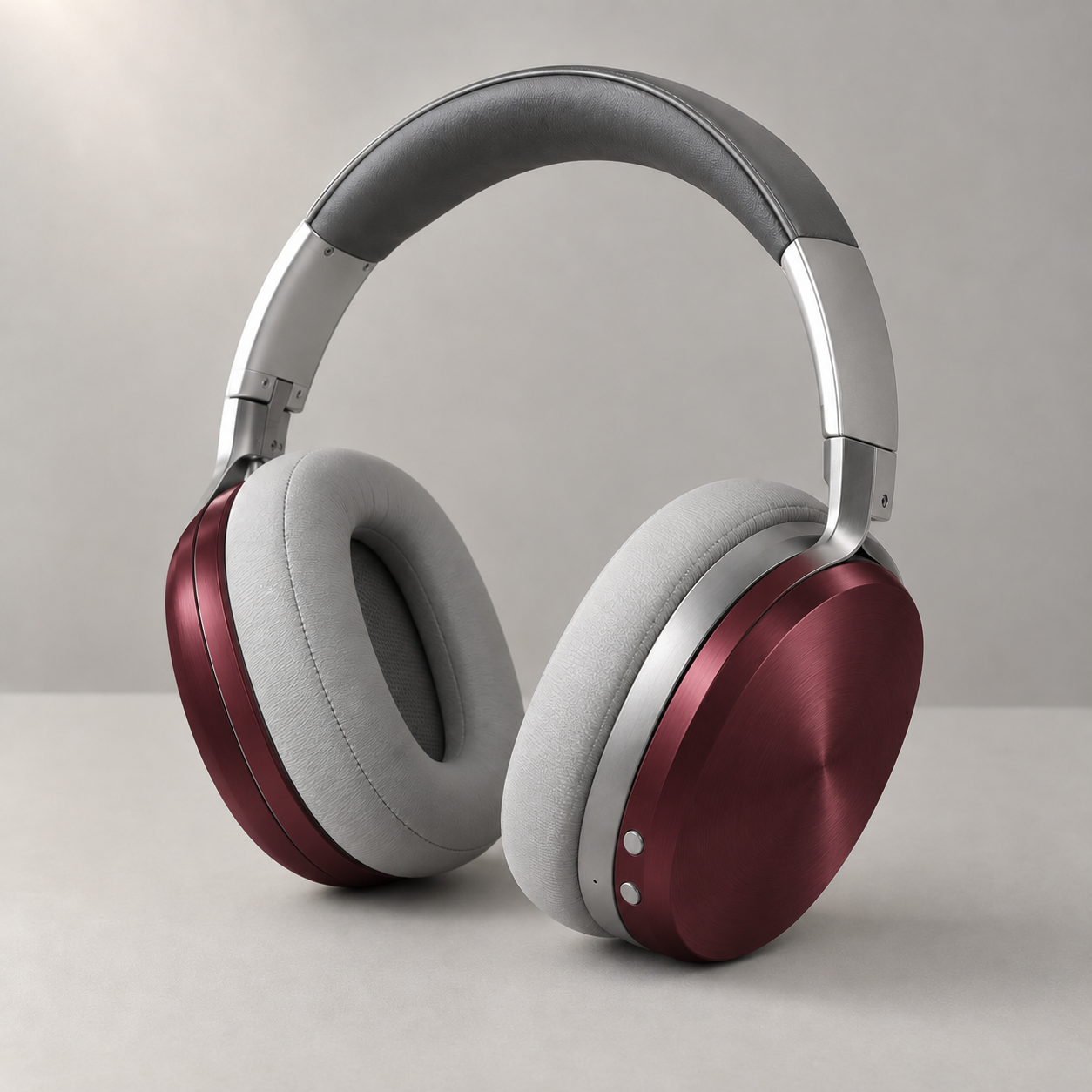 After: burgundy shells in the original 1254 × 1254 PNG, without resizing or lossy recompression.
At first glance, the edit worked. The viewpoint remained, the cushions stayed gray and the supports stayed silver. Both buttons were still present and had not been painted burgundy along with the shell. As a product color concept, the result retained the main design.
The button-area crop tells a more detailed story. Reflections around the button edges changed, and a small pale point above them in the original is no longer clearly visible. A new surface color naturally changes its reflections, but the explicitly protected details were also reinterpreted.
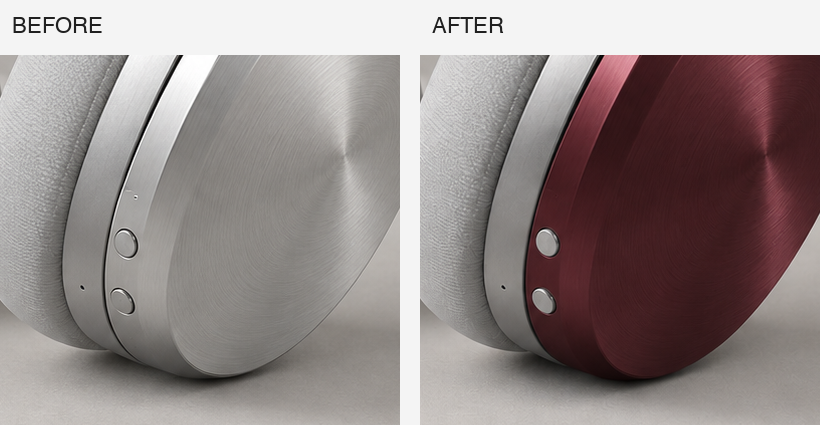 Matching native-pixel crops: before on the left, after on the right. Neither crop has been upscaled.
That is the extra demand in a local edit: produce the requested new color without revising already approved parts. Changes acceptable in an early color concept may deserve closer inspection in a final product image.
This September 9 example used a ChatGPT interface labeled Images 2.5, which did not expose a Flare or Sunburst identifier. It illustrates what to inspect in an edit, not which variant wins. The Vercel launch note similarly uses Sunburst for a bottle-cap color-change example, consistent with its positioning for precise revisions.
Faster than which model?
OpenAI’s API announcement gives a concrete speed claim: Flare delivers 50% lower latency than GPT Image 2. The comparison is with the predecessor. It does not say that Flare takes half as long as Sunburst.
The same announcement quotes Manus’s evaluation team reporting Flare at two to four times GPT Image 2’s speed in its evaluations. Again, the comparison is with GPT Image 2, under Manus’s evaluation conditions. Those numbers should remain attached to their respective sources rather than becoming a universal estimate for every image request.
For the two new variants, the supported distinction is simpler: Flare prioritizes faster generation, while Sunburst takes longer. The materials reviewed here do not supply one fixed pair of completion times covering every size, quality setting and editing task.
The value of that wait also changes with the stage of the work. When exploring a composition, delays interrupt a sequence of visual decisions: try a different background, move the subject, change the lighting. A faster next image can keep that process moving.
When revising a final product image, however, the relevant duration includes any cleanup after generation. A quick output followed by another correction is not necessarily a quicker finished job. That is a reason to pay attention to editing precision, not evidence that Sunburst already saves a particular number of minutes.
Flare vs Sunburst pricing: equal rates, not necessarily equal bills
As checked on September 9, OpenAI’s Standard pricing lists the same rates for both models: $5 per million text input tokens, $8 per million image input tokens and $30 per million image output tokens. Tokens are units used to account for the input and output processed by the model; one token is not one image.
A rate answers how much a unit of usage costs. A bill also requires the number of units consumed. Reference inputs, output dimensions, quality settings and actual consumption matter. Equal rates therefore establish neither that Sunburst always costs more per image nor that both models always cost the same.
Both model pages explicitly warn that the GPT Image 2 calculator does not estimate GPT Image 2.5 token consumption. Copying a predecessor’s square-image estimate into a new-model price comparison can be wrong even when the per-million-token rates match.
This is a particularly easy mistake to make because a per-image number feels more useful than a token table. But a convenient estimate is not useful if it describes a different model’s consumption. Without returned usage or a documented estimate for the selected configuration, an exact per-image bill would be false precision.
There is another expense outside the rate table. A generated image that gets rejected can still have incurred a charge, and manual repair consumes the designer’s time. Those costs belong in the decision, but they do not justify declaring Sunburst cheaper without actual usage and revision records. Its positioning gives a reason to consider it for demanding edits, not a measured savings claim.
For someone using a creative application rather than the API directly, the application’s own credits or subscription rules also matter. An OpenAI token price is not automatically the price shown by a third-party image tool. Confirm which version the tool exposes and how it charges before treating the two product menus as interchangeable.
An image that already works does not need another model
Choosing between the variants does not require moving every image to the same model. If Flare has already met a routine brief, Sunburst’s higher-precision positioning is not, by itself, a reason to generate it again.
Repeated failures at one particular detail are a better reason to reconsider. If background changes keep altering a product’s outline, the task fits the problem Sunburst is intended to address. Simply increasing a quality setting may not address the same issue: more generation effort and better adherence to a narrow edit are not interchangeable promises.
There is also a category of revision where neither model is necessarily the simplest option. If a price is stored in an editable text layer and nothing else should move, changing that layer avoids asking a generative model to reinterpret the whole scene. Using an image model for every adjustment can add uncertainty to an otherwise exact operation.
For the broader editing features, see our Images 2.5 introduction and official examples. Our separate five-round editing record looks at what changes across successive revisions.
FAQ
Is Sunburst more expensive than Flare?
Their official Standard token rates match. Per-request expense depends on actual consumption. The model name alone does not determine the bill, and the predecessor’s calculator is not a substitute for GPT Image 2.5 usage.
Does Sunburst always make better images?
OpenAI emphasizes its precision in detailed creative work and editing. That does not establish a visible advantage for every prompt. Making an appealing open-ended illustration and preserving a specific product accurately are different requirements.
Should I choose Flare at max or Sunburst at high?
The reviewed official materials do not provide a direct comparison of those configurations. Model selection and quality settings are separate decisions; their names do not form a single performance ranking.
Does Images 2.5 in ChatGPT identify the underlying variant?
Not by that label alone. Flare and Sunburst are the published API model names. Seeing Images 2.5 in the web interface does not automatically identify which variant produced an individual image.
The useful part of this split is that finding an image quickly and preserving an image carefully are being treated as distinct priorities. During exploration, speed matters. Once the composition is approved, avoiding one unwanted change can matter more than another few seconds saved.