Doubao Xiaodou vs Microsoft Copilot: Personal Follow-Up vs Work Autopilot (2026)
Official Xiaodou copy emphasizes personal-life follow-up. Official Microsoft Copilot copy emphasizes work content and Microsoft 365. Autopilot stays labeled preview or Frontier, not generally available.
Doubao Xiaodou and Microsoft Copilot are both officially described as assistants that can keep going after the first reply. Official pages, checked on 26 November 2026, Asia/Shanghai, still put them in different jobs. Xiaodou is an invite-only personal assistant in the Doubao family, with official emphasis on proactive messages and authorized consumer-app connections. Microsoft Copilot is officially framed as AI built for work, inside Word, Excel, PowerPoint, Outlook, and Teams, with an Autopilot layer that official copy still labels as Private Preview and as rolling out in Microsoft Frontier.
This article does not write Autopilot as generally available. It also does not run an office-productivity benchmark. The pinyin Xiaodou is a pronunciation aid, not a confirmed official English brand name. For Xiaodou’s official definition, see What Is Doubao Xiaodou?. A wider, still unscored category view is in Personal AI Assistants in 2026.
Key takeaway
- Official Xiaodou positioning, from the product page and Doubao’s 24 November 2026 announcement: a Doubao that understands you and can take the initiative to get things done. Public beta is invite-only. The confirmed client is the China App Store listing for iOS and iPadOS 15.0 or later.
- Official Copilot positioning, from the Microsoft Copilot page: AI built for work, in Word, Excel, PowerPoint, Outlook, and Teams, with Chat and Cowork. Autopilot is described as an always-on personal agent with identity, memory, tools, and background work through Microsoft 365 and Work IQ — and it is labeled Private Preview and/or rolling out in Microsoft Frontier.
- Official connected suites are not the same list. Xiaodou names Douyin, Feishu, Calendar, Health, and Location. Copilot’s official work surface is the Microsoft 365 app family named above. Neither list is used to fill the other.
- Official plans for Copilot are grouped as Individuals, Business, and Enterprise on the official page. This article points at that official plan structure. It does not invent a full tariff, and it does not merge Xiaodou’s two App Store number sets into one table. Those Xiaodou figures stay in Doubao Xiaodou Pricing in 2026.
- Not compared: quality, latency, office-productivity scores, or whether Autopilot already behaves as a generally available product. Home and Code on the same Microsoft page also carried Frontier labels in this check and are not treated as unqualified general availability.
Official positioning

Xiaodou product page, captured 26 November 2026. The hero reads 一句话办事 交给小豆.
The Xiaodou product page presents a Doubao that understands you and can take the initiative to get things done. Invite-page metadata calls it a personal AI assistant that remembers preferences, connects commonly used apps, and helps proactively with work and life. Doubao’s official account, on 24 November 2026 at 10:21:53 Asia/Shanghai, said public beta is invite-only, that an invite code opens the trial with a free quota of unpublished size, and that Xiaodou’s capabilities and experience will gradually go live in the Doubao app. The relationship with that main app is covered in Xiaodou vs the Doubao App.
Microsoft’s official Copilot page describes AI built for work. Named work surfaces include Word, Excel, PowerPoint, Outlook, and Teams. The same official page describes Chat and Cowork as ways to work with Copilot. That is a workplace-content framing, not a Doubao-ecosystem life-assistant framing. The two official sentences can both use the word “assistant.” They do not describe the same room.
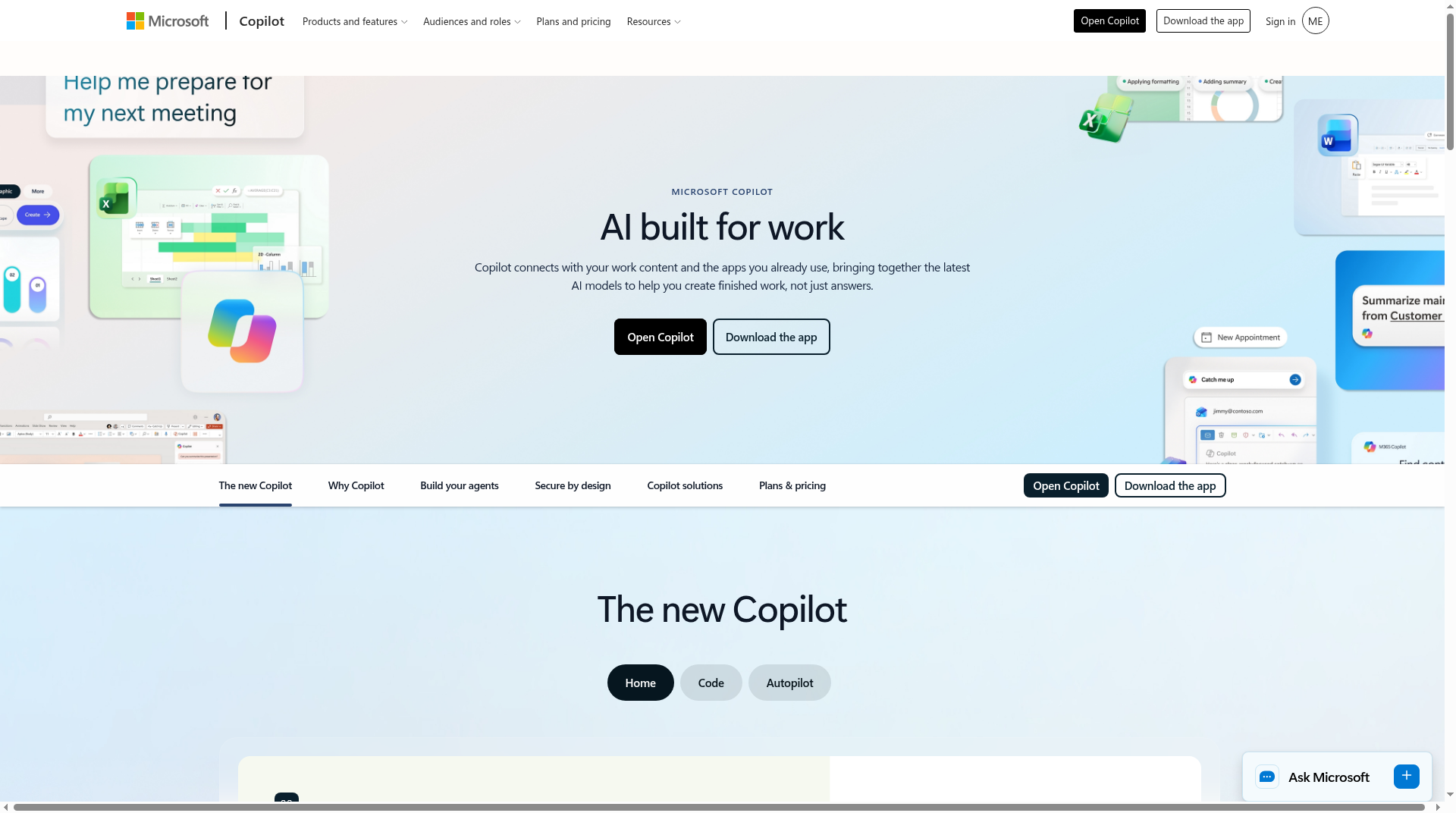
Microsoft Copilot page, captured 26 November 2026. The visible headline is “AI built for work,” with the line that Copilot connects to work content and apps you already use to create finished work, not just answers.
A nearby official workbench comparison, still claims-only, is Xiaodou vs Kimi. Kimi and Copilot are not merged here; each product keeps the wording from its own page.
Proactive help, memory, and Autopilot’s preview label
Official Xiaodou behaviors are proactive messages, “guess what you want,” and task follow-up. Proactive messages use what you have already discussed and the apps you have connected, then remind you when needed. Follow-up examples include a daily brief, a price-drop reminder, and an exercise goal, handed over in one sentence and changeable or stoppable later. Official copy also refers to some of your memory in Doubao. Closing examples include placing a reservation by phone, organizing Feishu to-dos, and following long-term goals.
Official Copilot copy describes Autopilot as an always-on personal agent with identity, memory, tools, and background work, via Microsoft 365 and Work IQ. That is the official “comes back and keeps working” language on the Copilot page. It is also explicitly labeled, in this check, as Private Preview and as rolling out in Microsoft Frontier. This article keeps that label in the same sentence as the capability. Autopilot is not written here as a feature every Copilot user already has.
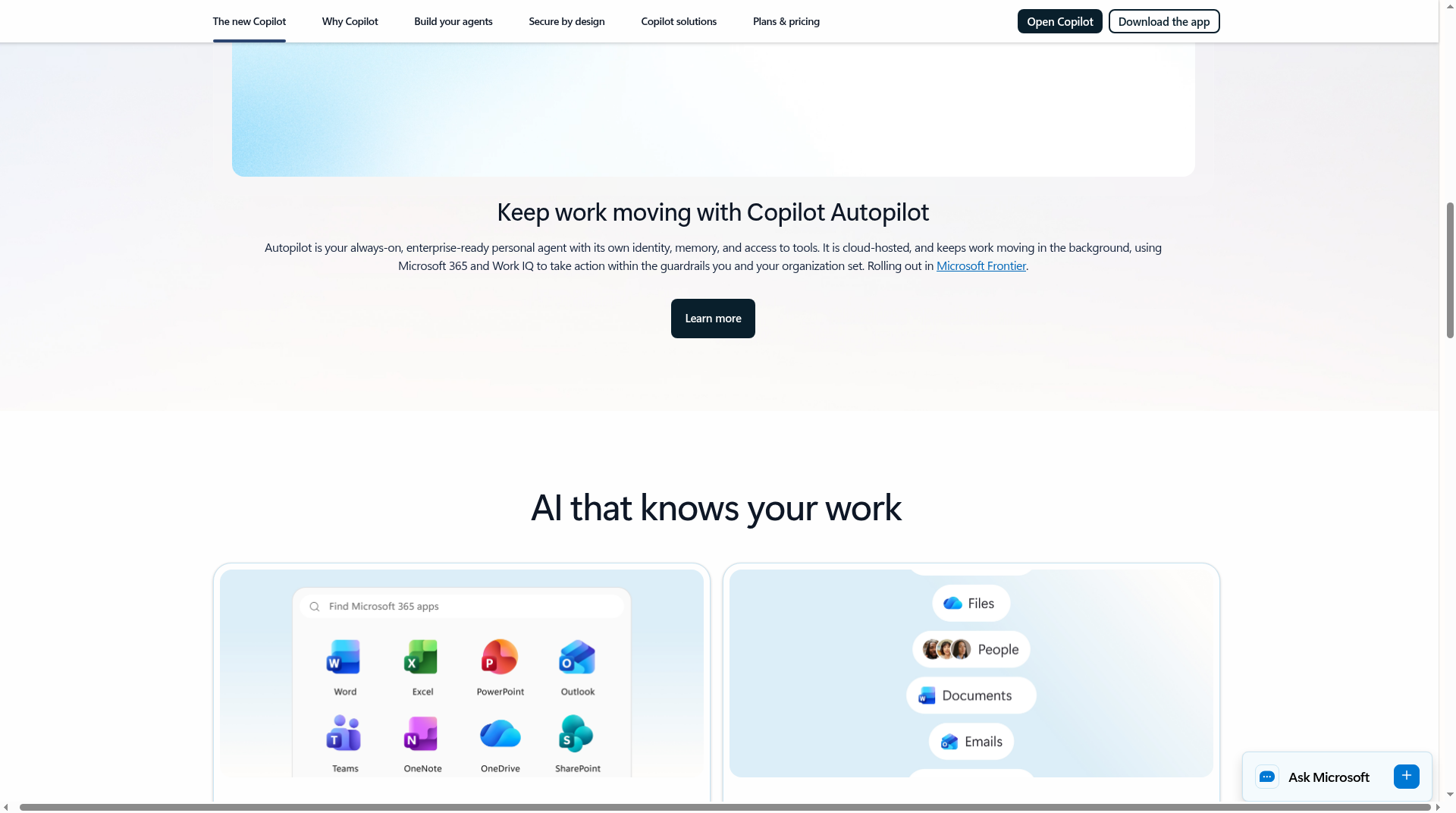
Same Copilot page, Autopilot section, captured 26 November 2026. The heading is “Keep work moving with Copilot Autopilot.” The text calls it an always-on personal agent with identity, memory, and tools, and says it is rolling out in Microsoft Frontier.
Other Microsoft surfaces on the same page, including Home and Code, also carried Frontier labels in this check. They are mentioned only to keep the preview discipline consistent. They are not turned into a second product comparison.
The two official follow-up stories therefore sit in different availability states as well as different ecosystems. Xiaodou’s proactive messages are part of the public-beta product story, still behind an invite. Copilot Autopilot is part of an official work-agent story, still behind a preview / Frontier label. A wider official-language look at this axis is in Assistants That Follow Up for You in 2026.
Connected app suites
Xiaodou’s named connections are Douyin, Feishu, Calendar, Health, and Location, plus “other apps,” under your authorization. Those names stay attached to the Xiaodou product page. The App Store listing adds a catalog used under explicit instructions and authorization, including calendars and to-dos, package tracking, nearby search, shopping after-sales, health reminders, and office writing. “Office writing” in that listing is a Xiaodou store phrase. It is not evidence that Xiaodou is a Microsoft 365 assistant.
Copilot’s official connected suite is the Microsoft 365 family named on its page: Word, Excel, PowerPoint, Outlook, and Teams. Chat and Cowork are official ways of working inside that suite. This article does not infer a Feishu connector for Copilot, or a Teams connector for Xiaodou.
Platform and plans
Xiaodou’s confirmed client in this check is the China App Store app, listed as 小豆 - 豆包旗下 AI 个人助理, free with in-app purchases, in Simplified Chinese, with an 18+ age rating on the store page, requiring iOS or iPadOS 15.0 or later. Official announcement copy still requires an invite code. A logged-in Xiaodou web app was not confirmed. An official Android store listing was not opened.
The official Copilot page describes desktop, mobile, and web. Official plan groups on that page are Individuals, Business, and Enterprise. This article points readers at that official plan structure and at the Copilot page itself. It does not invent dollar or seat prices, plan entitlements, or a full tariff from a heading. It also does not line those plan names up against Xiaodou’s 标准, 加强, and 高级 rows.
Xiaodou’s own prices remain two official number sets that do not fully match, as documented in the pricing article. That disagreement is a Xiaodou documentation fact, not a Copilot comparison input.
Chat and Cowork, on the official Copilot page, are two named ways of working, not a benchmark result. Chat is the official conversational surface. Cowork is officially described as a way to take on more complex, multi-step work across apps, data, and workflows. This article records those names because they are on the page. It does not invent a task list that would show which mode is “better,” and it does not map Cowork onto Xiaodou’s one-sentence handoff.
The preview discipline is also an access fact. A reader who chooses Copilot for Autopilot is choosing a capability that official copy, on 26 November 2026, still placed in Private Preview and in Microsoft Frontier. A reader who chooses Xiaodou for proactive messages is choosing a public-beta claim that is still behind an invite. Those are two different kinds of gate, and neither one is a quality score. If Autopilot’s label later changes to general availability, that cell should be checked again rather than remembered from this article.
What cannot be compared yet
- Which product is better at writing, follow-up, or office work.
- Whether a Xiaodou reservation call or a Copilot Autopilot background job actually completes as advertised.
- Autopilot, Home, or Code as generally available features; in this check they carried Private Preview and/or Frontier labels.
- Official Android details for Xiaodou.
- A like-for-like quota comparison, or a merged price table.
- An office-productivity benchmark, or a verdict about memory quality.
How to choose, with the information that exists
If you already live in Doubao, can obtain an invite, and want the assistant whose own page emphasizes personal follow-up — proactive messages, reminders, and authorized connections to Douyin, Feishu, Calendar, Health, and Location — Xiaodou is the official product for that framing. The confirmed download path in this check is the China App Store listing.
If you want an official Microsoft work assistant, inside Word, Excel, PowerPoint, Outlook, and Teams, start from the Microsoft Copilot page and the official Individuals, Business, or Enterprise plan paths published there. If the feature you care about is Autopilot, read the preview and Frontier labels on that page first. This article does not treat Autopilot as something you can already assume is on.
The two official jobs can overlap in the abstract word “work,” but they do not overlap in the named suites. A reader whose documents live in Feishu should start from the page that names Feishu. A reader whose documents live in Microsoft 365 should start from the page that names Microsoft 365.
Nearby official-claim comparisons include Xiaodou vs ChatGPT, whose official Work section also names workplace apps, and Xiaodou vs Apple Intelligence and Siri AI, a system-level rather than Microsoft 365 comparison.
If you are building your own assistant rather than choosing a consumer or workplace app, that is a different job. SandBase has no Xiaodou card. The live model-family card is Seed 2.1 Pro (bytedance/seed-2.1-pro), listed at $0.89 input, $4.45 output, and $0.18 cache read per million tokens, with a 1M context window, and described as Doubao-Seed-2.1-Pro through Doubao and Volcano Engine. Related catalogs: ByteDance models and Chinese LLM APIs. Those links are for the model family. They are not a way to call Xiaodou, and they are not a Microsoft Copilot API.
Sources
- Official Xiaodou product page: doubao.com/xiaodou. Checked 26 November 2026, Asia/Shanghai.
- China App Store listing for Xiaodou, id 6815582077, same day.
- Doubao official announcement, 24 November 2026, 10:21:53 Asia/Shanghai, as cited in What Is Doubao Xiaodou?.
- Official Microsoft Copilot page: microsoft.com/en-us/microsoft-copilot, same day, including the work framing, named Microsoft 365 apps, Autopilot’s Private Preview / Frontier labels, plan group names, and desktop, mobile, and web language.
- SandBase cards linked above, confirmed live the same day. There is still no Xiaodou catalog card.
Found this useful? Share it