Anthropic Prompt Caching for Agents: Cut Claude Bill 60%
How to implement Anthropic prompt caching in agent loops. Real code, cost math, and advanced patterns that cut Claude API bills by 60% for repetitive workflows.
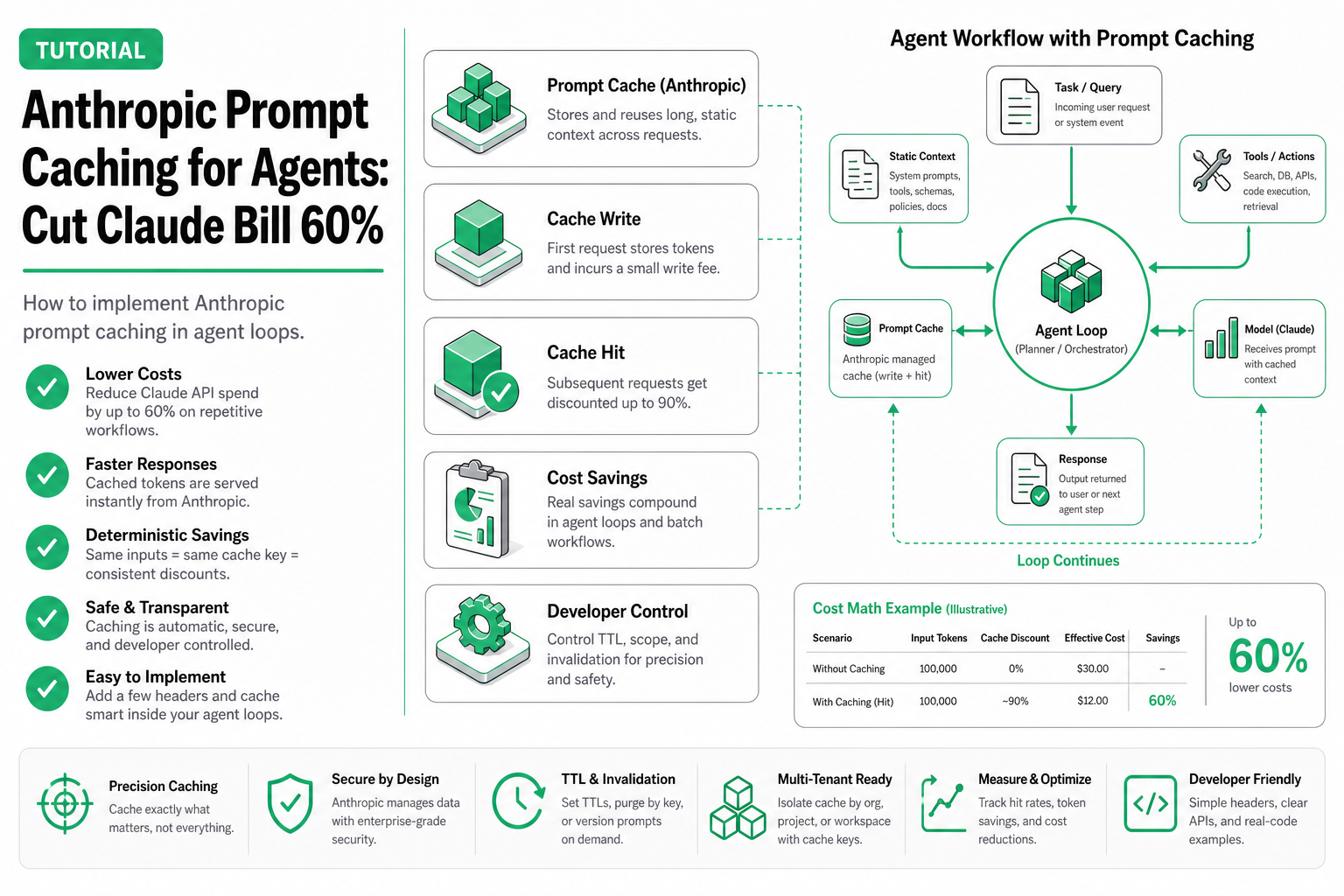
Last month I watched our monitoring dashboard tick past $180/day on Claude API calls for a single customer-support agent. The agent made ~200 calls per hour, each carrying the same 8,000-token system prompt. That’s 1.6 million redundant input tokens every hour, billed at full price. After implementing anthropic prompt caching, the same workload dropped to $72/day—a 60% reduction with zero changes to output quality.
This tutorial shows you exactly how to replicate that result in your own agent loops.
TL;DR: Add
cache_control: {"type": "ephemeral"}to your static system prompt blocks. For an agent making 200 calls/hour with an 8K system prompt on Sonnet 5, you’ll save roughly $108/day. The implementation takes ~20 lines of Python.
How Anthropic Prompt Caching Works
The concept is straightforward: you tell the API which parts of your prompt are stable across requests. Anthropic stores those token sequences server-side. On subsequent requests, if the cached prefix matches exactly, the API reads from cache instead of reprocessing.
Here’s the flow:
Request 1 (cache MISS):
  [System Prompt: 8K tokens] ──► cache_control: ephemeral
  [User Message: 200 tokens]
  Cost: 8K × write_price (1.25× normal) + 200 × normal_price

Request 2-N (cache HIT):
  [System Prompt: 8K tokens] ──► read from cache
  [User Message: 200 tokens]
  Cost: 8K × cache_read_price (0.1× normal) + 200 × normal_price
The economics break down like this:
- Cache write: 25% more expensive than a normal input token
- Cache read: 90% cheaper than a normal input token
- Cache TTL: 5 minutes (free) or 1 hour (paid tier, additional cost)
- Break-even point: You need just 2 cache hits to recoup the write cost
The cache_control directive uses {"type": "ephemeral"} which gives you the 5-minute TTL. For agents running continuously, 5 minutes is plenty—your cache stays warm as long as requests arrive at least once every 5 minutes.
Minimum Token Thresholds
Not everything is cacheable:
- Sonnet 5 / Opus 5: Minimum 1,024 tokens
- Haiku: Minimum 2,048 tokens
If your system prompt is under these thresholds, caching won’t activate. Most agent system prompts easily exceed 1,024 tokens once you include tool definitions, behavioral rules, and context.
When Caching Helps vs. When It Doesn’t
| Scenario | Request Frequency | Static Prefix Size | Estimated Savings | Verdict |
|---|---|---|---|---|
| Agent loop (support bot) | 200/hour | 8K tokens | 60-65% | ✅ Strong fit |
| RAG pipeline (fixed instructions + dynamic docs) | 50/hour | 3K tokens | 40-50% | ✅ Good fit |
| Multi-tool agent (large tool schema) | 100/hour | 12K tokens | 65-70% | ✅ Excellent fit |
| One-shot summarization | 5/hour | 1K tokens | ~5% | ❌ Marginal |
| Chat with unique system prompts per user | varies | varies | 0% | ❌ No benefit |
| Batch processing (prompts change each call) | 1000/hour | 500 tokens | 0% | ❌ Below threshold |
My take: If your agent sends >10 requests/hour with a stable prefix above 1,024 tokens, implement caching. The ROI is immediate.
Full Python Implementation: Agent Loop with Smart Caching
Here’s a complete, runnable implementation of a Claude agent loop with prompt caching using the Anthropic Python SDK:
import anthropic
import time
from typing import Generator

client = anthropic.Anthropic()  # Uses ANTHROPIC_API_KEY env var

SYSTEM_PROMPT = """You are a customer support agent for Acme Corp.
You have access to the following tools and must follow these rules:

1. Always verify the customer's identity before accessing account data.
2. Escalate billing disputes over $500 to a human agent.
3. Never share internal system IDs with customers.
4. Log every action taken with a reason code.

[... imagine this continues to ~8,000 tokens with tool definitions,
     policy rules, example interactions, and response formatting ...]
"""

TOOLS = [
    {
        "name": "lookup_customer",
        "description": "Find customer by email or phone number",
        "input_schema": {
            "type": "object",
            "properties": {
                "email": {"type": "string"},
                "phone": {"type": "string"}
            }
        }
    },
    {
        "name": "get_order_status",
        "description": "Check the status of an order by order ID",
        "input_schema": {
            "type": "object",
            "properties": {
                "order_id": {"type": "string"}
            },
            "required": ["order_id"]
        }
    },
    {
        "name": "create_ticket",
        "description": "Create a support ticket for escalation",
        "input_schema": {
            "type": "object",
            "properties": {
                "subject": {"type": "string"},
                "priority": {"type": "string", "enum": ["low", "medium", "high"]},
                "description": {"type": "string"}
            },
            "required": ["subject", "priority", "description"]
        }
    }
]


def run_agent_turn(conversation_history: list[dict]) -> dict:
    """Execute a single agent turn with prompt caching enabled."""
    response = client.messages.create(
        model="claude-sonnet-5-20261001",
        max_tokens=1024,
        system=[
            {
                "type": "text",
                "text": SYSTEM_PROMPT,
                "cache_control": {"type": "ephemeral"}  # Cache the system prompt
            }
        ],
        tools=TOOLS,
        messages=conversation_history
    )
    return response


def run_agent_loop(user_messages: Generator[str, None, None]):
    """Main agent loop that processes incoming user messages."""
    conversation_history = []

    for user_msg in user_messages:
        # Append user message
        conversation_history.append({
            "role": "user",
            "content": user_msg
        })

        # Run agent turn (cache hits on system prompt after first call)
        response = run_agent_turn(conversation_history)

        # Log cache performance
        usage = response.usage
        print(f"Input tokens: {usage.input_tokens}")
        print(f"Cache read tokens: {getattr(usage, 'cache_read_input_tokens', 0)}")
        print(f"Cache write tokens: {getattr(usage, 'cache_creation_input_tokens', 0)}")

        # Handle tool use loop
        while response.stop_reason == "tool_use":
            tool_results = execute_tools(response.content)
            conversation_history.append({"role": "assistant", "content": response.content})
            conversation_history.append({"role": "user", "content": tool_results})
            response = run_agent_turn(conversation_history)

        # Append final assistant response
        conversation_history.append({
            "role": "assistant",
            "content": response.content
        })

        yield response.content


def execute_tools(content_blocks) -> list[dict]:
    """Execute tool calls and return results."""
    results = []
    for block in content_blocks:
        if block.type == "tool_use":
            # Replace with your actual tool execution logic
            result = dispatch_tool(block.name, block.input)
            results.append({
                "type": "tool_result",
                "tool_use_id": block.id,
                "content": result
            })
    return results


def dispatch_tool(name: str, params: dict) -> str:
    """Route tool calls to implementations."""
    handlers = {
        "lookup_customer": lambda p: '{"id": "cust_123", "name": "Jane Doe"}',
        "get_order_status": lambda p: '{"status": "shipped", "eta": "2026-08-04"}',
        "create_ticket": lambda p: '{"ticket_id": "TKT-4521"}',
    }
    handler = handlers.get(name, lambda p: '{"error": "unknown tool"}')
    return handler(params)
The critical line is "cache_control": {"type": "ephemeral"} on the system message block. That single addition tells the API to cache that block for 5 minutes.
Cost Calculation: Before vs After
Let’s do real math for our support agent scenario using Claude Sonnet 5 pricing:
Assumptions:
- System prompt: 8,000 tokens
- Average user message: 200 tokens
- Average response: 400 tokens
- Calls per hour: 200
- Hours per day: 24
Without caching:
Input cost per call:  8,200 tokens × $3.00/1M tokens = $0.0246
Output cost per call: 400 tokens × $15.00/1M tokens  = $0.006
Total per call: $0.0306
Daily cost: $0.0306 × 200 × 24 = $146.88/day
With caching (first call writes, remaining 199 read from cache):
First call (cache write):
  8,000 tokens × $3.75/1M (write premium) = $0.030
  200 tokens × $3.00/1M (normal)          = $0.0006
  Output: 400 × $15.00/1M                 = $0.006
  Subtotal: $0.0366

Remaining 199 calls (cache hit):
  8,000 tokens × $0.30/1M (cache read) = $0.0024
  200 tokens × $3.00/1M                = $0.0006
  Output: 400 × $15.00/1M              = $0.006
  Subtotal per call: $0.009

Hourly cost: $0.0366 + (199 × $0.009) = $1.83/hour
Daily cost: $1.83 × 24 = $43.92/day
Savings: $102.96/day (70% reduction)
The savings get even better at higher volumes. The cache write penalty is a fixed cost amortized over all subsequent reads within the TTL window.
Advanced Patterns
Pattern 1: Cache Warming on Startup
If your agent has cold-start latency concerns, send a lightweight “warm-up” request when the service starts:
def warm_cache():
    """Send a minimal request to populate the cache."""
    client.messages.create(
        model="claude-sonnet-5-20261001",
        max_tokens=1,
        system=[{
            "type": "text",
            "text": SYSTEM_PROMPT,
            "cache_control": {"type": "ephemeral"}
        }],
        messages=[{"role": "user", "content": "hello"}]
    )
    print("Cache warmed successfully")
This costs a fraction of a cent and ensures your first real user request gets a cache hit.
Pattern 2: Caching Tool Definitions for Multi-Tool Agents
If your tool schema is large (common with 10+ tools), cache it separately:
response = client.messages.create(
    model="claude-sonnet-5-20261001",
    max_tokens=1024,
    system=[
        {
            "type": "text",
            "text": SYSTEM_PROMPT,
            "cache_control": {"type": "ephemeral"}
        }
    ],
    tools=TOOLS,  # Tools are included in the cached prefix automatically
    messages=conversation_history
)
When you pass cache_control on the system block and tools are defined, the entire prefix (system + tools) gets cached together. For an agent with 15 tools (~4K tokens of schema), this doubles your cache savings.
Pattern 3: Conversation Context Caching
For long-running conversations, you can cache the conversation history itself by marking earlier messages with cache_control:
def build_messages_with_context_cache(conversation_history: list[dict]) -> list[dict]:
    """Cache older conversation turns to reduce re-processing cost."""
    if len(conversation_history) <= 4:
        return conversation_history

    # Cache everything except the last 2 turns
    cached_messages = []
    cache_boundary = len(conversation_history) - 4  # Last 2 exchanges

    for i, msg in enumerate(conversation_history):
        if i == cache_boundary - 1:
            # Mark the boundary message for caching
            cached_msg = msg.copy()
            if isinstance(cached_msg["content"], str):
                cached_msg["content"] = [{
                    "type": "text",
                    "text": cached_msg["content"],
                    "cache_control": {"type": "ephemeral"}
                }]
            cached_messages.append(cached_msg)
        else:
            cached_messages.append(msg)

    return cached_messages
This is particularly valuable for agents that maintain 20+ turn conversations. After turn 10, your conversation history might be 5K+ tokens that get re-sent and re-processed on every call.
Gotchas and Limitations
1. TTL Expiry Bites During Low Traffic
The 5-minute ephemeral cache expires silently. If your agent handles 2 requests per hour (one every 30 minutes), you’ll get cache misses on every single call and actually pay more due to the 25% write premium. Monitor your cache_read_input_tokens in responses—if it’s consistently 0, caching is costing you money.
2. Exact Prefix Matching is Strict
The cache matches on the exact token sequence. If you inject a dynamic timestamp, user ID, or request ID anywhere in your system prompt, you’ll break cache hits for everything after that point. Keep dynamic content in the user messages, never in cached blocks.
3. Minimum Token Thresholds Are Per-Block
A common mistake: splitting your system prompt into multiple small blocks where each is under 1,024 tokens. The minimum threshold applies to the contiguous cached content. Combine your system instructions into a single large block.
4. Cache Doesn’t Survive Model Version Changes
If you switch from claude-sonnet-5-20261001 to a newer version, all caches are invalidated. Plan your model upgrades during low-traffic windows.
5. No Cache Invalidation API
You can’t manually purge cached content. If you need to update your system prompt, you simply start sending the new version—it’ll write to a new cache entry while the old one expires naturally.
FAQ
Does prompt caching affect response quality?
No. Caching is purely a billing and latency optimization. The model receives exactly the same tokens whether they’re read from cache or processed fresh. Outputs are identical.
Can I cache user messages, not just system prompts?
Yes. Any content block can receive cache_control. In practice, this is useful for caching few-shot examples or long document contexts that stay constant across multiple queries against the same document.
What happens if my cache expires mid-conversation?
The next request will be a cache miss—it writes to cache again (25% premium on the cached tokens for that one request) and subsequent requests resume reading from cache. There’s no error or failure; it’s transparent.
Is the 1-hour paid TTL worth it?
For most agent workloads running continuously, the 5-minute free TTL is sufficient since requests arrive frequently enough to keep the cache warm. The 1-hour TTL makes sense for batch-scheduled agents that run every 15-30 minutes—infrequent enough to miss the 5-minute window but regular enough to benefit from caching.
Does caching work with streaming responses?
Yes. Prompt caching operates on the input side and is completely independent of whether you use streaming or non-streaming for the output. Use client.messages.stream(...) with the same cache_control parameters.
Related Reading
- Anthropic Prompt Caching: 5min vs 1hr Pricing
- Cost Dashboard Agent (Anthropic SDK Tutorial)
- LLM API Pricing in 2026: The Complete Guide
- Opus 5 vs Sonnet 5: When to Pay 5x More
- Per-Call vs Token Pricing: Which Works for Agents
- RAG Cost Structure: Embedding + Search + LLM
Key Takeaways
-
Add
cache_control: {"type": "ephemeral"}to your system prompt. This single change delivers the majority of savings for agent workloads. -
The break-even is 2 requests. If your cached prefix gets hit twice within 5 minutes, you save money. Most agents far exceed this.
-
Keep static content static. Don’t inject timestamps, request IDs, or any per-request dynamic data into cached blocks. Put those in user messages.
-
Monitor
cache_read_input_tokensin responses. This is your signal that caching is working. If it’s 0, debug your prefix matching. -
For agents specifically, the ROI is massive. The combination of large system prompts, frequent calls, and stable prefixes makes agent loops the ideal use case for the anthropic caching API.
The implementation cost is minimal—a few lines of code and some discipline about prompt structure. For any production agent running on Claude, there’s no reason not to enable it today.
Run Claude with Caching on SandBase
SandBase supports Anthropic prompt caching through its unified API — the same cache_control parameter works. You get the caching savings plus the ability to fall back to other models (DeepSeek, GPT-5.x) when Claude is rate-limited.
from openai import OpenAI

client = OpenAI(base_url="https://api.sandbase.ai/v1", api_key="your-key")

# Prompt caching works identically through SandBase
response = client.chat.completions.create(
    model="anthropic/claude-sonnet-5",
    messages=[...],  # same cache_control structure
    extra_body={"anthropic_cache": True}
)
See Claude models on SandBase: sandbase.ai/vendor/anthropic