How to Build a YouTube Transcript Pipeline with One API | SandBase
Go from a channel name to caption tracks in four calls: resolve the channel, list videos, read video info, and discover captions — one SandBase key, no OAuth.
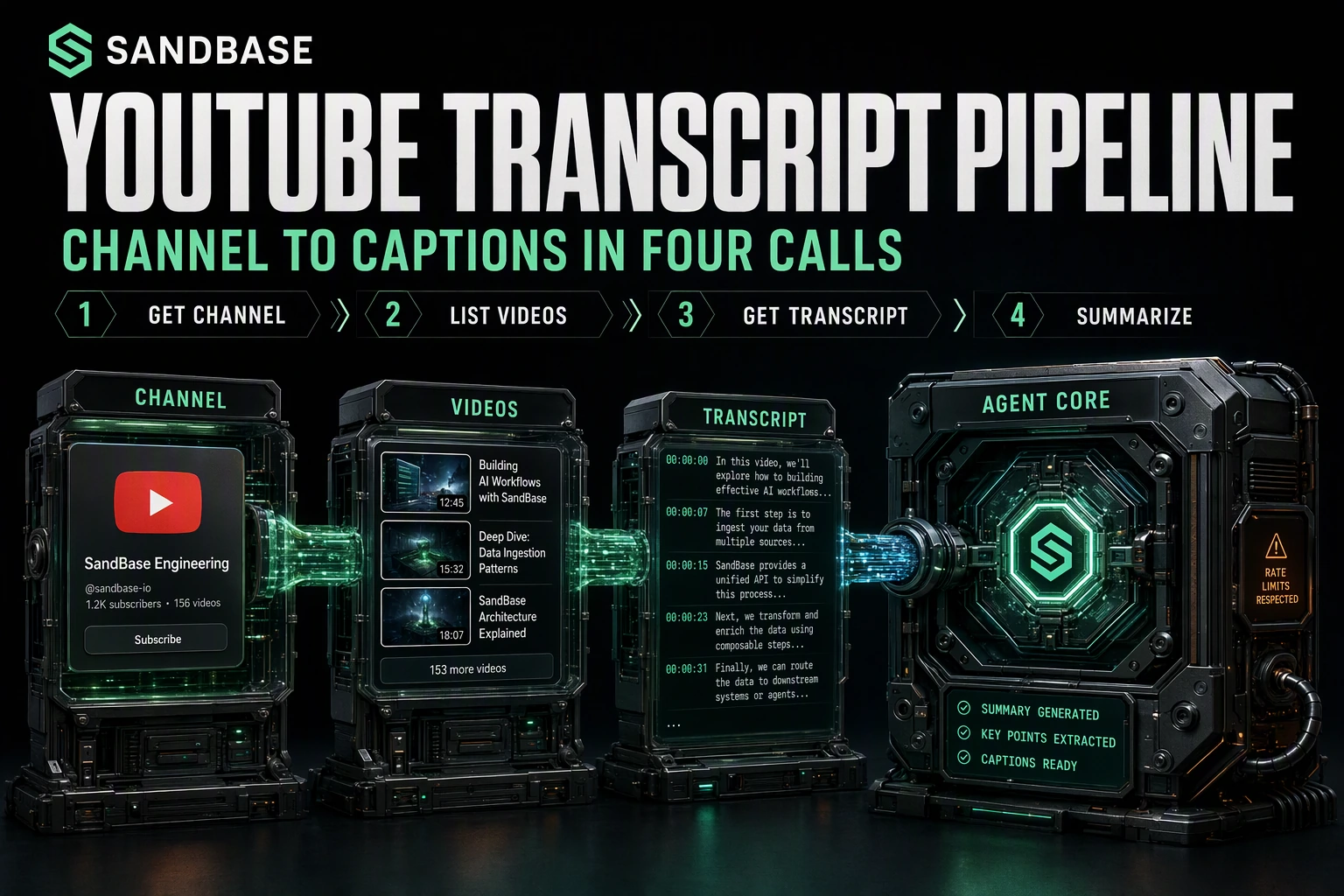
Feeding YouTube content into an LLM — for summarization, semantic search, or dataset building — comes down to one question: how do you get from “a channel I care about” to a specific video’s caption track without scraping? This tutorial walks the exact four-call path end to end with the SandBase YouTube API: it takes you from a channel to a video’s available caption tracks, and then you request the track you want. You still need a SandBase key, but no Google Cloud project or OAuth. The endpoint reference only guarantees the response envelope (id, status, model, outputs[0].data); the business field names below are an illustrative structure, not a guaranteed schema, so confirm them against a live response.
If you want the full endpoint tour first, start with the YouTube public data API hub. This piece is the applied pipeline.
Key takeaway
- Four calls:
channel-id→channel-videos→video-info→video-captions.- Every call is
POST /v1/api/youtube/<path>with oneSANDBASE_API_KEY; responses share the{ id, status, model, outputs }envelope.- Carry the
channel_idand eachvideo_idforward as stable keys between steps.- Public, read-only captions only; you still need a SandBase key, but no Google Cloud project or OAuth on your side.
The pipeline at a glance
| Step | Endpoint | Input | You get |
|---|---|---|---|
| 1. Resolve channel | youtube/web/channel-id | channel_name | a stable channel_id |
| 2. List videos | youtube/web-v2/channel-videos | channel_id | recent videos + continuation_token |
| 3. Read video | youtube/web-v2/video-info | video_id | title, author, category, caption tracks |
| 4. Pull captions | youtube/web-v2/video-captions | video_id | available caption languages |
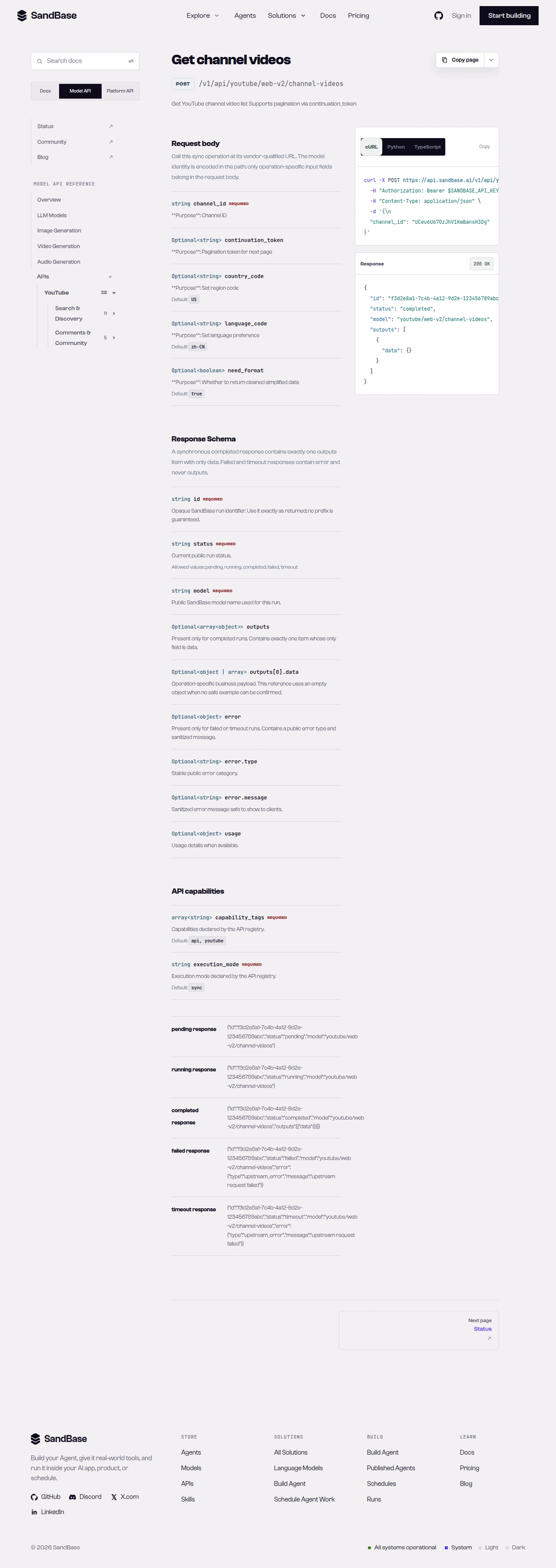 The endpoint API reference is the source of truth for each parameter name and response path.
Step 1 — Resolve the channel
You usually start with a human-facing name, not an id. Turn it into a stable channel_id once, then reuse it:
import os
import requests

BASE = "https://api.sandbase.ai/v1/api/youtube"
HEADERS = {
    "Authorization": f"Bearer {os.environ['SANDBASE_API_KEY']}",
    "Content-Type": "application/json",
}


def call(path: str, payload: dict) -> dict:
    resp = requests.post(f"{BASE}/{path}", headers=HEADERS, json=payload, timeout=120)
    resp.raise_for_status()
    body = resp.json()
    if body.get("status") != "completed":
        raise RuntimeError(body.get("error", {}).get("message", "request did not complete"))
    return body["outputs"][0]["data"]


channel = call("web/channel-id", {"channel_name": "NASA"})
# use .get() defensively — business fields like channel_id are an illustrative structure, not a guaranteed schema
channel_id = channel.get("channel_id")
print(channel_id)  # e.g. a channel id string
The call helper branches on status before touching outputs — reuse it for every step below. Only the outer envelope is guaranteed; read business fields defensively.
Step 2 — List the channel’s videos
Pass the channel_id to list recent uploads. The response carries a videos array and a continuation_token for paging:
listing = call("web-v2/channel-videos", {"channel_id": channel_id})
# use .get() defensively — the videos array and its fields are an illustrative structure, not a guaranteed schema
videos = listing.get("videos", [])
first = videos[0] if videos else {}
print(first.get("video_id"), "-", first.get("title"))
The listing may carry a videos array with fields like video_id, title, view_count, published_time, and duration; treat these field names as an illustrative structure and confirm them against a live response. Where an endpoint accepts an optional continuation_token request parameter, send it back to fetch the next page.
Step 3 — Read the video’s metadata
Before pulling captions, read the video to confirm it has caption tracks and to capture metadata for your record:
info = call("web-v2/video-info", {"video_id": first.get("video_id")})
# use .get() defensively — these business fields are an illustrative structure, not a guaranteed schema
print(info.get("title"), "|", info.get("author"), "|", info.get("category"))
print(info.get("view_count"), "views,", info.get("length_seconds"), "seconds")
A captions field may list the caption tracks available for the video, each with something like a base_url; treat these field names as an illustrative structure and confirm them against a live response. When present, it is your signal that step 4 will return something.
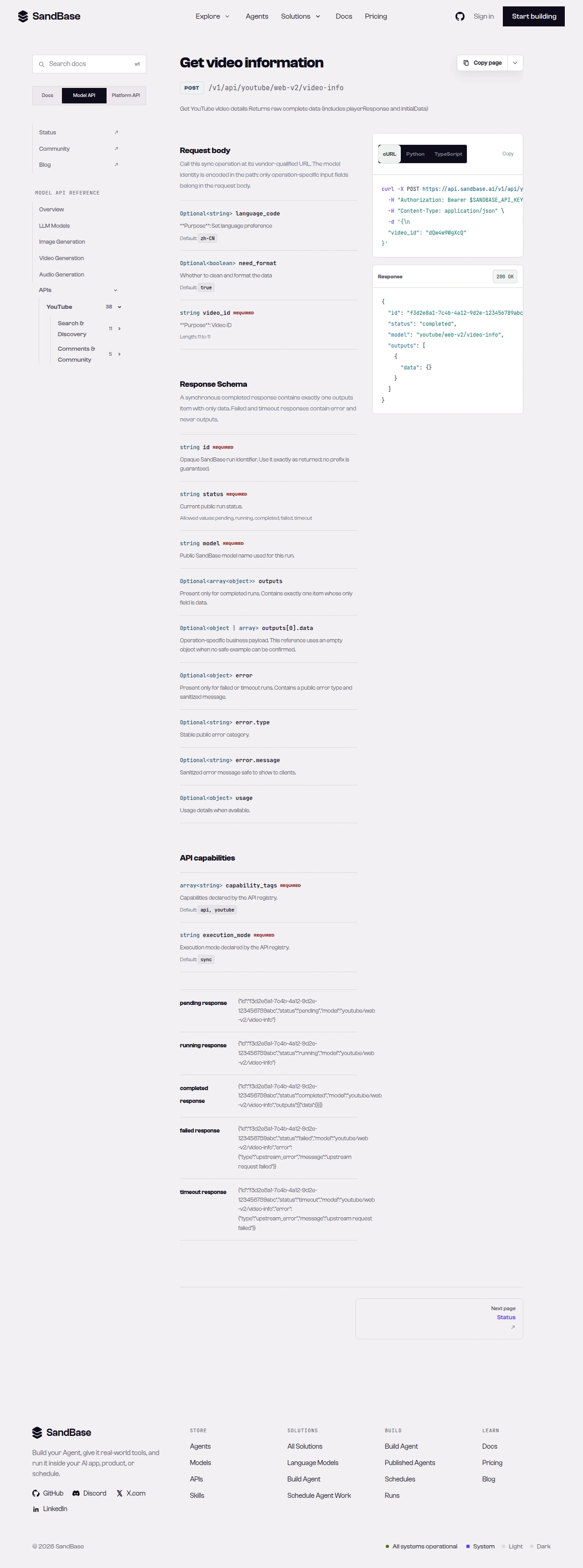 video-info confirms caption availability before you request a caption track.
Step 4 — Pull the captions
Finally, request the caption tracks for the video:
result = call("web-v2/video-captions", {"video_id": first.get("video_id")})
# use .get() defensively — the captions list and its fields are an illustrative structure, not a guaranteed schema
tracks = result.get("captions", [])
languages = [t.get("language_code") for t in tracks]
print(languages[:6])
Calling video-captions without a language typically returns a captions list of available language tracks (each with something like a language_code and language_name); treat these field names as an illustrative structure and confirm them against a live response. This step discovers the tracks — it is not the transcript text itself. Select the track you need — typically en — and request it with that language_code to fetch the caption content for that track. The block below is an illustrative response shape; treat the values as examples and confirm the exact fields against a live response:
{
"id": "5858627b-350e-47fc-8888-b81a70bf9628",
"status": "completed",
"model": "youtube/web-v2/video-captions",
"outputs": [
{
"data": {
"video_id": "IwZVXmQdX1E",
"captions": [
{ "language_code": "en", "language_name": "English" },
{ "language_code": "ar", "language_name": "Arabic" }
]
}
}
]
}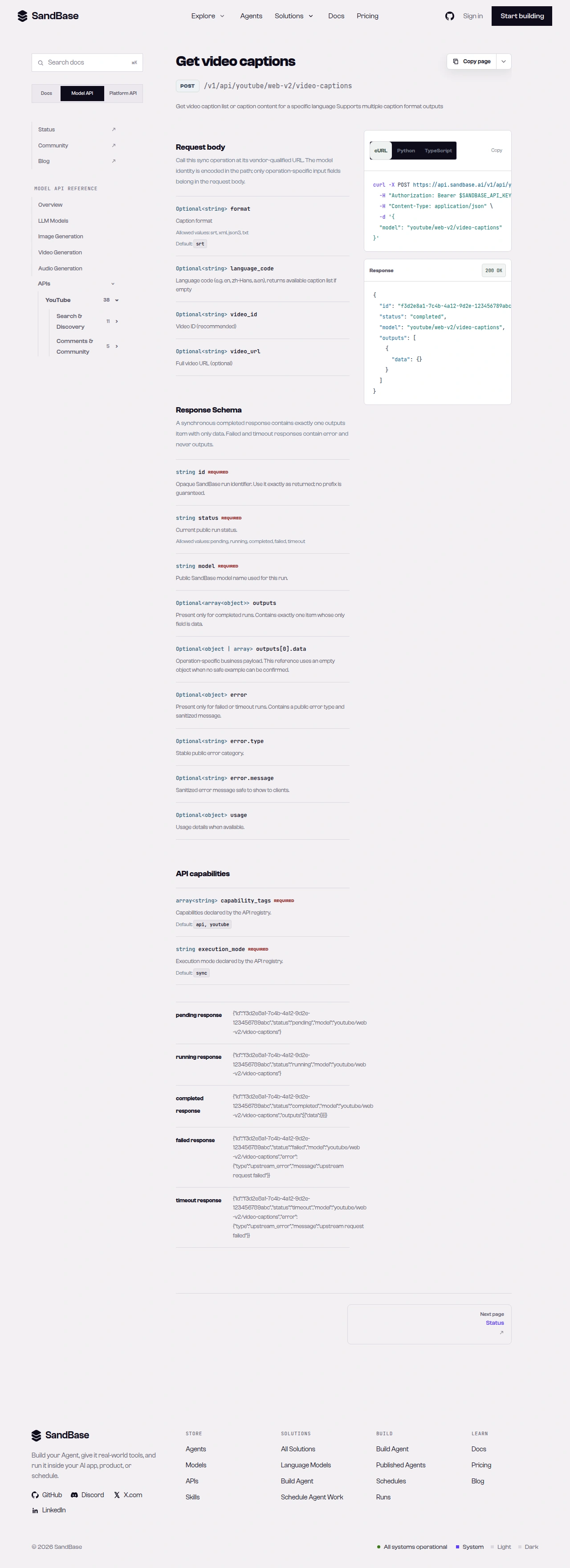 video-captions lists the available language tracks for the video.
Putting it together
The full loop — resolve once, then iterate videos — looks like this:
channel_id = call("web/channel-id", {"channel_name": "NASA"}).get("channel_id")
listing = call("web-v2/channel-videos", {"channel_id": channel_id})

# use .get() defensively throughout — business fields are an illustrative structure, not a guaranteed schema
for video in listing.get("videos", [])[:10]:
    info = call("web-v2/video-info", {"video_id": video.get("video_id")})
    if not info.get("captions"):
        continue  # skip videos without caption tracks
    caps = call("web-v2/video-captions", {"video_id": video.get("video_id")})
    english = [t for t in caps.get("captions", []) if t.get("language_code") == "en"]
    if english:
        # hand the English track to your transcript/subtitle fetch and indexing step
        index_transcript(video.get("title"), video.get("video_id"))
Because every call shares the same envelope and the same call helper, adding retries or rate-limit backoff is a one-place change. For channel-wide collection at higher volume, confirm which endpoints are available in the live YouTube API listing and check their parameters against the reference before wiring anything in.
Handling the rough edges
- Skip videos without captions. Check
info.get("captions")before requestingvideo-captions; not every upload has tracks. - Page deliberately.
channel-videosmay return acontinuation_token; send it back as a request parameter to fetch older uploads rather than assuming one page is the whole channel. - Branch on
status. Afailedortimeoutrun carrieserrorand nooutputs. Thecallhelper already enforces this. - Respect rate limits. Handle HTTP 429 with backoff.
- Read the schema. Field names and nesting can differ by endpoint version — inspect one real response and map paths before you build.
Why this beats a homegrown scraper
You could stitch this together with a headless browser or a download tool, but the maintenance cost adds up fast. A scraper breaks when YouTube changes its markup, needs proxy rotation to avoid blocks, and forces you to parse HTML for every field. This pipeline gives you structured JSON with named fields (video_id, title, captions) on every call, so your code depends on a stable contract instead of a page layout. Auth is one API key rather than a Google Cloud project with a daily quota, and because all four calls share one envelope, retries, logging, and error handling live in a single helper. When you outgrow per-video calls, the same identifiers carry into whatever endpoints the live listing confirms as available, so the read logic stays the same.
The tradeoff is that you read public data through a uniform layer rather than owning the fetch end to end. For most summarization, search, and dataset workflows, that is exactly the tradeoff you want: less plumbing, more time on the actual model work.
FAQ
Do I need a Google account or OAuth?
No. You authenticate to SandBase with your SANDBASE_API_KEY. This pipeline reads public, read-only captions and needs no Google Cloud project, YouTube Data API quota, or OAuth on your side.
How do I page through a channel’s videos?
channel-videos returns a continuation_token; send it back as a request parameter on the next call to fetch older uploads. Page deliberately rather than assuming the first page is the whole channel.
Does video-captions return the transcript text?
No. Calling it without a language discovers the available tracks — a captions list of language_code/language_name entries. Pick the track you need (typically en) and request it with that language_code to fetch that track’s caption content.
Next steps
You now have a repeatable channel-to-transcript pipeline built on four public, read-only calls. From here you can index transcripts for semantic search, summarize them with an LLM, or build a dataset.