Xiaohongshu Note Research API Tutorial | SandBase
See which Xiaohongshu notes perform in a category: search notes, page results, open top notes, and sample comments with SandBase. No RED login; one API key.

Before a brand briefs creators on Xiaohongshu (also called RED), someone usually spends an afternoon scrolling search results for the category. Which notes got saved, not just liked? Are the winners image posts or videos? Which hashtags keep showing up, and what are commenters actually asking? This Xiaohongshu note research API tutorial turns that afternoon into a script: search notes by keyword, page through results, open the top notes for full text, tags, and engagement, then sample their comments. It builds on the Xiaohongshu public data API hub, which has the full endpoint map.
This is the note angle. If you want shoppable products, SKUs, and product reviews instead, the Xiaohongshu product research workflow covers that side.
Everything here is public, read-only data. You need no Xiaohongshu login and no SDK, just a SandBase API key. The note endpoints are currently listed as Free in the SandBase catalog.
The endpoint API reference is the source of truth for parameters and the response envelope, and that envelope is all it guarantees. The payload field names below come from calls I ran (tested on 2026-10-01, UTC). Treat them as illustrative and observed-only, not documented guarantees, and confirm them against a live response before you depend on them.
Key takeaway
xiaohongshu/app-v2/search-notestakes akeywordand returns note cards with id, type, title, and like/collect/comment counts. Page it withpageplus thesearch_idandsearch_session_idit returns.- Open image notes with
app-v2/image-note-detailand video notes withapp-v2/video-note-detail, both bynote_id. The video route returns a list, so match on the id.app-v2/note-commentssamples comments bynote_id; sort bylike_countand page by sending back the returnedcursorstring.- Compare collects to likes. In my runs that ratio separated save-worthy guides from entertainment and giveaway posts better than likes alone.
SandBase or the official route
| Your need | Use |
|---|---|
| Public note, engagement, and comment data for category research | SandBase Xiaohongshu public-data API |
| Publishing, managing a brand account, ads, or licensed data | Xiaohongshu’s official channels |
| Private, follower-only, or account-gated content | Neither public workflow |
The workflow at a glance
- Expand the seed keyword (optional) with
xiaohongshu/web-v3/search-suggest. - Search notes with
xiaohongshu/app-v2/search-notes(keyword,page) and page with the returned ids. - Rank the cards by likes plus collects and pick the top few.
- Open each top note with
image-note-detailorvideo-note-detail, depending on the card’stype. - Sample comments with
xiaohongshu/app-v2/note-comments. - Aggregate: tag frequency, video share, median likes, collect-to-like ratio.
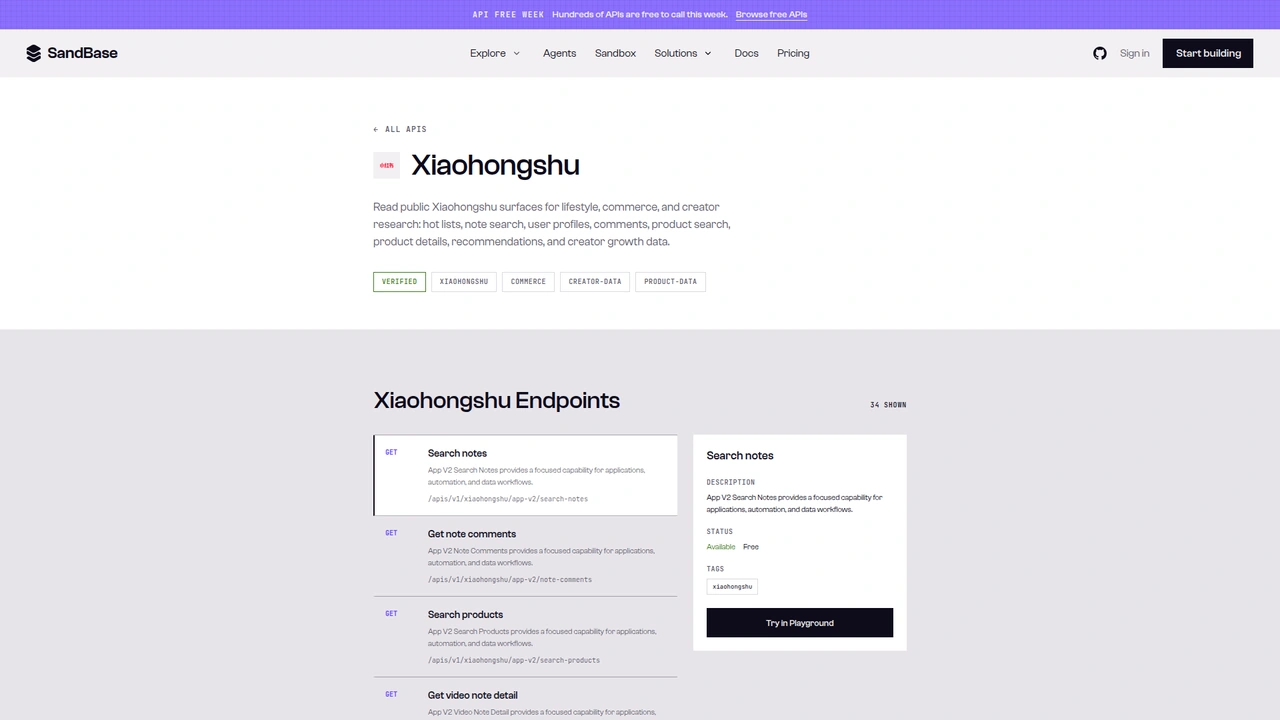 The Xiaohongshu catalog on SandBase. It shows 34 endpoints as
 GET /apis/v1/xiaohongshu/..., with Search notes selected as Available, Free. This tutorial calls the Model API POST /v1/api/xiaohongshu/... routes instead.
A note on surfaces before the code. The catalog lists each operation as GET /apis/v1/xiaohongshu/<path>. This tutorial uses the Model API surface from the endpoint reference: POST /v1/api/xiaohongshu/<path> with a JSON body that holds only the endpoint’s parameters. Some generated reference examples include a model field in the body; the path already identifies the operation, so I left it out. Keep the POST method and the /v1/api/ prefix when you copy the examples.
Step 0: one helper for every call
import os
import time
import requests

API = "https://api.sandbase.ai/v1/api"
HEADERS = {
    "Authorization": f"Bearer {os.environ['SANDBASE_API_KEY']}",
    "Content-Type": "application/json",
}

def call(path: str, payload: dict, retries: int = 2) -> dict:
    for attempt in range(retries + 1):
        try:
            resp = requests.post(f"{API}/{path}", headers=HEADERS, json=payload, timeout=90)
            resp.raise_for_status()
            break
        except requests.RequestException:
            if attempt == retries:
                raise
            time.sleep(2 * (attempt + 1))
    body = resp.json()
    if body.get("status") != "completed":
        raise RuntimeError(body.get("error", {}).get("message", f"{path} did not complete"))
    # Reference documents outputs[0].data; also accept a top-level `output`.
    output = body.get("output")
    if output is None and body.get("outputs"):
        output = body["outputs"][0].get("data", {})
    output = output or {}
    # app-v2 routes used code 0, web-v3 used code 1000; both carried success: true.
    if output.get("success") is False:
        raise RuntimeError(f"{path}: upstream code {output.get('code')} {output.get('msg')}")
    return output
The reference documents completed responses as outputs[0].data, and every Xiaohongshu call in this test returned that shape. The helper also reads a top-level output, because I have seen that shape on other SandBase platform endpoints. Inside the payload sits an upstream wrapper: code, msg, success, and the real content under data.
My first version treated any non-zero code as a failure. That broke on the first call. web-v3/search-suggest answered with code: 1000 and msg: "成功" (success), while the app-v2 routes used code: 0. Both carried success: true, so the helper checks that instead. It also retries transient network errors, since one of my polling calls in this session died with a connection reset.
Step 1 (optional): expand the seed keyword
def suggest_keywords(seed: str) -> list[str]:
    data = call("xiaohongshu/web-v3/search-suggest", {"keyword": seed}).get("data", {})
    return [s.get("text") for s in data.get("sug_items", []) if s.get("text")]
For the seed 防晒霜 (sunscreen), the run I logged (74a3e360-568a-4688-b9c4-f347d630a1a0) suggested five longer phrases: sunscreen recommendations, light non-greasy sunscreen recommendations, how to apply sunscreen correctly, sunscreen recommendations for men, and sunscreen recommendations for military training. That’s already useful research: “recommend”, “non-greasy”, “how to apply”, “for men”, and “for military training” are the angles people search. Run the next step for each phrase if you want a wider sample.
Step 2: search notes and page through results
def search_notes(keyword: str, pages: int = 2) -> list[dict]:
    notes, params = [], {"keyword": keyword, "page": 1}
    for _ in range(pages):
        out = call("xiaohongshu/app-v2/search-notes", params)
        for item in out.get("data", {}).get("items", []):
            if item.get("model_type") != "note":
                continue  # skip ads and other cards
            n = item.get("note", {})
            notes.append({
                "note_id": n.get("id"),
                "type": n.get("type"),  # "normal" (image) or "video"
                "title": n.get("title"),
                "likes": n.get("liked_count", 0),
                "collects": n.get("collected_count", 0),
                "comments": n.get("comments_count", 0),
            })
        if not out.get("next_page"):
            break
        params = {
            "keyword": keyword,
            "page": out["next_page"],
            "search_id": out.get("search_id", ""),
            "search_session_id": out.get("search_session_id", ""),
        }
    return notes
The reference says search_id and search_session_id should be passed from the first response for pagination. The responses confirmed it. Page 1 (run 829c7829-b1d4-4588-abcb-bdabd4f2a16a) returned 20 items plus page: 1, next_page: 2, search_id, and search_session_id beside data. Sending those back with page: 2 (run c578ddab-1bfe-42f9-ac33-509e5bb39206) returned 20 more items, the same two ids, and next_page: 3.
Two things showed up on page 2. One item had model_type: "ads" instead of "note", which is why the loop filters on it. And results drift between runs: two pages gave me 40 unique notes in one run and 30 in the next. Dedupe by note_id, and don’t treat a single run as a stable ranking.
Each note card carried id, type, title, desc, liked_count, collected_count, comments_count, shared_count, a user object, and an xsec_token, all observed-only. The user object includes creator nicknames and ids. For category research you rarely need them, so the function leaves them out.
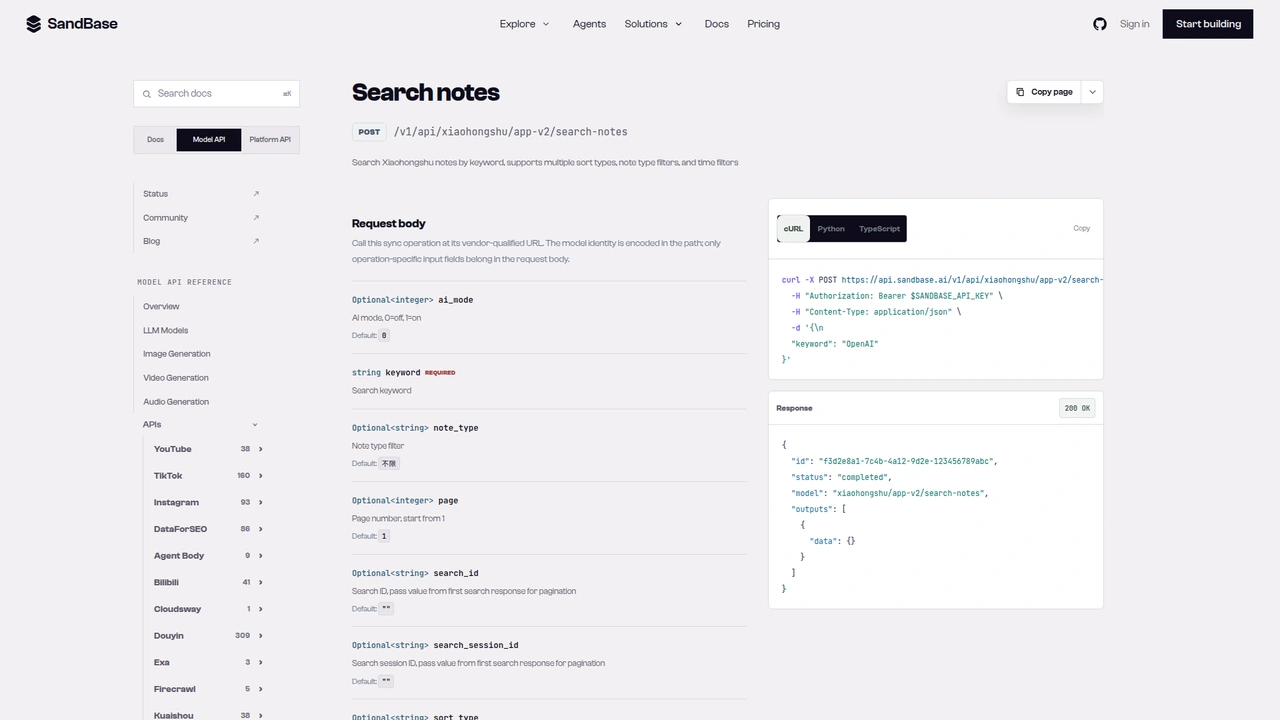 The
The xiaohongshu/app-v2/search-notes reference: POST /v1/api/xiaohongshu/app-v2/search-notes with a required keyword, page starting at 1, and optional search_id and search_session_id for pagination. The response example leaves outputs[0].data empty.
Step 3: open the top notes
def fetch_note(note_id: str, note_type: str) -> dict | None:
    if note_type == "video":
        items = call("xiaohongshu/app-v2/video-note-detail", {"note_id": note_id}).get("data", [])
        note = next((x for x in items if x.get("id") == note_id), None)
    else:
        items = call("xiaohongshu/app-v2/image-note-detail", {"note_id": note_id}).get("data", [])
        notes = items[0].get("note_list", []) if items else []
        note = next((x for x in notes if x.get("id") == note_id), None)
    if not note:
        return None  # deleted, private, or the id did not come back
    return {
        "note_id": note_id,
        "type": note.get("type"),
        "title": note.get("title"),
        "text": (note.get("desc") or "")[:1500],
        "tags": [t.get("name") for t in note.get("hash_tag", []) if t.get("name")],
        "likes": note.get("liked_count"),
        "collects": note.get("collected_count"),
        "comments": note.get("comments_count"),
        "shares": note.get("shared_count"),
        "posted_at": note.get("time"),
        "video_seconds": (note.get("video_info_v2") or {}).get("capa", {}).get("duration"),
    }
The two detail routes return different shapes, and this is the part that took the most poking. image-note-detail returned data as a list with one wrapper object, and the note sat inside its note_list. video-note-detail returned data as a flat list of video notes. The requested note came first, followed by other videos.
That second shape has a trap. When I sent an image note’s id to video-note-detail, it still answered code: 0, but with two unrelated videos and not the note I asked for (run fd0b3c04-618a-4a9b-8098-153badd96660). The next(...) match on id turns that into a clean None instead of silently returning the wrong note. Route by the card’s type, and always match the id.
Here is a trimmed excerpt from a public note by La Roche-Posay’s brand account about a spokesperson merchandise giveaway (run f90a6662-0eb4-49b5-a76b-88ffe488d085, read again with identical counts in 640fbaba-3390-4935-a269-08ba2162937c):
{
  "code": 0,
  "success": true,
  "data": [
    {
      "model_type": "note",
      "note_list": [
        {
          "id": "6a749cd70000000005021fd8",
          "type": "normal",
          "title": "莎莎周边已就位!晒单抽亲签💙",
          "desc": "夏日养肤,谁还没用这套!\n维稳抗应激、深层修护、清洁净肤……",
          "liked_count": 4297,
          "collected_count": 136,
          "comments_count": 193,
          "shared_count": 86,
          "time": 1786071657,
          "ip_location": "Shanghai",
          "view_count": 0,
          "hash_tag": [
            {"name": "理肤泉B5面膜PRO", "type": "topic"},
            {"name": "理肤泉超级B5精华", "type": "topic"}
          ],
          "user": {"nickname": "理肤泉larocheposay", "red_official_verified": false}
        }
      ]
    }
  ]
}
A few observations from this note and the others I opened. Hashtags appear twice: inline in desc as #name[话题]# and as structured hash_tag entries. Use the structured list. view_count came back 0 here, so don’t read it as a view metric. time is a Unix timestamp in seconds. And red_official_verified was false for this brand account in both search and detail, so it can’t tell you which notes come from brands. If you need that split, keep your own list of brand account ids.
image-note-detail also accepted a video note’s id. It returned the right note with type: "video" and its counts, just without the video_info_v2 block. That makes it a reasonable single fallback when you only need text and engagement.
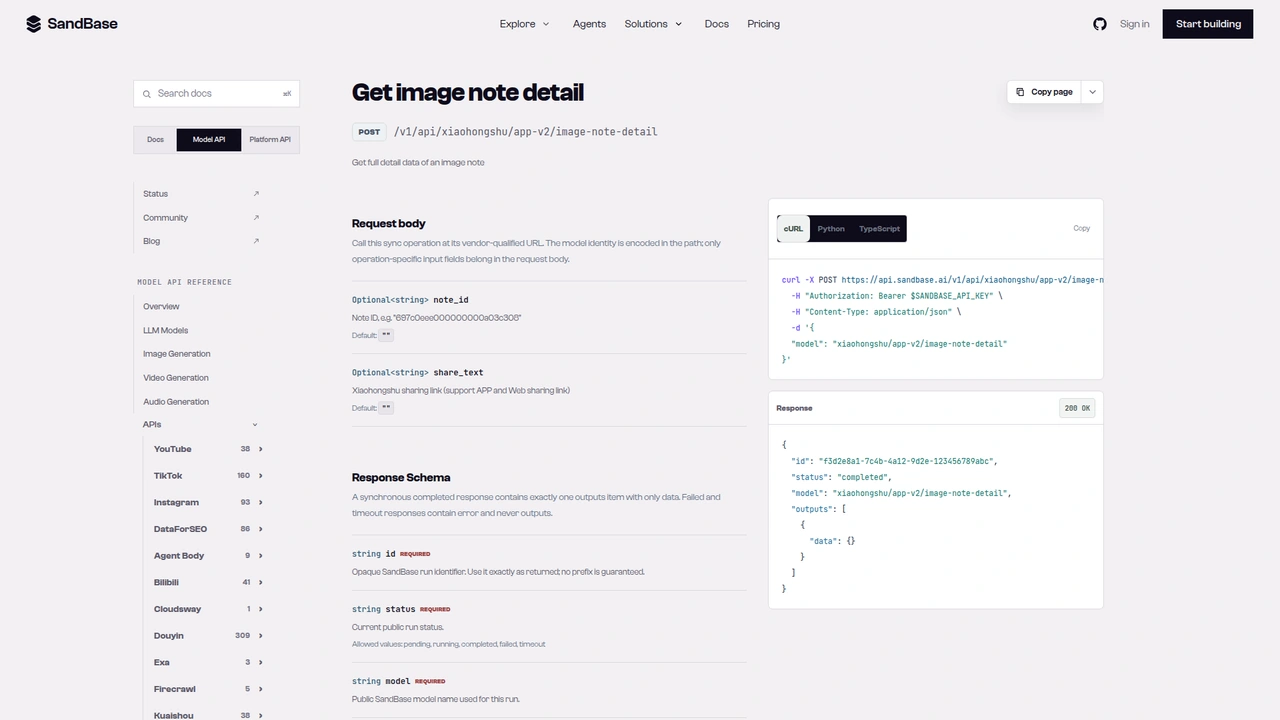 The
The xiaohongshu/app-v2/image-note-detail reference: optional note_id and share_text (a share link). Its generated cURL example sends only a model field, so add a note_id yourself.
Step 4: sample comments
def sample_comments(note_id: str, max_pages: int = 2, sort: str = "like_count") -> list[dict]:
    params, out = {"note_id": note_id, "sort_strategy": sort}, []
    for _ in range(max_pages):
        data = call("xiaohongshu/app-v2/note-comments", params).get("data", {})
        for c in data.get("comments", []):
            if c.get("content"):
                out.append({"text": c["content"], "likes": c.get("like_count"),
                            "replies": c.get("sub_comment_count")})
        if not data.get("has_more") or not data.get("cursor"):
            break
        params = {"note_id": note_id, "sort_strategy": sort, "cursor": data["cursor"]}
    return out
The schema default for sort_strategy is latest_v2. The response listed three options in all_sort_strategies: default, latest_v2, and like_count. For research, like_count surfaces the comments other readers agreed with.
Pagination took one experiment. The reference lists cursor, index, and pageArea as request fields to copy from the previous response. In practice, the response’s cursor was itself a JSON string holding cursor, index, and pageArea. I tried both ways on the brand note. Sending the whole string back as cursor (run dbfada10-3360-4a16-a0fd-e0cd1b2db866) and sending the three parsed fields separately (run a01020cc-24ea-4d94-aea9-64bfa31b921e) returned the same next 10 comments. The function uses the simpler form.
Each comment carried content, like_count, sub_comment_count, time, and ip_location, plus commenter identity under user, all observed-only. The function keeps only text, likes, and reply counts, which is enough for theme analysis and keeps personal data out of your store. With like_count sorting on the brand note, the first comment had 0 likes but 18 replies, and the next ones had 97, 41, and 30 likes. So the order isn’t strictly by likes. Sort again on your side if it matters.
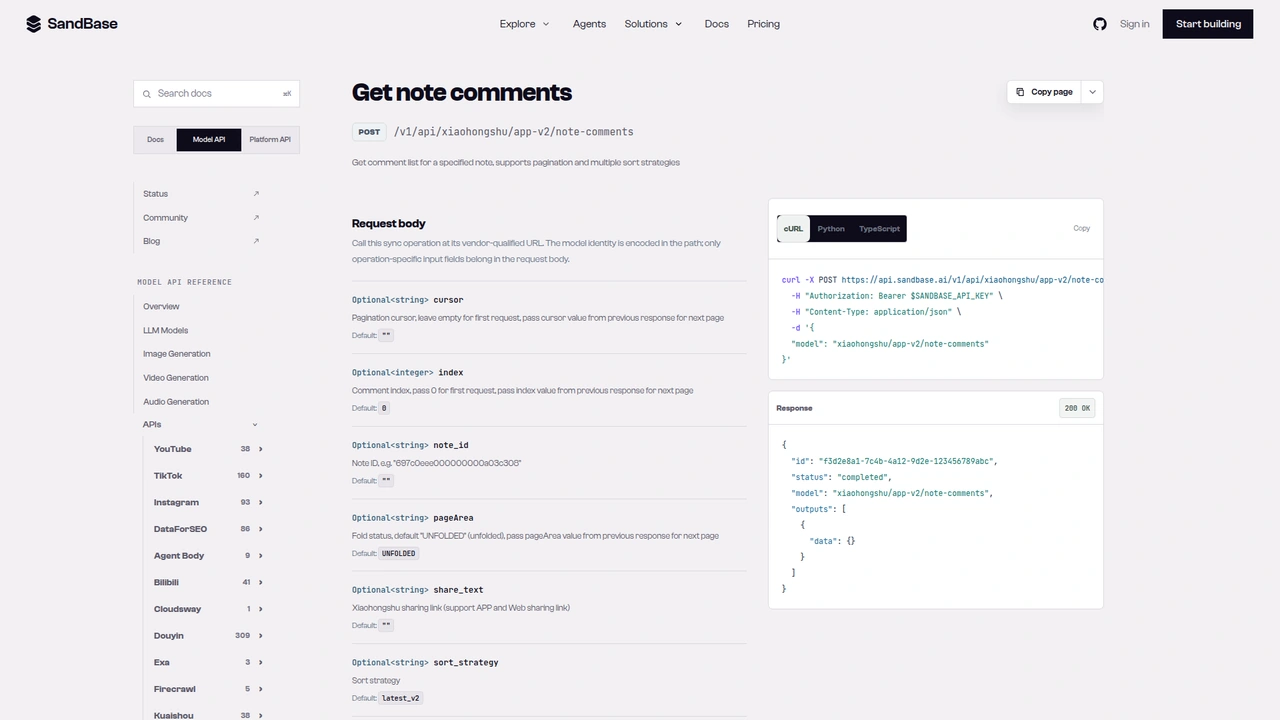 The
The xiaohongshu/app-v2/note-comments reference: optional cursor, index, note_id, pageArea, share_text, and sort_strategy (default latest_v2).
Putting it together: one category report
from collections import Counter
from statistics import median

def research_topic(keyword: str, top_n: int = 5) -> dict:
    notes = search_notes(keyword, pages=2)
    unique = list({n["note_id"]: n for n in notes if n["note_id"]}.values())
    ranked = sorted(unique, key=lambda n: n["likes"] + n["collects"], reverse=True)
    top = []
    for n in ranked[:top_n]:
        detail = fetch_note(n["note_id"], n["type"])
        if detail is None:
            continue
        detail["comment_sample"] = sample_comments(n["note_id"], max_pages=1)
        top.append(detail)
    return {
        "keyword": keyword,
        "searched": len(ranked),
        "video_share": round(sum(n["type"] == "video" for n in ranked) / max(len(ranked), 1), 2),
        "median_likes": median([n["likes"] for n in ranked]) if ranked else 0,
        "top_notes": top,
        "top_tags": Counter(t for d in top for t in d["tags"]).most_common(10),
    }
I ran research_topic("防晒霜") on 2026-10-01 UTC. Two search pages (be1bcdab-01f0-41c8-ba6c-7d64f74ab394, 1ad8a233-75c2-4054-afa0-14e8396eb072) gave 30 unique notes. Of those, 23% were videos, and the median note had 84 likes. Three of the top five were videos.
The engagement mix was the interesting part. The top note, an untitled video tagged comedy, had about 156,000 likes but only about 6,700 collects. The second, a sunscreen round-up video, had about 22,000 likes and 25,500 collects. The brand giveaway note above sat at 4,297 likes and 136 collects. Likes reward entertainment and giveaways; collects look closer to “I’ll come back to this before I buy”. If your goal is a content brief for a product category, rank by collects or by the collect-to-like ratio, not by likes. That’s one keyword on one day, so treat it as a hypothesis to check on your own categories, not a rule.
The tag counter is the other quick signal. In this run the tags for sunscreen, sunscreen for sensitive skin, and commuter sunscreen led. Hand the whole report to a model and ask it to describe the formats, hooks, and objections in the top notes and their comments.
Cost-wise, each run is two search calls plus two calls per top note. At five top notes that’s 12 calls, or 13 with the suggest step.
Documented vs. observed
| Item | Status |
|---|---|
POST /v1/api/xiaohongshu/app-v2/search-notes with keyword, page, search_id, search_session_id | Documented in the reference |
POST /v1/api/xiaohongshu/app-v2/image-note-detail and video-note-detail with note_id or share_text | Documented in the reference |
POST /v1/api/xiaohongshu/app-v2/note-comments with note_id, cursor, sort_strategy | Documented in the reference |
Envelope id / status / model / outputs[0].data | Documented in the reference |
Upstream wrapper code / msg / success / data | Observed only |
Search items[].model_type, note.liked_count, collected_count, next_page | Observed only |
Image detail data[0].note_list[]; video detail flat data[] list | Observed only |
hash_tag[].name, desc, time, shared_count, video_info_v2.capa.duration | Observed only |
Comments comments[], has_more, JSON-string cursor, all_sort_strategies | Observed only |
Common use cases
Content briefs for a product category
Search the category and its suggested variants, then rank by collects. Hand the top notes’ titles, tags, and text to a model and ask for the patterns. Input: a seed keyword. Output: a brief with formats, hooks, and tags. Endpoints: search-suggest, search-notes, image-note-detail.
Brand vs. category benchmarking
Compare your brand’s notes against the category median for likes, collects, and comments. Keep your own list of brand account ids, since the verified flag didn’t help. Input: note ids. Output: a benchmark table. Endpoints: image-note-detail, video-note-detail.
Objection and question mining
Sample the most-liked comments on top notes and cluster them by theme: texture, whitening cast, price, where to buy. Input: top note ids. Output: a ranked list of buyer questions. Endpoint: note-comments.
Format tracking over time
Run the same keyword weekly and store video share, median likes, and top tags, so you can see when a format starts winning. Input: keywords. Output: a time series. Endpoint: search-notes.
Practical notes
- Route detail calls by
type.normalgoes toimage-note-detailandvideotovideo-note-detail. Match onideither way. - Filter on
model_type. Search pages can includeadscards. - Send back what the response gives you.
next_page,search_id, andsearch_session_idfor search, and thecursorstring for comments. - Check
success, notcode. The success code differed between app-v2 and web-v3 in my runs. - Don’t trust
view_countorred_official_verifiedfor this research. One read 0 and the other was false for a brand account. - Expect drift. Search results changed between runs, so dedupe and store snapshots.
- One route I couldn’t use.
xiaohongshu/web-v3/note-detailneeds anote_idplus anxsec_token. With the token from the app-v2 search result, three attempts all came back HTTP 503 wrapping an upstream 400. Stick to the app-v2 detail routes. - Public, read-only data only. No posting, and no private or follower-only content.
FAQ
Do I need a Xiaohongshu account or login?
No. You authenticate to SandBase with SANDBASE_API_KEY. These read endpoints need no Xiaohongshu account or OAuth on your side.
Is it free? The note endpoints are currently listed as Free in the SandBase catalog. Check the catalog for the current status.
How do I get more search results?
Send page from the previous response’s next_page, along with the search_id and search_session_id it returned.
Can I open a note from a share link?
The detail and comment references also accept share_text, a Xiaohongshu share link. I only tested with note_id in this tutorial.
How is this different from the product research workflow?
That one works on products: search-products, product-detail, and product reviews keyed by sku_id. This one works on notes, the posts people write about products.
Wrap up
A keyword is enough to see what performs in a Xiaohongshu category. Search notes and page with the returned ids. Open the top notes through the detail route that matches their type, and sample their most-liked comments. Then compare collects to likes before you decide what “performs” means. For the other Xiaohongshu endpoints, see the Xiaohongshu public data API hub. When you’re ready: