Weibo Account Post Research API Tutorial | SandBase
Research a Weibo account with five SandBase endpoints: find it, read the profile, page and rank original posts, and sample comments. No Weibo login; one API key.

Most Weibo account research starts with a name, not an id. Someone asks “what does this brand’s Weibo actually get traction on?” and you have a keyword, maybe a logo, and no idea which of the twenty look-alike accounts is the real one. This Weibo Account Post Research API tutorial goes from that keyword to a ranked list of the account’s original posts, then opens the top post’s full text and a sample of its comments. It uses five SandBase endpoints that an agent can run end to end. For the full endpoint map, start with the Weibo public data API hub. If you want trending topics instead of one account, the Weibo hot search monitoring tutorial covers that angle.
Everything here is public, read-only data. You need no Weibo login, no Weibo developer app, and no SDK, but you do authenticate with a SandBase API key. The endpoints used below are currently listed as Free in the SandBase catalog.
The endpoint API reference is the source of truth for parameters and the response envelope, and it only guarantees that envelope. The payload field names below come from calls I ran (tested on 2026-10-01, UTC) against the public account of Chinese National Geography magazine. Treat them as illustrative and observed-only, not documented guarantees.
Key takeaway
weibo/web-v2/user-searchturns a keyword into candidate accounts with auid. Pick the exact name match.weibo/web-v2/user-infogives the verified profile. Use itsfollowers_count, not the roundedfansnumber from search.weibo/web-v2/user-original-postspages the account’s own posts withpage. Rank them byreposts_count,comments_count, orattitudes_count(likes).- Feed text is truncated on long posts. Open the winner with
weibo/web-v2/post-detailfor full text, then sample comments withweibo/web-v2/post-comments, paged bymax_id.
When this beats the official route
Weibo’s own open platform is built for apps acting on behalf of logged-in users. That’s the right tool if you publish, manage an account, or need licensed data. For reading what a public account posted and how it landed, it’s a lot of setup for a read-only job.
| Your need | Use |
|---|---|
| Public profile, post, and comment data for research | SandBase Weibo public-data API |
| Post, reply, or manage an account; licensed data feeds | Weibo’s official open platform |
| Private posts, follower-only content, DMs | Neither public workflow |
The workflow at a glance
- Find the account with
weibo/web-v2/user-search(query). - Read the profile with
weibo/web-v2/user-info(uid). - Page original posts with
weibo/web-v2/user-original-posts(uid,page). - Rank locally by reposts, comments, or likes.
- Open the top post with
weibo/web-v2/post-detail(id) for full text. - Sample comments with
weibo/web-v2/post-comments(id,count,max_id).
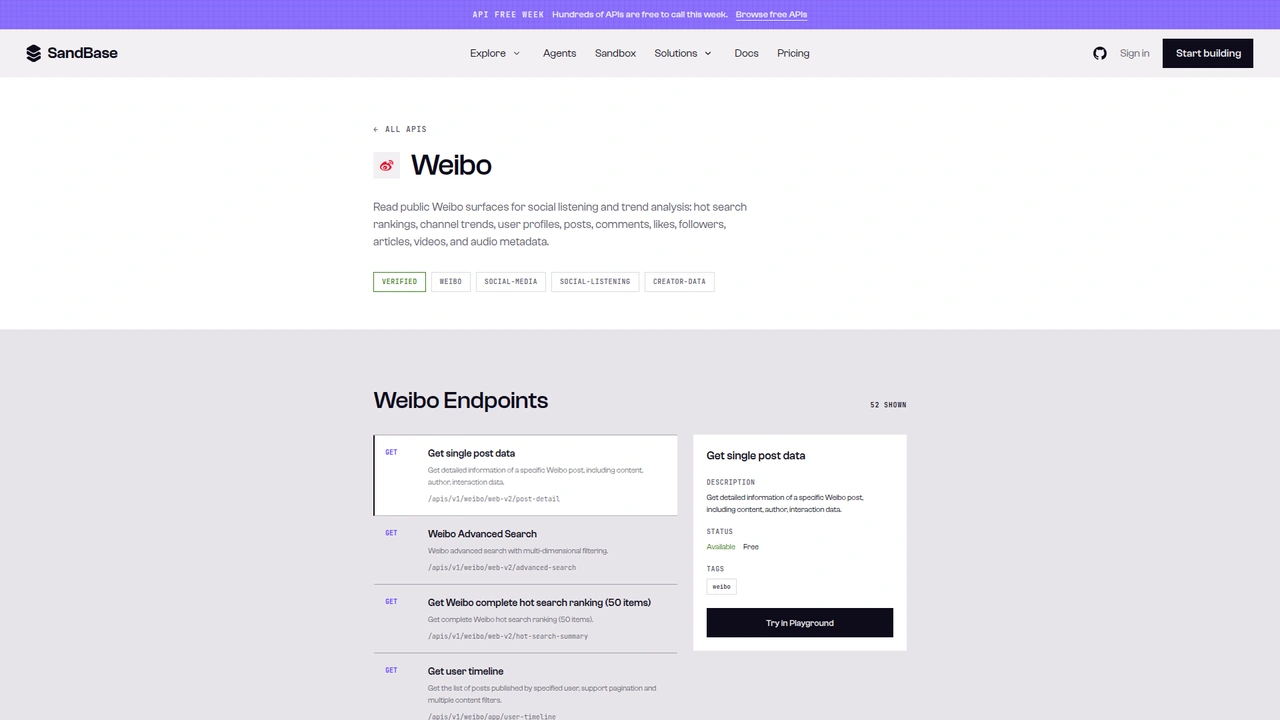 The Weibo catalog on SandBase lists 52 endpoints as
 GET /apis/v1/weibo/.... The selected “Get single post data” endpoint shows Available and Free. This tutorial calls the Model API POST /v1/api/weibo/... routes instead.
A note on surfaces before the code. The catalog shows each operation as GET /apis/v1/weibo/<path>. This tutorial uses the Model API surface from the endpoint reference: POST /v1/api/weibo/<path> with a JSON body that holds only the endpoint’s parameters. The generated cURL examples on the reference pages I captured send only the endpoint parameters. If a reference ever shows a model field, follow the reference. Don’t mix the two surfaces when you copy code.
Step 0: one helper for every call
import os
import time
import requests

API = "https://api.sandbase.ai/v1/api"
HEADERS = {
    "Authorization": f"Bearer {os.environ['SANDBASE_API_KEY']}",
    "Content-Type": "application/json",
}


def call(path: str, payload: dict, retries: int = 2) -> dict:
    for attempt in range(retries + 1):
        try:
            resp = requests.post(f"{API}/{path}", headers=HEADERS, json=payload, timeout=90)
            resp.raise_for_status()
            break
        except (requests.ConnectionError, requests.Timeout):
            if attempt == retries:
                raise
            time.sleep(2 * (attempt + 1))
    body = resp.json()
    if body.get("status") != "completed":
        raise RuntimeError(body.get("error", {}).get("message", f"{path} did not complete"))
    # Prefer a top-level `output`; fall back to the documented outputs[0].data.
    output = body.get("output")
    if output is None and body.get("outputs"):
        output = body["outputs"][0].get("data", {})
    return output or {}
The reference documents completed responses as outputs[0].data. Every Weibo call in my test runs came back in that shape. I’ve seen other SandBase platform endpoints return a top-level output instead, so the helper reads both and prefers output when it’s there. The retry is there for a practical reason: one of my post-detail calls died with a TLS connection reset and worked on the next attempt.
Inside the payload, the five endpoints don’t share a wrapper. Search wraps results in parsed_data, user-info puts the profile under user, user-original-posts nests posts under data.list, and post-detail and post-comments return their fields at the top level. Each step below reads its own path.
Step 1: find the account by keyword
def find_account(keyword: str) -> dict | None:
    users = call("weibo/web-v2/user-search", {"query": keyword}).get("parsed_data", {}).get("users", [])
    exact = [u for u in users if u.get("name") == keyword]
    return (exact or users or [None])[0]
Searching 中国国家地理 (Chinese National Geography) (run 4a509105-eb13-4513-bc6b-9e515167d4c7) returned 20 candidates, each with name, uid, profile_url, avatar, and fans. The magazine’s main account came first, followed by its shop, heritage, and media-center accounts. Further down were unrelated accounts that only matched loosely. That’s why the helper prefers an exact name match before falling back to the first result.
Don’t use fans from search for anything numeric. The main account showed fans: 1167, and the profile in step 2 reported 11,677,520 followers ("1167.8万"). A search for People’s Daily showed fans: 1 for an account with 158 million followers ("1.58亿"). The field looks like the display number with its 万 (ten thousand) or 亿 (hundred million) unit stripped. It’s fine for eyeballing, useless for ranking.
Step 2: read the profile
def read_profile(uid: str) -> dict:
    user = call("weibo/web-v2/user-info", {"uid": uid}).get("user", {})
    return {
        "uid": user.get("idstr"),
        "name": user.get("screen_name"),
        "followers": user.get("followers_count"),
        "posts": user.get("statuses_count"),
        "verified_reason": user.get("verified_reason"),
        "location": user.get("location"),
    }
The run for uid 1222135407 (59d3b350-2227-49e1-bb25-1790a06950cb) returned a trimmed profile like this, inside outputs[0].data:
{
  "user": {
    "idstr": "1222135407",
    "screen_name": "中国国家地理",
    "followers_count": 11677520,
    "followers_count_str": "1167.8万",
    "friends_count": 373,
    "statuses_count": 28394,
    "verified": true,
    "verified_reason": "《中国国家地理》官方微博",
    "location": "北京",
    "status_total_counter": {
      "repost_cnt": "3,130,409",
      "comment_cnt": "1,820,565",
      "like_cnt": "7,438,106",
      "total_cnt_format": "1238.9万"
    }
  }
}
status_total_counter is a nice lifetime engagement summary, but its numbers came back as comma-formatted strings. Strip the commas before you do math. There’s also weibo/web-v2/user-basic-info, which takes the same uid. In my run it returned a lighter card with followers_count_str but no numeric follower count, so user-info is the better pick here.
Step 3: page the account’s original posts
def original_posts(uid: str, pages: int = 2) -> list[dict]:
    seen, posts = set(), []
    for page in range(1, pages + 1):
        data = call("weibo/web-v2/user-original-posts", {"uid": uid, "page": page}).get("data", {})
        batch = data.get("list", []) or []
        if not batch:
            break
        for p in batch:
            if p.get("idstr") in seen:
                continue
            seen.add(p.get("idstr"))
            posts.append({
                "id": p.get("idstr"),
                "mblogid": p.get("mblogid"),
                "created_at": p.get("created_at"),
                "reposts": p.get("reposts_count", 0),
                "comments": p.get("comments_count", 0),
                "likes": p.get("attitudes_count", 0),
                "is_long": p.get("isLongText", False),
                "co_post": bool(p.get("cooperate_info")),
                "text": (p.get("text_raw") or "").strip(),
            })
    return posts
The schema for this endpoint lists uid, page, and a since_id whose description says the first value must come from a different endpoint. I didn’t need it. Plain page numbers worked. Page 1 (run cc08c1c1-9d06-4453-b0b6-35d44d04f1bb) returned 47 posts, and page 2 (run 2b5b4795-95ec-4180-96bc-ee397f16ed4a) returned 50 older ones, with no overlap. Together they covered about four weeks of posting. The response carried no since_id or has_more, so the loop stops on an empty list and dedupes by id in case pages ever shift.
Each post came with a numeric-string idstr, a short mblogid (the code in the post URL), created_at in a format like Sun Sep 27 10:00:33 +0800 2026, and the three counters. The data.total value changed between runs (27,299 on one call, 27,807 on the next) and didn’t match statuses_count, so I’d ignore it.
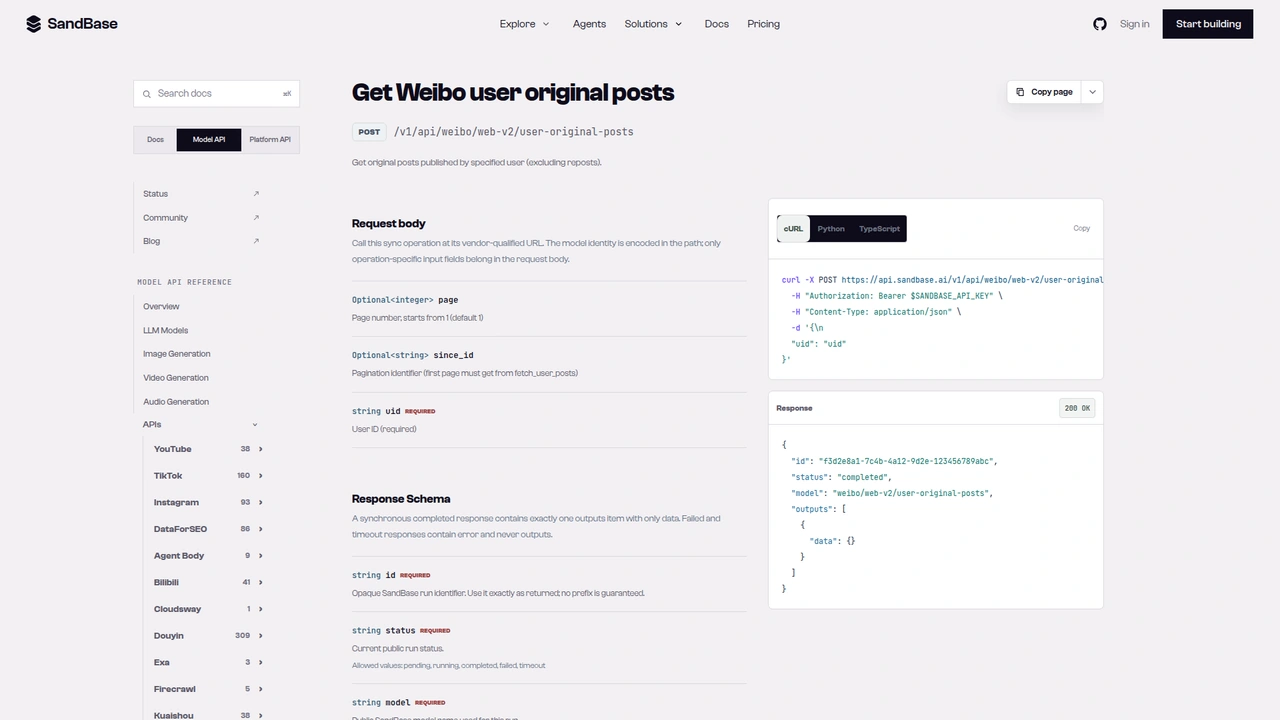 The
The weibo/web-v2/user-original-posts reference: POST /v1/api/weibo/web-v2/user-original-posts with optional page and since_id and a required uid. It describes the endpoint as original posts excluding reposts, and the response example leaves outputs[0].data empty.
Step 4: rank the posts
def rank(posts: list[dict], key: str = "reposts", top: int = 5, skip_co_posts: bool = False) -> list[dict]:
    pool = [p for p in posts if not (skip_co_posts and p["co_post"])]
    return sorted(pool, key=lambda p: p.get(key) or 0, reverse=True)[:top]
Ranking 97 posts was where the research got interesting. One post topped all three lists: 6,254 reposts, 692 comments, 6,879 likes. The next-best repost count was 384. A gap that size is a signal to look closer, and the post turned out to be a co-branded autumn-travel campaign with a delivery app. Its record carried a cooperate_info object listing both accounts as co-authors. No other post in the 97 had one. That’s why co_post exists, and why skip_co_posts=True gives you the organic ranking: a glacier-and-new-rivers science post (384 reposts), then two Mid-Autumn greeting posts.
I first tried isAd as the ad marker. It was true on 37 of the 97 posts, including routine good-morning greetings, so it doesn’t mean “sponsored” in any way I could rely on. cooperate_info was the cleaner signal in this sample. That’s an observation from one account, not a rule.
Also, isLongText was true on 67 of the 97 posts. On those, text_raw in the feed is a preview, which matters for the next step.
Step 5: open the top post’s full text
def full_text(post_id: str) -> dict:
    d = call("weibo/web-v2/post-detail", {"id": post_id})
    long_text = (d.get("longText") or {}).get("content")
    return {
        "text": long_text or d.get("text_raw"),
        "reads": d.get("reads_count"),
        "source": d.get("source"),
    }
For the campaign post, the feed preview was 147 characters and ended mid-sentence. post-detail (run fff2fd24-3225-4ba1-921c-71f54cd4fb72) returned the full 238-character text under longText.content, plus a reads_count of about 5.94 million that the feed list didn’t include. The id parameter takes the same idstr from step 3. The default is_get_long_text: "true" was enough. I left it out.
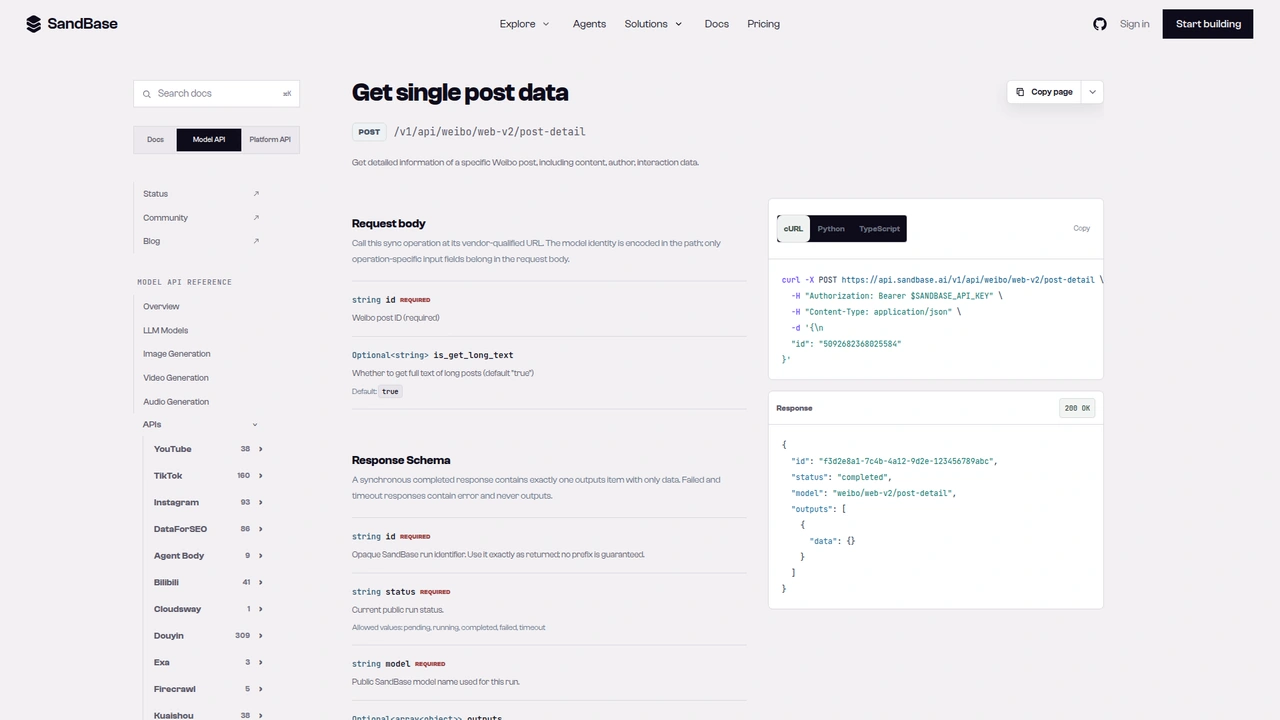 The
The weibo/web-v2/post-detail reference: a required id and an optional is_get_long_text that defaults to true.
Step 6: sample the comments
def comment_sample(post_id: str, pages: int = 2) -> list[dict]:
    max_id, out = "", []
    for _ in range(pages):
        page = call("weibo/web-v2/post-comments", {"id": post_id, "count": 20, "max_id": max_id})
        for c in page.get("data", []) or []:
            # Keep only text and like count; drop commenter identity.
            out.append({"text": c.get("text_raw"), "likes": c.get("like_counts", 0)})
        next_id = page.get("max_id")
        if not next_id:
            break
        max_id = str(next_id)
    return out
The reference describes max_id as the cursor: send an empty string first, then the max_id from the previous response. The live responses agreed. Page 1 (run f62a40cf-d18e-4f6f-b90b-c1c2b30b0f71) returned 20 comments, total_number: 692, and a numeric max_id. Sending that back as a string (run 5664ad51-897d-4e17-8ef4-052a8f70e2d8) returned 20 different comments. count: 20 was honored over the default of 10.
Two oddities. Every page carried trendsText: "已加载全部评论" (“all comments loaded”), even with more pages available, so don’t use it as a stop signal. And in one earlier full run, the second page added nothing; the two runs after it returned 40 comments as expected. Treat a short page as “maybe retry,” not proof the thread is exhausted.
Each comment also includes a full user object. The helper drops it on purpose. For this kind of research you want what people said and how much it resonated, not who they are. In this sample, the most-liked comment (17 likes) pushed back on the campaign’s advertising, which is the kind of reaction a repost count alone can’t show you.
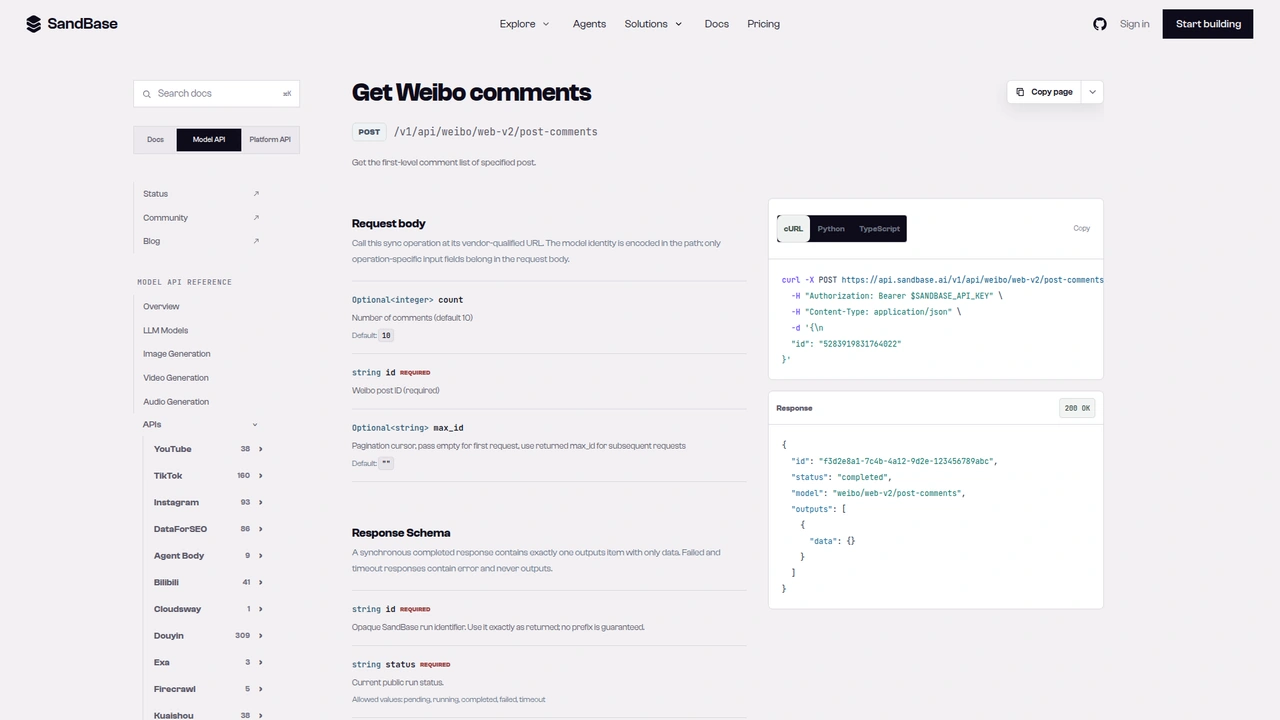 The
The weibo/web-v2/post-comments reference: optional count (default 10), required id, and a max_id cursor that starts empty and takes the returned max_id on later requests.
Putting it together
account = find_account("中国国家地理")
profile = read_profile(account["uid"])
posts = original_posts(profile["uid"], pages=2)
for metric in ("reposts", "comments", "likes"):
    print(metric, [(p["id"], p[metric], p["co_post"]) for p in rank(posts, metric, 3)])
print("organic only:", [(p["id"], p["reposts"]) for p in rank(posts, "reposts", 3, skip_co_posts=True)])
top = rank(posts, "reposts", 1)[0]
detail = full_text(top["id"])
comments = comment_sample(top["id"], pages=2)
That run made seven calls: one search, one profile, two post pages, one detail, two comment pages. It printed a 97-post sample, the three top-3 lists, the organic ranking, the feed-vs-detail text lengths (147 vs. 238), and 40 sampled comments. Hand the structured result to a model and ask it to describe what this account’s audience reposts, how campaign posts compare with organic ones, and what the comment tone says about the winner.
Documented vs. observed
| Item | Status |
|---|---|
POST /v1/api/weibo/web-v2/user-search with query, page | Documented in the reference |
POST /v1/api/weibo/web-v2/user-info with uid or custom | Documented in the reference |
POST /v1/api/weibo/web-v2/user-original-posts with uid, page, since_id | Documented in the reference |
POST /v1/api/weibo/web-v2/post-detail with id | Documented in the reference |
POST /v1/api/weibo/web-v2/post-comments with id, count, max_id | Documented in the reference |
Envelope id / status / model / outputs[0].data | Documented in the reference |
parsed_data.users[].uid / name / fans (unit-stripped) | Observed only |
user.followers_count, statuses_count, status_total_counter | Observed only |
data.list[] with idstr, reposts_count, comments_count, attitudes_count, isLongText, cooperate_info | Observed only |
longText.content, reads_count on post-detail | Observed only |
Comments data[], max_id, total_number, like_counts | Observed only |
Common use cases
Brand content audits
Pull a month of a brand’s original posts and see which formats and themes earn reposts versus likes. Separate co-branded campaigns so they don’t drown out organic posts. Endpoints: user-original-posts, post-detail.
Media account benchmarking
Run the same flow for several media accounts and compare median reposts per post rather than follower counts. Endpoints: user-search, user-info, user-original-posts.
Campaign post-mortems
Open the campaign post’s full text and sample its comments to see whether the reaction matched the reach. Endpoints: post-detail, post-comments.
Agent research briefs
Give an agent a brand name and let it return a one-page brief: profile, top posts by each metric, and a comment-tone summary for the winner. All five endpoints.
Practical notes
- Resolve the account first. Search returns look-alikes and loosely matched personal accounts. Match the exact name, and confirm
verified_reasonin the profile. - Use profile numbers, not search numbers.
fansin search is unit-stripped. - Page posts by
page, stop on empty. I saw nohas_moreon this endpoint. - Fetch detail for long posts. Feed text is a preview when
isLongTextis true. - Page comments by the returned
max_id, sent as a string. IgnoretrendsText. - Normalize types. Counters in
status_total_counterare formatted strings; commentmax_idis a number. - Keep commenter identity out of your store. Text and like counts are usually enough.
- Business fields are observed-only. Re-check them against a live response before you depend on them.
FAQ
Do I need a Weibo account or developer app?
No. You authenticate to SandBase with SANDBASE_API_KEY. These read endpoints need no Weibo login or OAuth on your side.
Is it free? The endpoints used here are currently listed as Free in the SandBase catalog. Check the catalog for the current status.
Does user-original-posts include reposts of other accounts?
The reference describes it as original posts excluding reposts, and none of the 97 posts in my sample carried a retweeted_status. If you want reposts too, weibo/web-v2/user-posts covers the full timeline. The reference lists since_id as an optional pagination parameter, and the one response I checked (run 16f18948-183c-446d-bbb3-d74731720f4e) carried a since_id value; confirm it against a live response before you page with it.
How far back can I page? I only tested two pages, about four weeks for this account. I can’t vouch for how deep paging goes.
Can I get every comment on a viral post?
You can keep paging with max_id, but sample first. Threads with hundreds of comments cost one call per page.
Wrap up
A keyword is enough to research a public Weibo account: resolve it, read the profile, page its original posts, rank them, then open the winner and listen to the comments. The one habit that paid off in this test was looking twice at an outlier before calling it the account’s best organic post. For the rest of the Weibo endpoints, see the Weibo public data API hub. When you’re ready: