MCP Protocol Explained: AI Agent Tool Standard
The MCP protocol gives AI agents a standard way to discover and call tools. How it works, how to build a server, and the ecosystem in 2026.
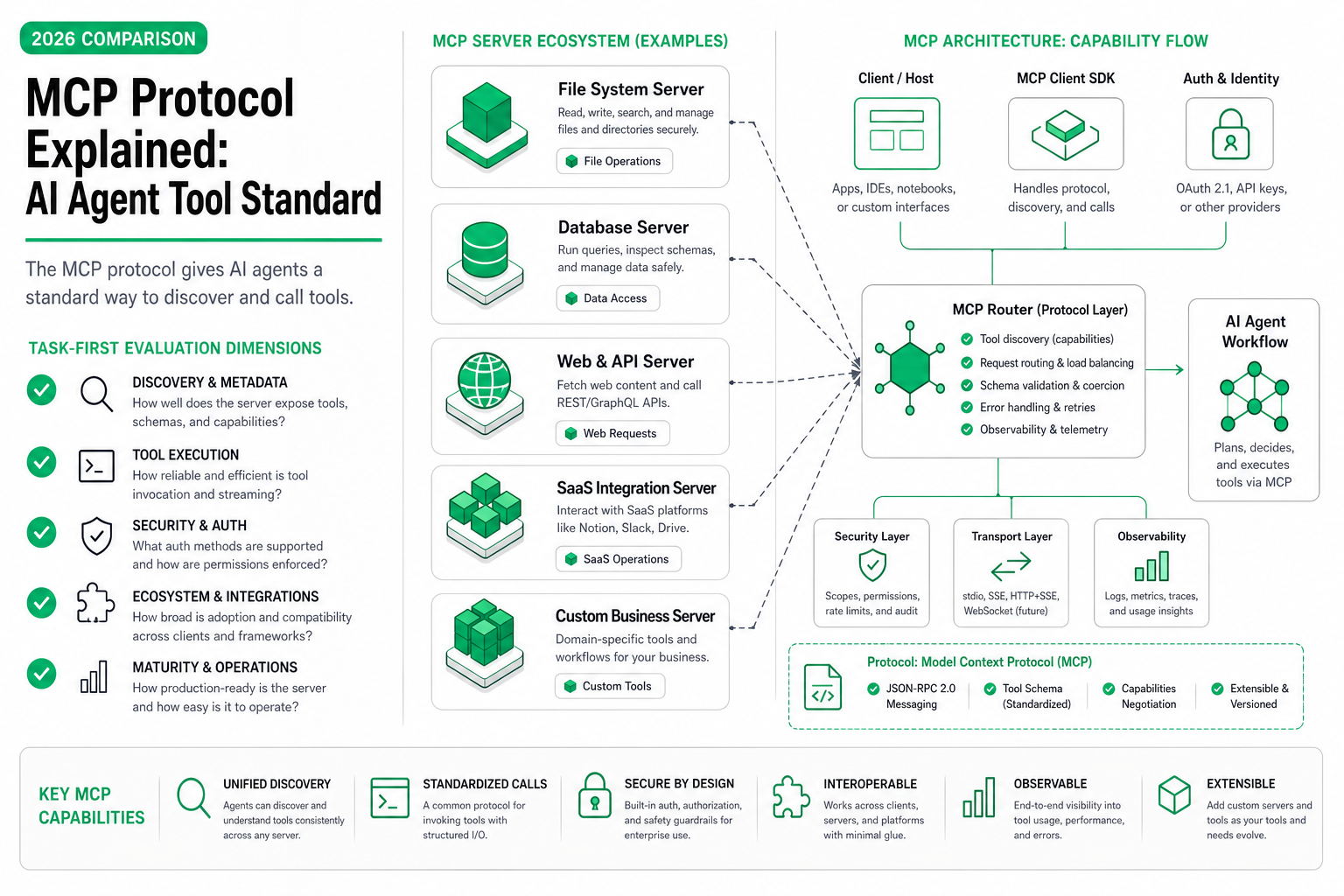
TL;DR — MCP (Model Context Protocol) is a JSON-RPC-based protocol that lets AI agents discover and invoke tools from external servers through a standardized interface. Think of it as USB-C for agent tooling: one plug, any device. A client (Claude, Cursor, Kiro, or your custom agent) connects to an MCP server, asks what tools are available, and calls them — no per-tool adapter code needed. The ecosystem has grown to 1,900+ servers covering databases, APIs, file systems, browsers, and more.
The Integration Tax I Kept Paying
I spent three weeks last year wiring a research agent to four data sources: a PostgreSQL database, a web scraper, a PDF parser, and a Slack channel. Each integration was bespoke. The Postgres tool needed a connection pool wrapper and schema-aware prompt injection. The scraper needed its own retry logic and output normalization. The PDF tool spoke a different format entirely. Every new data source meant another adapter, another set of error codes to handle, another chunk of glue code that had nothing to do with the agent’s actual job.
Then I rewired the same agent to use MCP servers for each source. The agent’s code shrank to a single client that connected to four server endpoints. Tool schemas came from the servers themselves — no hardcoded definitions on the client side. Adding a fifth data source took 20 minutes instead of three days.
That’s the pitch of the MCP protocol in concrete terms: it eliminates the per-integration adapter tax.
The Problem Before MCP
Before MCP, every AI application reinvented tool integration from scratch. The pattern looked like this:
- Define a function schema in your application code
- Write a handler that translates the model’s output into an actual API call
- Format the result back into something the model can consume
- Handle auth, errors, retries, and timeouts — all custom per tool
- Repeat for every tool, in every agent
The real cost wasn’t just the initial build. It was maintenance. When an external API changed, you updated your adapter. When you switched from GPT-4 to Claude, you rewrote schema formats. When a teammate built a different agent that needed the same Postgres access, they wrote their own adapter because yours was tangled into your agent’s codebase.
No standard meant:
- No reuse — tools were locked inside individual applications
- No discovery — agents couldn’t ask “what can you do?” at runtime
- No portability — switching the host model meant rewriting tool definitions
- Duplicated effort — every team built the same Slack/GitHub/DB integrations independently
Anthropic published the MCP specification in late 2024 to solve exactly this fragmentation.
How MCP Works
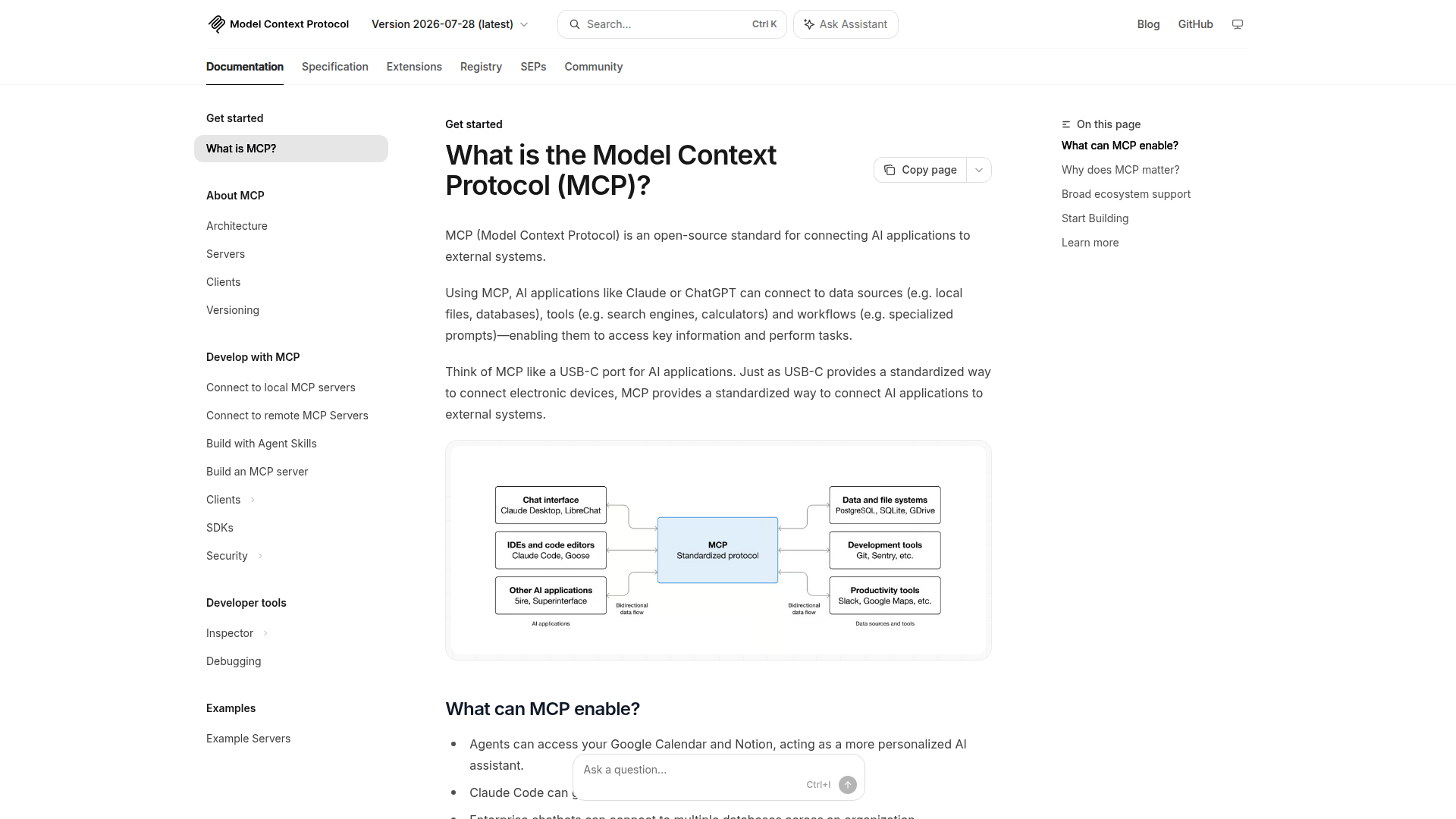 modelcontextprotocol.io — the official spec site. The architecture diagram shows how MCP sits between AI applications (left) and data sources/tools (right).
The MCP protocol defines a client-server architecture over JSON-RPC 2.0. The mental model:
- MCP Host — the application the user interacts with (Claude Desktop, Cursor, an IDE, your custom agent runtime)
- MCP Client — lives inside the host, manages connections to one or more servers
- MCP Server — a process that exposes tools, resources, and prompts through the protocol
graph LR
    User([User]) --> Host[MCP Host<br/>Claude / Cursor / Kiro]
    Host --> Client1[MCP Client]
    Client1 --> Server1[MCP Server<br/>PostgreSQL]
    Client1 --> Server2[MCP Server<br/>GitHub]
    Client1 --> Server3[MCP Server<br/>Web Scraper]
    Server1 --> DB[(Database)]
    Server2 --> API1[GitHub API]
    Server3 --> Web[Web Pages]
The Three Primitives
MCP servers expose three types of capabilities:
| Primitive | Who controls it | What it does |
|---|---|---|
| Tools | Model-initiated | Functions the agent can call (query a DB, send a message, create a file) |
| Resources | Application-controlled | Data the client can read (file contents, database schemas, config values) |
| Prompts | User-initiated | Pre-built prompt templates that guide interactions |
Tools are the most commonly used primitive. When an agent connects to an MCP server, it calls tools/list to discover available tools with their names, descriptions, and JSON Schema parameter definitions. The agent then calls tools/call with arguments, and the server executes and returns results.
Transport Layer
MCP supports two transport mechanisms:
stdio — The client spawns the server as a child process and communicates over stdin/stdout. Zero network overhead. Used for local tools like filesystem access or CLI wrappers.
Streamable HTTP (formerly SSE) — The client connects to the server over HTTP. Supports remote deployments, auth headers, and multiple concurrent clients. This is what you use for hosted MCP servers.
The protocol itself is transport-agnostic — the same JSON-RPC messages flow regardless of whether they travel over a Unix pipe or an HTTP connection.
Connection Lifecycle
A typical session:
- Initialize — Client sends
initializewith its capabilities, server responds with its own - Discover — Client calls
tools/list,resources/list, orprompts/list - Invoke — Client calls tools as the agent needs them
- Shutdown — Client sends
shutdownnotification, connection closes
The protocol is stateful within a session — the server can maintain context between calls. But sessions are ephemeral. There’s no built-in persistence across restarts.
Building Your First MCP Server
Here’s a minimal MCP server in TypeScript that exposes a single tool — a word counter:
import { McpServer } from "@modelcontextprotocol/sdk/server/mcp.js";
import { StdioServerTransport } from "@modelcontextprotocol/sdk/server/stdio.js";
import { z } from "zod";

const server = new McpServer({
  name: "word-counter",
  version: "1.0.0",
});

// Register a tool
server.tool(
  "count_words",
  "Count words in a given text string",
  {
    text: z.string().describe("The text to count words in"),
  },
  async ({ text }) => {
    const count = text.trim().split(/\s+/).filter(Boolean).length;
    return {
      content: [
        {
          type: "text",
          text: `Word count: ${count}`,
        },
      ],
    };
  }
);

// Start the server on stdio
const transport = new StdioServerTransport();
await server.connect(transport);
To use it in Claude Desktop, add this to your MCP config:
{
  "mcpServers": {
    "word-counter": {
      "command": "npx",
      "args": ["tsx", "./word-counter.ts"]
    }
  }
}
That’s it. Claude now sees count_words as an available tool. No adapter code on the client side — the protocol handles discovery and invocation.
For production servers, you’d add error handling, input validation, logging, and likely switch to HTTP transport for remote access. But the core pattern stays the same: declare tools with schemas, implement handlers, connect a transport.
The Ecosystem Today
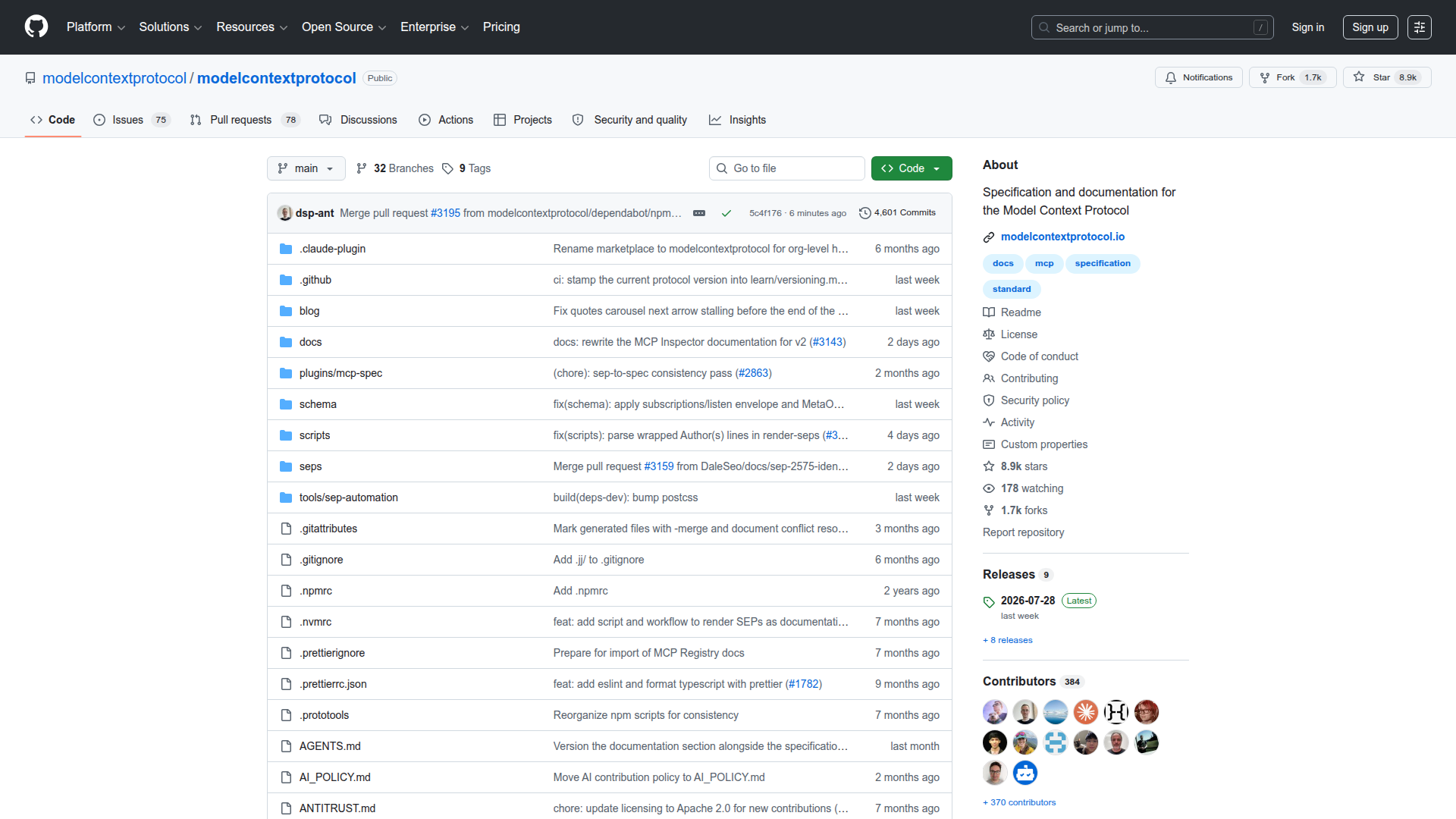 The modelcontextprotocol/modelcontextprotocol spec repo — 8.9K stars, 384 contributors, actively maintained with the latest release just last week.
The MCP ecosystem grew faster than most open standards. Some numbers as of mid-2026:
| Metric | Count |
|---|---|
| Public MCP servers | 1,900+ (on SandBase Store) |
| Official SDKs | TypeScript, Python, Java, Kotlin, C# |
| Major hosts supporting MCP | Claude Desktop, Claude Code, Cursor, Kiro, Windsurf, Cline, Continue |
| GitHub stars (spec repo) | 42,000+ |
Who’s Using It
The host ecosystem has converged quickly:
- Claude Desktop & Claude Code — Anthropic’s own products were first movers
- Cursor — IDE agent uses MCP for tool extensions
- Kiro — AWS’s AI IDE supports MCP server connections
- Windsurf, Cline, Continue — coding assistants that adopted MCP for extensibility
- Custom agents — any agent framework (LangGraph, CrewAI, AutoGen) can integrate the MCP client SDK
“MCP provides a standardized way to connect AI models to different data sources and tools.” — Anthropic MCP Documentation
Common Server Categories
The 1,900+ servers in the SandBase Store span:
- Databases — PostgreSQL, MySQL, SQLite, MongoDB, Redis
- Developer tools — GitHub, GitLab, Jira, Linear, Sentry
- Communication — Slack, Discord, Email, Telegram
- File & storage — Local filesystem, S3, Google Drive
- Web — Browsers (Puppeteer, Playwright), web search, scraping
- Specialized — Financial data, weather, maps, analytics platforms
Limitations and Gotchas
Worth being upfront about where MCP falls short today. These are real issues I’ve hit in production:
No standard authentication. The spec doesn’t define how a client authenticates with a server. Each server rolls its own approach — API keys in environment variables, OAuth flows, bearer tokens in HTTP headers. If you’re connecting to 10 servers, you manage 10 different auth mechanisms. The community is working on an auth spec extension, but it’s not finalized.
Session state is ephemeral. MCP sessions don’t survive server restarts. If your MCP server process crashes or gets redeployed, the client loses all session context. For stateless tools (database queries, API calls) this is fine. For tools that accumulate state across calls (multi-step workflows, file editing sessions), you need to handle persistence yourself outside the protocol.
Cold start latency with stdio. When a host spawns an MCP server as a subprocess, there’s startup time — installing dependencies, initializing connections, loading configs. I’ve seen 2-8 seconds for heavier Node.js servers. Users notice this on first tool invocation. HTTP-based remote servers avoid this since they’re already running.
Tool description quality varies wildly. The agent’s ability to use a tool correctly depends entirely on the tool’s name, description, and parameter schemas. Poorly described tools get misused by models. There’s no linting or validation standard for tool descriptions yet.
No built-in rate limiting or cost tracking. The protocol doesn’t define how servers communicate rate limits or costs. If a model decides to hammer an MCP tool in a loop, there’s nothing in the protocol to stop it. You implement safeguards at the application layer.
Honestly unclear when all of these will be resolved — the spec is evolving, but production usage is outpacing standardization in several areas.
FAQ
What does MCP stand for?
MCP stands for Model Context Protocol. It’s an open protocol created by Anthropic that standardizes how AI applications connect to external tools and data sources.
Is MCP only for Anthropic / Claude?
No. MCP is an open specification. Any AI application can implement an MCP client. Claude was the first major host, but Cursor, Kiro, Windsurf, and many open-source frameworks support it. The server side is completely model-agnostic — the same MCP server works with any host that speaks the protocol.
How is MCP different from function calling?
Function calling is the mechanism a model uses to request tool invocations (model outputs structured JSON for a function call). MCP is the layer that standardizes how tools are packaged, discovered, and served to any client. In practice, MCP tools get translated into function-call schemas before reaching the model. They compose, not compete. See our detailed comparison.
Can I use MCP in production?
Yes, with caveats. The protocol is stable for tool invocation. The gaps are around auth, observability, and lifecycle management. Production deployments need wrapper infrastructure — auth proxies, health checks, restart policies — that the protocol itself doesn’t provide yet.
How do I find MCP servers to use?
The SandBase Store lists 1,900+ MCP servers across categories. You can also find servers on GitHub (search for mcp-server-*) or build your own using the official SDKs.