Gemini 4 Argon Prompts for Creative Coding: 45 Shared Prompts and an A/B Test
How to write Gemini 4 Argon prompts for animations, 3D scenes and simulations: what 45 shared creator prompts specify and skip, a minimal vs structured A/B run on SandBase, and a reusable template.
I gave Gemini 4 Argon the same domino animation twice: once as a one-line request, once as a 270-word spec. The one-liner came back with a real physics engine, a feature list in prose, and a chain reaction that stopped after the first few dominoes. The spec came back as bare HTML that toppled the whole spiral on schedule, and it cost less. One run of each isn’t a law, so this guide starts from a bigger sample: the prompts creators actually shared when they posted Argon animations in launch week.
This guide is for developers who want better Gemini 4 Argon prompts for creative coding: animations, Three.js scenes and simulations. It covers what 45 shared prompts specify and skip, our A/B numbers, and a template you can paste.
Key takeaway
- Of 52 launch-week posts in the SandBase Lab collection flagged as sharing a prompt, we recovered 45 readable code prompts. The median is 23 words; 28 are 40 words or fewer and name almost nothing beyond the subject.
- The 17 longer prompts (41 to 1,989 words) mostly specify library, camera, interaction, visual direction and “no external assets”. Few name a library version (3 of 45), ask for a console-error check (4), set an output-length budget (1) or require time-based animation (1).
- In our A/B on SandBase, both minimal runs used legacy Three.js r128 plus Cannon.js; one chain stalled, one crawled. Both structured runs used the pinned Three.js 0.160 and a clock. All four pages had zero console errors.
- Structured calls cost slightly less ($0.059 to $0.063 vs $0.068 to $0.069) because the answer had no prose. A spec isn’t a guarantee: one structured run ignored “spaced so each hits the next”.
- All seven Argon calls we made (total $0.43) reported 0 reasoning tokens, with or without a reasoning-effort field.
What we read: 52 posts, 45 usable prompts
The SandBase Lab Gemini 4 Argon gallery collects 264 public X posts from 2026-10-13 and 2026-10-14 (data synced 2026-10-14 16:29 UTC). Fifty-two are flagged prompt_shared, meaning the prompt is in the post or its replies. The gallery’s JSON doesn’t store prompt text, so we read each post, then pulled the author’s own replies through the SandBase X comments endpoint, and for two posts followed the link to the original prompt’s author.
That gave 46 readable prompts; one (@HeyAbhishek) targets image and video models, so the analysis covers 45 code prompts. Six posts yielded no text: four linked to outside pages, one linked a post without the prompt, one only paraphrased it. Two of the 45 are @Adidotdev reruns of prompts by @maxt3chno and @Saccc_c; we credit both.
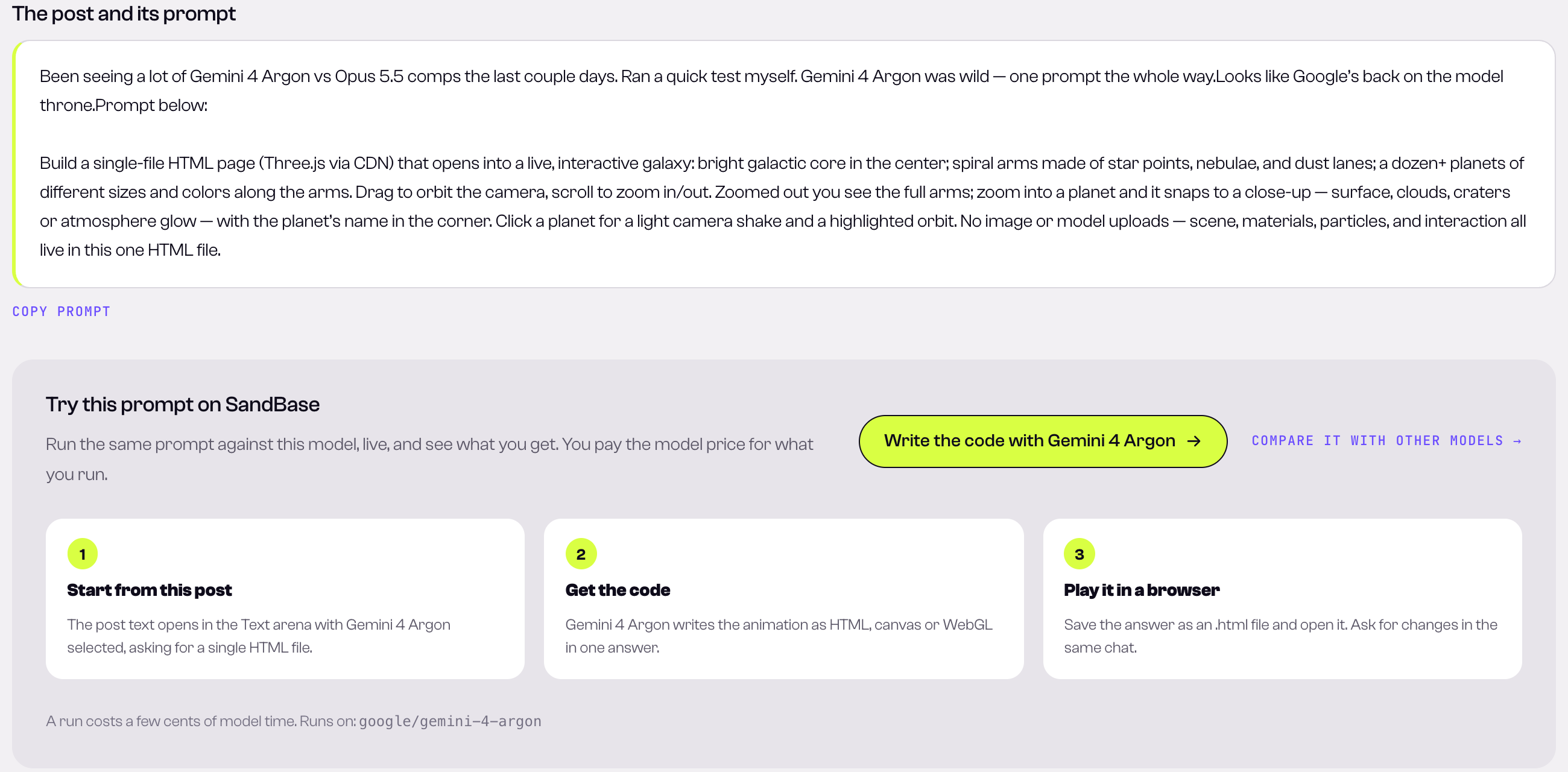
Lab detail pages show the post text, where many creators put the prompt; @Smlay_ero’s galaxy prompt is a typical medium-length spec (captured 2026-10-14 UTC).
A caution: these are prompts creators chose to share, attached to videos they chose to post. Times, costs and “one shot” claims are the creators’ statements, not verified by us, and likes measure attention, not quality.
Most Gemini 4 Argon prompts are one line
The median shared prompt is 23 words. Many are shorter than a tweet’s first line:
- @HarshithLucky3: “voxel art of dragon flying on temple”, 171 likes (Lab page).
- @noclipepe: “Create a pelican doing a wheelie on top of a flying fighter jet. Voxel artstyle. Single HTML.” (Lab).
- @analogalok: “Create a ultra realistic, high quality forest environment that i can navigate. single html file.” The creator reports 27K tokens with high reasoning and $0.27.
- @servasyy_ai ran a bare one-line Chinese prompt asking for an SVG animation of a pelican on a bicycle “shown in H5” (post). Their observation, unverified by us: Argon wrote a two-bone inverse-kinematics solver to keep the feet on the pedals without being asked.
Short prompts aren’t wrong; they’re how people probe a model’s defaults. But a one-liner hands every decision to the model: library, version, camera, real or faked physics, answer length. In 28 short prompts, 5 said “single file”, 8 named a rendering technology (usually SVG or Three.js), and only one mentioned the camera.
What the long prompts specify
The 17 prompts over 40 words read like product specs. We coded each one for the slots it fills, with keyword matching that we then spot-checked by hand:
| Slot | Long prompts (17) | Short prompts (28) | Example wording |
|---|---|---|---|
| Rendering library | 14 | 8 | ”Three.js via CDN” (@Smlay_ero) |
| Camera | 12 | 1 | camera path that clears every object (@SidraMiconi) |
| Interaction | 12 | 7 | drag to tilt, shatter on click (@kinderlayer, short) |
| Visual direction (palette, light, tone mapping) | 11 | 0 | ACES tone mapping, environment reflections (@MiaAI_lab) |
| No external assets / procedural | 10 | 0 | ”no external models, textures or images” |
| Timing or duration | 8 | 1 | full orbit in about 32 seconds (@SidraMiconi) |
| Single file | 7 | 5 | ”ONE complete, copy-pasteable HTML file” (@ivanainai) |
| Mobile or responsive | 7 | 0 | fall back to a swipeable wall on phones (@MiaAI_lab) |
| Self-check before answering | 6 | 0 | headless screenshot, then fix (@realbrucemartin) |
| Frame rate target | 5 | 0 | ”Smooth 60fps” |
| Explicit physics rules | 4 | 0 | gravity and flap velocity as numbers (@ivanainai) |
| Console-error check | 4 | 0 | ”Check the console for errors” (@maxt3chno) |
| Output format | 4 | 0 | ”Return only the complete HTML” |
Four prompts show the patterns best.
Make the camera a constraint, not a vibe. @SidraMiconi’s temple courtyard prompt (post, Lab) ends with: “The camera path must stay outside every object: orbit at a radius and height that clear all trees, walls and buildings, always aimed at the pagoda.” It also pins Three.js, caps the code at about 1,200 lines and wants a composed first frame. They report 18,359 output tokens and 25 cents, on the third try.
Turn physics into numbers. @ivanainai’s Flappy Bird prompt (reply, Lab) doesn’t say “realistic gravity”. It says: “Gravity: 18 world units per second squared, downward. Each flap sets upward velocity to 6.8 world units per second.” It adds a fixed timestep, seed 42 for obstacles, and an auto-demo limited to the flap a human can press: written so two models can be compared fairly.
Say what the piece is for. @MiaAI_lab’s gummy-bear prompt (post, Lab) has a section headed “Physics (this is the whole point - it must feel like jelly, not plastic)”, then lists soft-body behaviors one by one. They posted it after rerunning another creator’s gummy-bear comparison and calling that video fake; their reply: run the prompt yourself.
Ask the model to check its own work. @realbrucemartin’s deck-builder prompt for Devin (post) ends: “then verify it actually renders — open it in a headless browser, take a screenshot, and fix whatever’s broken. Go deep, not broad.” That only works in an agent with a browser. In a plain chat call, the equivalent is @lemomo_ai’s three-step instruction (post): write the design plan first (parts list, scene hierarchy, gear ratios), then the code, then tick off every requirement and fix misses before answering.
What almost nobody asks for
Across all 45 prompts, a few slots were nearly empty:
- A library version. 3 prompts name one (Three.js r165 or 0.160, or react-three-fiber v9); the Flappy prompt allows “a pinned CDN import” without saying which. Otherwise the model picks, and our minimal runs got 2021’s Three.js r128.
- Time-based animation. Only the Flappy prompt asks for a fixed timestep. Per-frame motion plays in slow motion on a slow machine, as one of our minimal runs did.
- An output budget. Only @SidraMiconi caps length. On SandBase one response tops out at 65.5K output tokens.
- Determinism. 2 prompts ask for seeded randomness, so most runs can’t be repeated.
- Accessibility and fallbacks. 1 prompt mentions
prefers-reduced-motion; 2 mention a fallback path.
None of these make a video look better. They make the HTML reproducible, which matters once you edit, compare or ship it.
Our A/B: minimal vs structured prompt for the same animation
We picked a scene with a camera, physical-looking motion and an obvious failure mode: a domino spiral chain reaction. Both prompts went to google/gemini-4-argon through SandBase’s OpenAI-compatible Chat Completions API with max_tokens 32,000 and otherwise default settings, two runs each, on 2026-10-14 between 22:59 and 23:03 UTC.
The minimal prompt copies the shape of the short shared prompts:
Create a 3D animation of dominoes toppling in a spiral chain reaction. Single html file.The structured prompt fills the slots the long prompts use, plus the ones they skip (version pin, clock-based motion, length budget, self-check):
Build a 3D animation of dominoes toppling in a spiral chain reaction.

OUTPUT
- One self-contained index.html. Return only the complete file in one ```html code block, starting with <!DOCTYPE html> and ending with </html>. No explanation.

STACK
- Three.js 0.160.0 via an import map pointing "three" and "three/addons/" at https://cdn.jsdelivr.net/npm/[email protected]/. No other libraries, no physics engine.
- No external models, textures, images or fonts. Build everything in code.

SCENE
- About 120 dominoes on an Archimedean spiral (outer radius about 9 units), each 0.2 x 1.0 x 0.5, standing upright and spaced so each one hits the next.
- Colors run along the spiral as a gradient from warm orange to deep teal. Matte table plane, soft shadows, warm key light, cool fill, ACES filmic tone mapping.

CAMERA
- Starts high and wide so the first frame already shows the whole spiral. Slowly orbits and dips toward the center as the wave reaches it. Keep the camera outside the dominoes at all times.

MOTION
- Animate the topple yourself: each domino rotates about its bottom front edge with gravity-like acceleration and starts falling when the previous one has tilted about 20 degrees. Fallen dominoes rest leaning on the next one, never pass through each other or the table.
- The chain starts at the outer end and finishes at the center in about 12 seconds. Pause 2 seconds, then reset and loop.

CONSTRAINTS
- Under about 300 lines. Fill the window and handle resize. Cap devicePixelRatio at 2. Smooth at 60 fps.
- Zero console errors. Before answering, check that the import map, every import path and every Three.js API you use exist in 0.160.0.
We saved each answer’s HTML, served it over local HTTP and opened it in headless Chrome (1280x720, software WebGL at about 30 fps), logging console errors, page errors and failed requests and taking frames at 1, 5 and 10 seconds.
| Run | Out tokens | HTML lines | Prose around code | Stack it chose | Console errors | Billed | What the page did |
|---|---|---|---|---|---|---|---|
| minimal-1 | 3,431 | 310 | 1,140 chars | Three.js r128 + Cannon.js 0.6.2 | 0 | $0.0688 | chain stalled after the first few dominoes |
| minimal-2 | 3,365 | 301 | 1,288 chars | Three.js r128 + Cannon.js 0.6.2 | 0 | $0.0675 | chain kept going, roughly two dozen fallen by 30 s |
| structured-1 | 3,045 | 246 | none | Three.js 0.160 import map | 0 | $0.0627 | toppled outer to center in about 12 s, looped |
| structured-2 | 2,871 | 242 | none | Three.js 0.160 import map | 0 | $0.0592 | toppled on schedule, but dominoes spaced too far apart to touch |
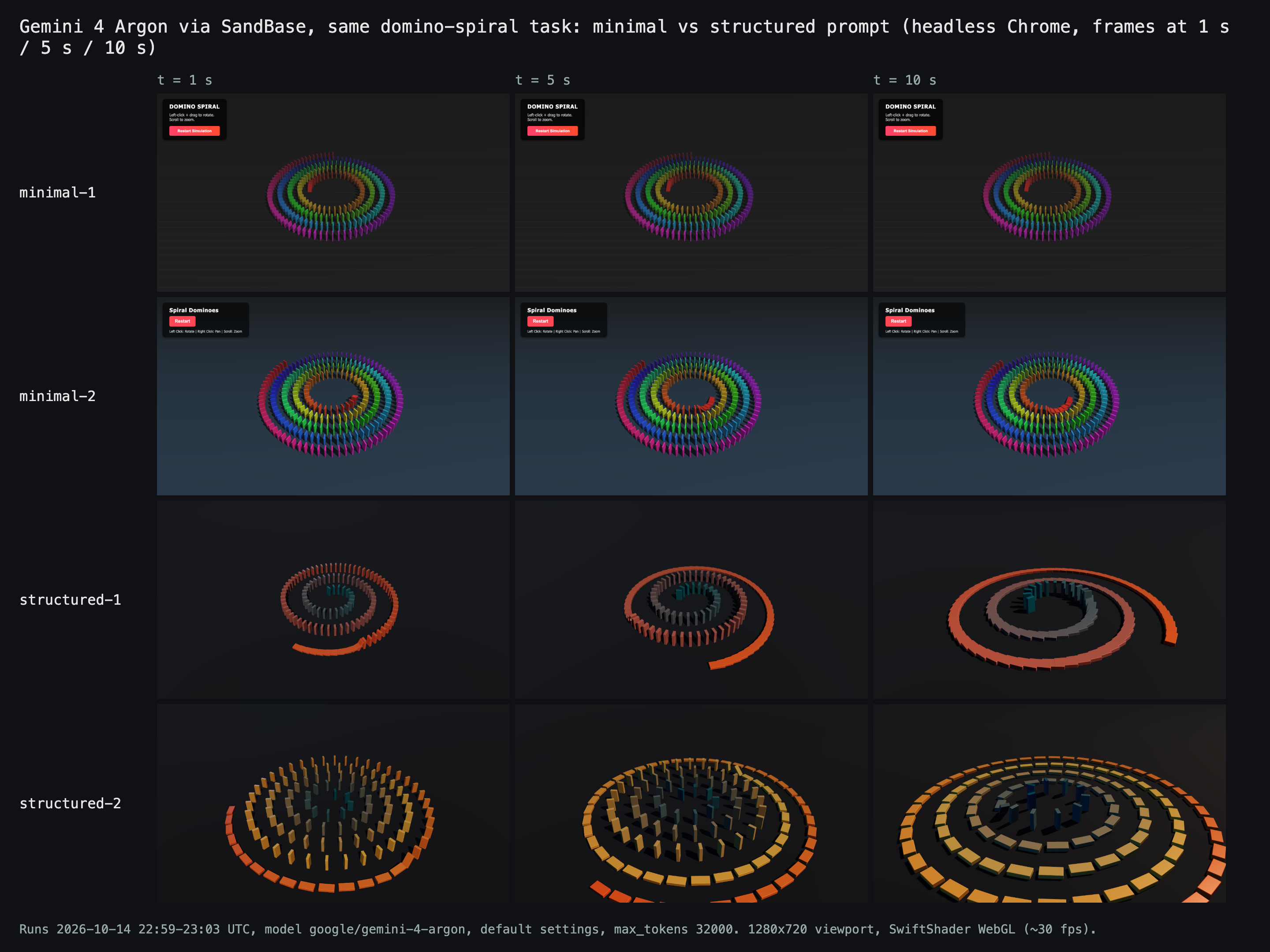
Our own renders of the four answers: the minimal pages barely move between 5 and 10 seconds, while both structured pages progress (pixel change between those frames: 0.01% and 0.31% for minimal, 10% and 21% for structured).
Three things stood out.
The minimal prompt picked old, global-script libraries. Both runs loaded Three.js r128 and Cannon.js 0.6.2 from cdnjs, with OrbitControls from the pre-module examples/js path. It works, but nothing told the model to use anything newer.
Real physics wasn’t the win it sounds like. minimal-1’s prose promised that the dominoes “actually hit each other to cause the chain reaction”. In our run the push reached a few dominoes and stopped. minimal-2 kept going but called world.step with a fixed step once per frame, so at our headless 30 fps it ran at half speed. We didn’t diagnose the minimal-1 stall further. The structured prompt asked for a scripted topple on a clock: less “real”, far more predictable.
Structure didn’t buy compliance everywhere. structured-2 hit the timing, colors and camera, then placed dominoes so far apart that none could touch the next. The topple is scheduled, so the animation still runs, and nothing in the console says it’s wrong. Only looking at the frames catches it.
Cost went the other way from what I expected. The structured prompt adds about 400 input tokens ($0.0016 at $4 per million) but removed 1,100 to 1,300 characters of explanation and 55 to 68 lines of code, so each call was half a cent to a cent cheaper.
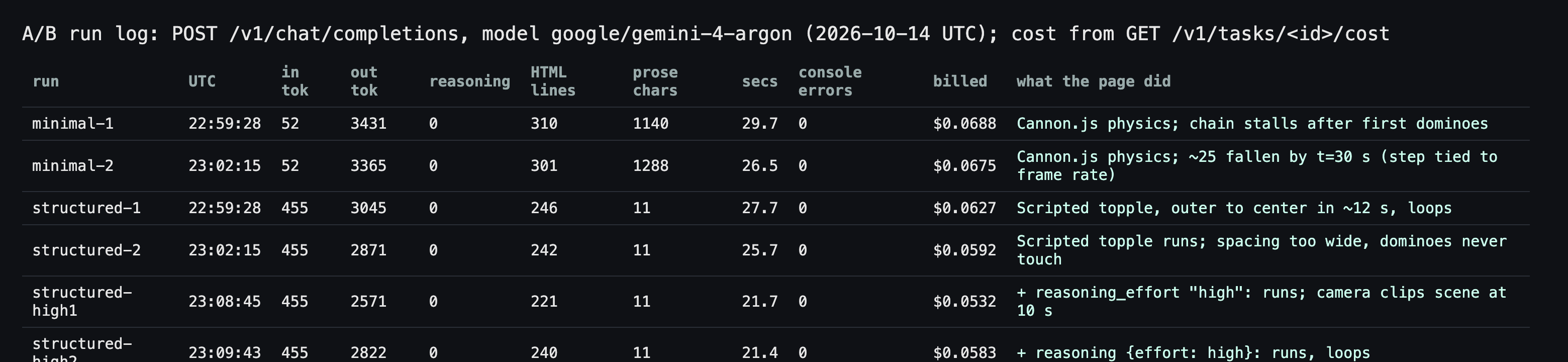
Billed amounts come from GET /v1/tasks/<id>/cost for each completion; all six calls finished with finish_reason: stop in 21 to 30 seconds and reported 0 reasoning tokens (run 2026-10-14 UTC).
About reasoning effort
Several creators credit “high” reasoning. We added two structured runs, one with "reasoning_effort": "high" and one with "reasoning": {"effort": "high"}. Both returned HTTP 200 and working pages, and both reported reasoning_tokens: 0, like the default runs. From outside we can’t tell whether the field was ignored; our Python tutorial hit the same ambiguity on a harder prompt. Don’t assume the setting did anything unless reasoning_tokens changes.
Creators report 18K to 28.5K output tokens with thinking, far above our roughly 3K, using other clients and, in one case, a third attempt.
A reusable Gemini 4 Argon prompt template
This keeps the slots that worked and adds the ones the shared prompts skip. Fill the angle brackets, delete what you don’t need.
Build <one-sentence description of the animation, scene or simulation>.

OUTPUT
- One self-contained index.html. Return only the complete file in one ```html code block, from <!DOCTYPE html> to </html>. No explanation.

STACK
- <Three.js 0.160.0 via an import map at https://cdn.jsdelivr.net/npm/[email protected]/ | plain Canvas 2D | inline SVG + CSS>. No other libraries unless listed here.
- No external models, textures, images or fonts. Generate everything in code.

SCENE
- <objects, counts, sizes in world units, layout>
- <palette as named colors or hex, lighting, tone mapping, background>

CAMERA
- First frame already shows <what>. Then <path, speed, target>. Keep the camera outside every object.

MOTION AND PHYSICS
- <rules as numbers: gravity, speeds, timings, what may never intersect>
- Drive all motion from elapsed time (THREE.Clock or performance.now), not per-frame steps. Use a seeded random generator (seed 42) for anything that should repeat.
- <duration of one cycle>, then <loop / stop / reset>.

INTERACTION
- <drag / click / keys and what each does, or "none">

CONSTRAINTS
- Under about <N> lines. Fill the window, handle resize, cap devicePixelRatio at 2, respect prefers-reduced-motion.
- Zero console errors. Before answering, check every import path and API exists in the pinned version, and that each requirement above is met.
To run it and check the result the way we did, save the template as prompt.txt and use this script. It needs Python 3 with requests and a SandBase API key in SANDBASE_API_KEY.
import os
import re
import sys
import time

import requests

BASE = "https://api.sandbase.ai/v1"
HEADERS = {"Authorization": f"Bearer {os.environ['SANDBASE_API_KEY']}"}

prompt = open(sys.argv[1] if len(sys.argv) > 1 else "prompt.txt", encoding="utf-8").read()
resp = requests.post(f"{BASE}/chat/completions", headers=HEADERS, timeout=900, json={
    "model": "google/gemini-4-argon",
    "max_tokens": 32000,  # SandBase caps one Argon response at 65.5K output tokens
    "messages": [{"role": "user", "content": prompt}],
})
resp.raise_for_status()
body = resp.json()
choice = body["choices"][0]
if choice.get("finish_reason") == "length":
    sys.exit("Answer cut at max_tokens; raise it or ask for shorter code.")

FENCE = "`" * 3  # a Markdown code fence, built here so this file nests cleanly in docs
content = choice["message"].get("content") or ""
match = re.search(FENCE + r"html\s*(.*?)" + FENCE, content, re.S | re.I)
if not match:
    sys.exit("No html code block in the answer; tighten the OUTPUT section.")
with open("index.html", "w", encoding="utf-8") as f:
    f.write(match.group(1))

usage = body["usage"]
print(f"saved index.html, {match.group(1).count(chr(10)) + 1} lines")
print(f"tokens in/out: {usage['prompt_tokens']}/{usage['completion_tokens']}, "
      f"reasoning: {usage.get('completion_tokens_details', {}).get('reasoning_tokens')}")

time.sleep(3)  # billing settles a moment after the response
cost = requests.get(f"{BASE}/tasks/{body['id']}/cost", headers=HEADERS, timeout=60).json()
print(f"billed: ${cost.get('cost')} (settled={cost.get('settled')})")
We ran this exact script with the structured domino prompt on 2026-10-14 at 23:34 UTC. It printed:
saved index.html, 241 lines
tokens in/out: 455/2913, reasoning: 0
billed: $0.060080 (settled=True)
That page loaded in our headless Chrome with zero console errors and toppled the spiral outer to center. Open index.html through a local server (python3 -m http.server), not file://, because some browsers block module imports from local files. Watch it for a full cycle and keep the console open. Our structured-2 run is the reason: zero errors, still wrong.
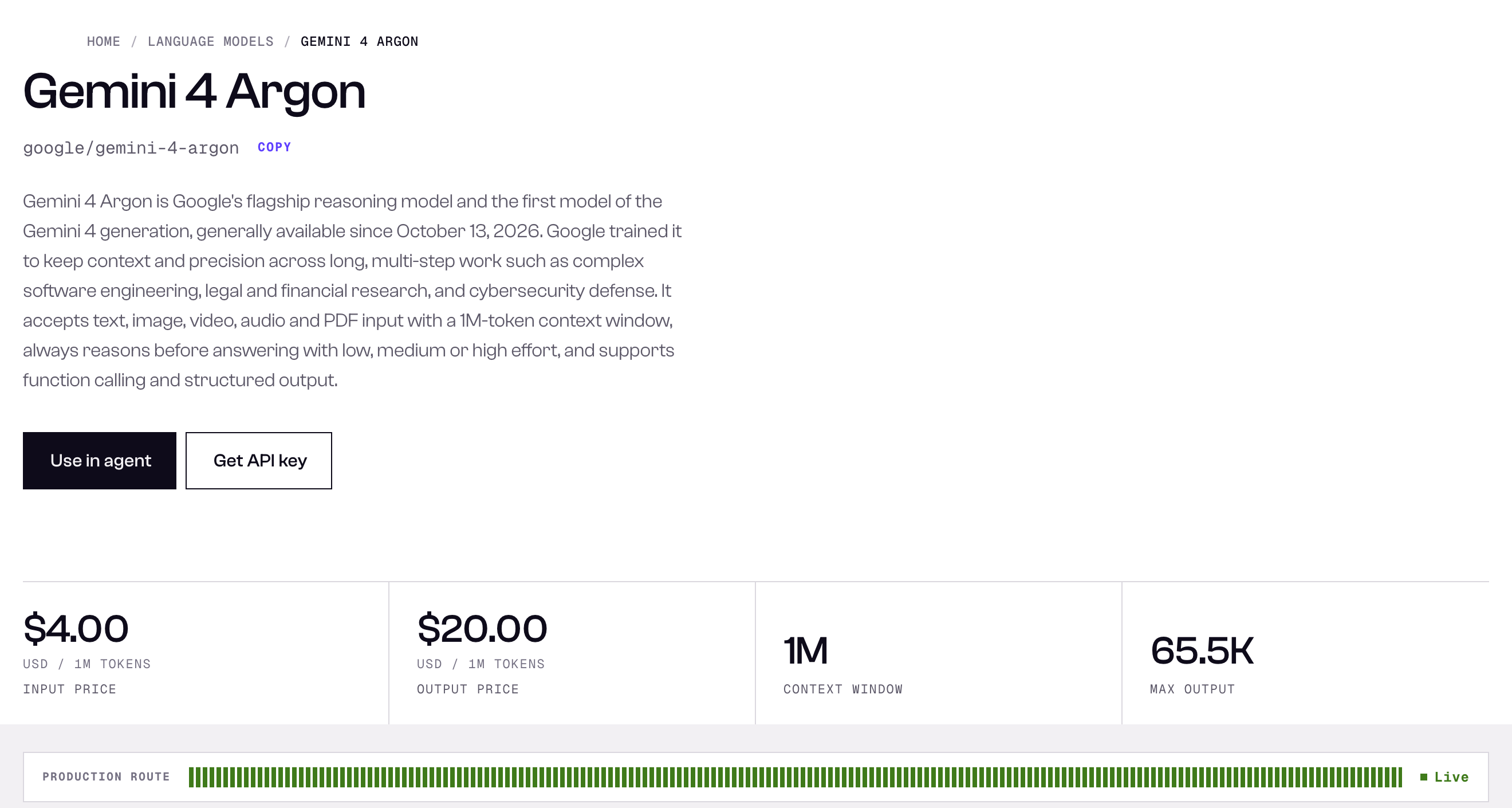
The Gemini 4 Argon model page lists $4 / $20 per million tokens and a 65.5K max output on SandBase, the rates behind every cost above; Google’s direct introductory rate is $2 / $10 until Nov 30, 2026 (captured 2026-10-14 UTC).
So the same call through Google directly costs about half until Nov 30; the pricing guide has the math. At six cents a call, iterating on the prompt is still cheaper than fixing code by hand.
Where to go next
Google says its engineers use Argon for “complex 3D visualizations, high-fidelity games, and interactive animations in vanilla code” (Google, Oct 13, 2026); the template targets that case. Next: a full Three.js scene test, a browser game with a fix round, the most-liked Argon creations and the launch-week data study. Our earlier Argon note predates general availability.
FAQ
What is a good Gemini 4 Argon prompt for a Three.js animation?
One that names the output format, a pinned Three.js version, sizes and counts, the camera path, motion rules as numbers on a clock, a length budget and a console-error check. The template above has those slots.
Do short prompts work with Gemini 4 Argon?
They produce something, and one-line voxel prompts got plenty of attention. In our two minimal runs Argon chose 2021-era Three.js r128 and a physics engine whose chain stalled or crawled. Use short prompts to see defaults, not for repeatable output.
How much does one creative-coding prompt cost on SandBase?
Our seven calls returned 2,571 to 3,431 output tokens and cost $0.053 to $0.069 each at SandBase’s $4 / $20 list price, $0.43 in total. Answers of 18K to 28.5K tokens, as some creators report, would cost several times more.
Does reasoning_effort high help creative coding?
We couldn’t see an effect: both effort spellings returned 0 reasoning tokens and similar code. Check reasoning_tokens on your own prompt before relying on it.
Can I reuse prompts from the SandBase Lab gallery?
Yes, as a starting point. Each Lab detail page has a copy button and a “Try this prompt on SandBase” link. The prompts belong to their creators; credit them.
Limitations
45 self-selected prompts and a two-run-per-arm A/B on one animation (plus two effort-field runs and one script run) are not a benchmark. Feature counts come from spot-checked keyword matching and can miss unusual phrasing. Our headless browser ran software WebGL at about 30 fps, which slows frame-coupled physics; a GPU machine may play minimal-2 at full speed. Creators used Antigravity, Devin, Mixar, browser chat and other clients; their time, cost and token claims are theirs.