X/Twitter Monitoring API: Search to Author | SandBase
Build an X/Twitter monitoring workflow: search a topic, read a tweet's engagement, and profile its author — one SandBase key, no X developer tier, no OAuth.

Monitoring on X (Twitter) comes down to three moves: find tweets about a topic, measure how each one is landing, and understand who posted it. This tutorial wires those three moves into one workflow using the SandBase X/Twitter API — no X developer tier of your own and no OAuth, though you still need a SandBase API key. These are synchronous request/response reads, so “real-time” here means polling on a schedule rather than a streaming subscription. The endpoint reference only guarantees the response envelope (id, status, model, outputs[0].data); the business fields shown below are an illustrative structure, not a guaranteed schema, so treat both the field names and the values as examples and confirm them against a live response.
If you want the full endpoint tour first, start with the X/Twitter public data API hub. This piece is the applied monitoring workflow.
Key takeaway
- Three steps:
search-timeline(discover) →tweet-detail(engagement) →user-profile(author).- Each
webcall isPOST /v1/api/twitter/web/<endpoint>with oneSANDBASE_API_KEY; responses share the{ id, status, model, outputs }envelope.- Carry the
tweet_idfrom search intotweet-detail, and thescreen_nameintouser-profile.- Only the envelope (
id,status,model,outputs[0].data) is guaranteed; the business fields are illustrative — confirm them against a live response.- Public, read-only data only; no X developer tier of your own and no posting, but you do need a SandBase API key.
The workflow at a glance
| Step | Endpoint | Input | You get |
|---|---|---|---|
| 1. Discover | twitter/web/search-timeline | keyword (optional cursor) | a timeline of tweets |
| 2. Measure | twitter/web/tweet-detail | tweet_id | text, likes, retweets, views |
| 3. Profile | twitter/web/user-profile | screen_name | follower and account signals |
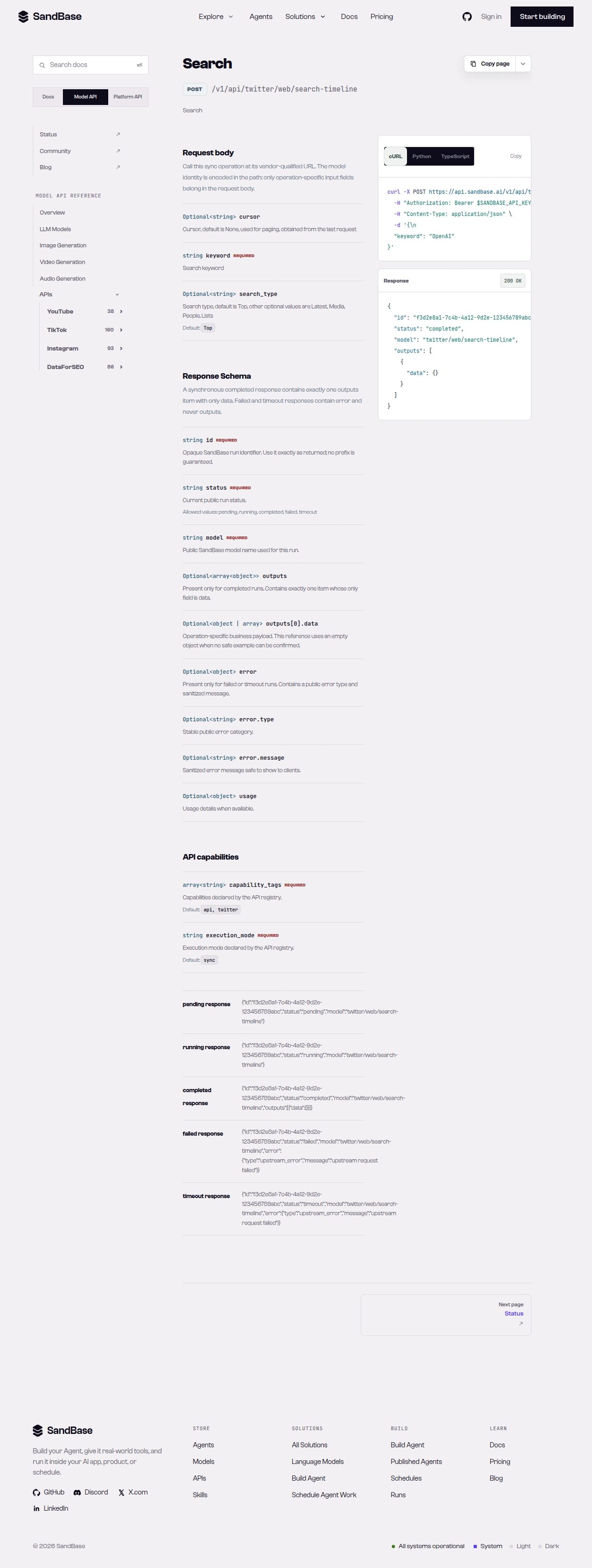 The endpoint API reference is the source of truth for each parameter name and response path.
Step 1 — Discover tweets about your topic
Search a keyword in Top or Latest mode. search-timeline accepts an optional cursor request parameter you carry over from the previous request to page:
import os
import requests

BASE = "https://api.sandbase.ai/v1/api/twitter"
HEADERS = {
    "Authorization": f"Bearer {os.environ['SANDBASE_API_KEY']}",
    "Content-Type": "application/json",
}


def call(path: str, payload: dict) -> dict:
    resp = requests.post(f"{BASE}/{path}", headers=HEADERS, json=payload, timeout=90)
    resp.raise_for_status()
    body = resp.json()
    if body.get("status") != "completed":
        raise RuntimeError(body.get("error", {}).get("message", "request did not complete"))
    return body["outputs"][0]["data"]


search = call("web/search-timeline", {"keyword": "NASA", "search_type": "Top"})
# inspect a real response and read the schema to locate tweet ids;
# carry the optional `cursor` request parameter over from the previous
# request to page — do not rely on a specific response field name
Inspect one real response to see exactly where tweet ids sit in the result, since only the envelope is guaranteed and the business layout may differ from any example. Then collect the ids you want to measure. To page, pass the optional cursor request parameter — a value you carry over from the previous request — rather than depending on a fixed field in the response body.
Step 2 — Measure a tweet’s engagement
For each tweet_id, read the full tweet with its engagement counts:
tweet = call("web/tweet-detail", {"tweet_id": "2041690396586090592"})
print((tweet.get("display_text") or "")[:60])
# example output: It's not just a phase 🌕 Artemis II astronauts captured these views...
print(tweet.get("retweets"), "retweets,", tweet.get("replies"), "replies,", tweet.get("views"), "views")
# example output: 17850 retweets, 1173 replies, 3880967 views
In this illustrative shape a tweet read can include fields such as display_text, created_at, lang, engagement counts (likes, retweets, replies, views, quotes, bookmarks), entities, media, and an embedded author. Only the envelope is guaranteed, so the code uses .get() rather than assuming those keys are present, and the printed values are illustrative. That embedded author can save you a call when you only need basic account context. The block below is an illustrative response shape — the business fields are not a guaranteed schema, so treat both the field names and the values as examples and confirm them against a live response, since payloads vary and change over time:
{
"id": "117db5dd-1189-4830-9459-98b624960286",
"status": "completed",
"model": "twitter/web/tweet-detail",
"outputs": [
{
"data": {
"id": "2041690396586090592",
"created_at": "Wed Apr 08 01:31:37 +0000 2026",
"display_text": "It's not just a phase 🌕 ...",
"retweets": 17850,
"replies": 1173,
"views": 3880967,
"author": { "name": "NASA", "screen_name": "NASA", "blue_verified": true }
}
}
]
}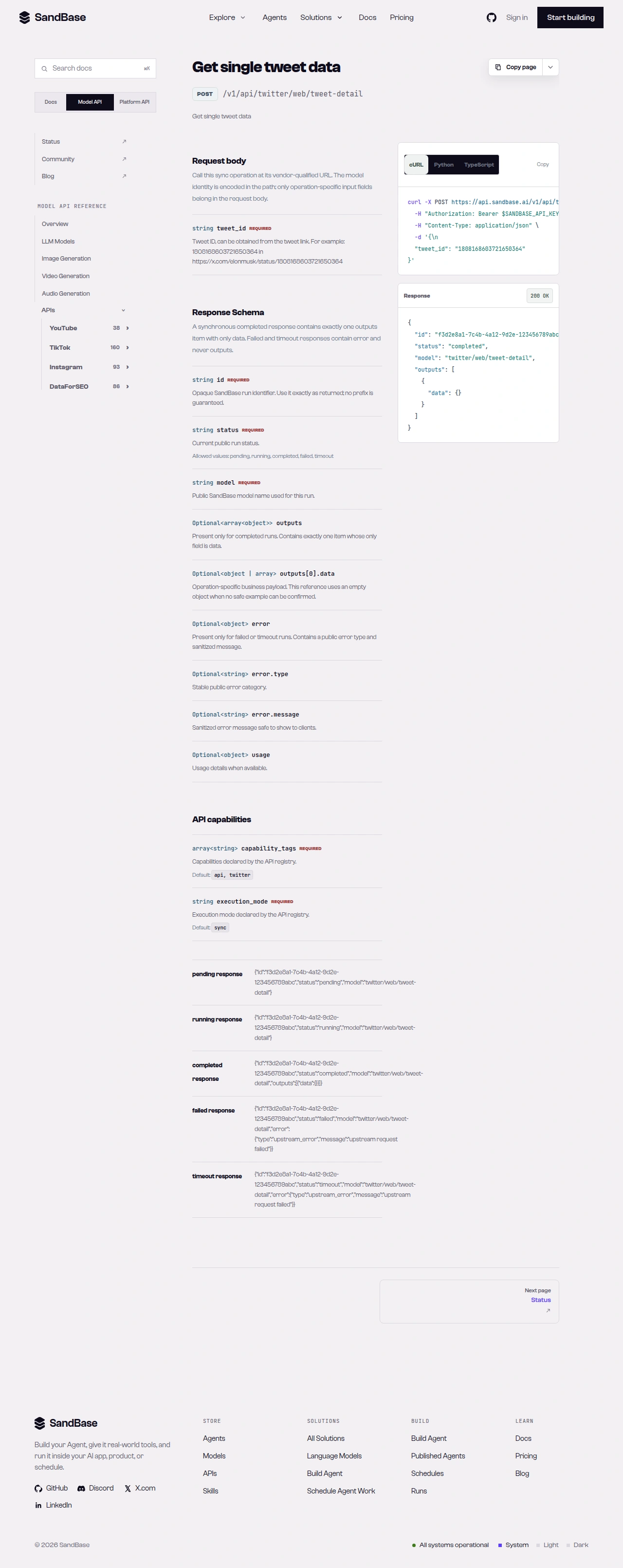 tweet-detail returns engagement counts and an embedded author object.
Step 3 — Profile the author
When you need the full account picture — follower count, account age, verification — read the profile by screen_name:
profile = call("web/user-profile", {"screen_name": "NASA"})
print(profile.get("name"), profile.get("rest_id"), profile.get("statuses_count"))
# example output: NASA 11348282 74334
print("verified:", profile.get("blue_verified"), "| since", profile.get("created_at"))
# example output: verified: True | since Wed Dec 19 20:20:32 +0000 2007
The field names and values above are illustrative — only the envelope is guaranteed, so the code reads with .get() and you should confirm the business fields against a live response. user-profile also accepts a rest_id as an optional input, so you can store the one you get back and re-read the profile later without depending on the screen name staying the same.
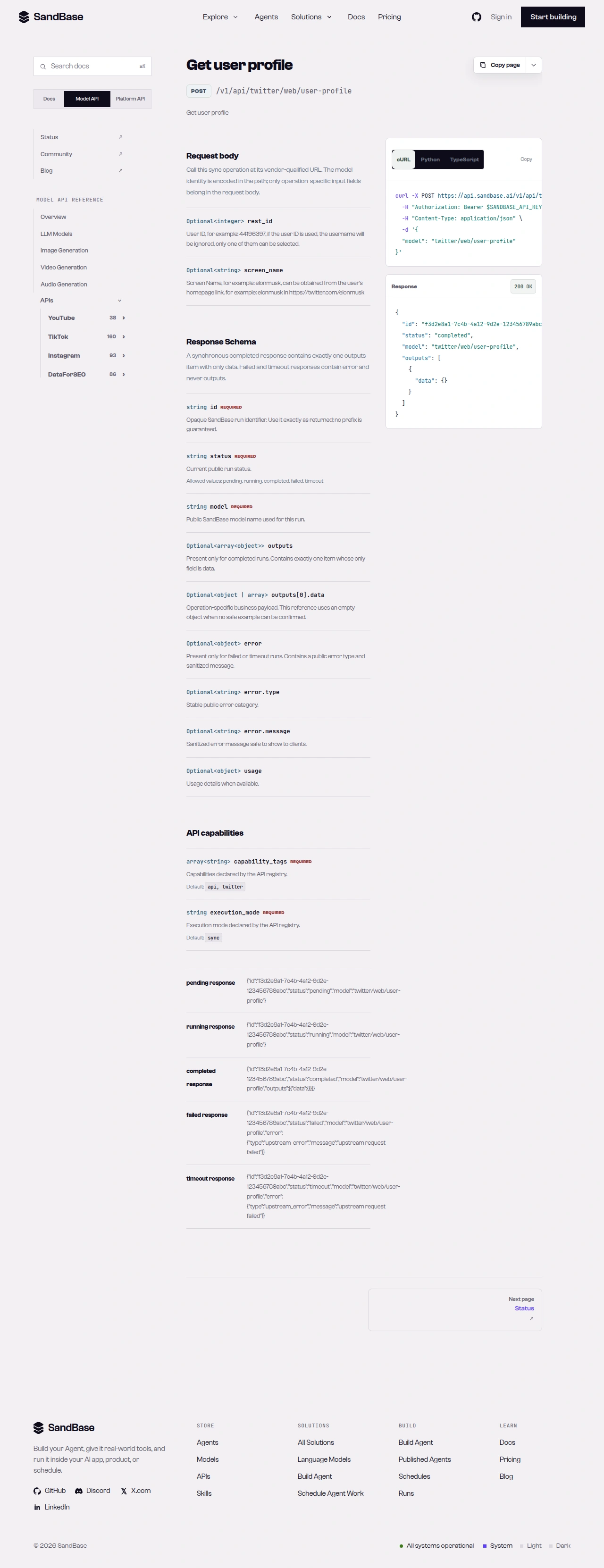 user-profile returns follower, verification, and account-age signals.
Putting it together
A minimal monitoring pass looks like this:
search = call("web/search-timeline", {"keyword": "NASA", "search_type": "Top"})
report = []

for tweet_id in extract_tweet_ids(search):  # extract_tweet_ids: your parser for the search response shape
    tweet = call("web/tweet-detail", {"tweet_id": tweet_id})
    author = tweet.get("author", {})
    report.append({
        "tweet_id": tweet.get("id"),
        "text": tweet.get("display_text"),
        "views": tweet.get("views"),
        "retweets": tweet.get("retweets"),
        "author": author.get("screen_name"),
        "author_verified": author.get("blue_verified", False),
    })
    # only spend a user-profile call when you need the full account picture
The code above reads every business field with .get(), since only the envelope is guaranteed and the illustrative fields may be absent or named differently in a live response. extract_tweet_ids is pseudocode — implement it against the actual search response shape once you have inspected a real response. Because each of the three web calls in this tutorial shares the same envelope and the same call helper, adding retries or rate-limit backoff is a one-place change. For higher-volume collection there is a separate twitter/bulk/tweet-search model, but note it is a distinct asynchronous surface: it runs through the Unified Run API (POST /v1/run with model: "twitter/bulk/tweet-search" and status polling), not the synchronous call() helper used here.
Handling the rough edges
- Reuse the embedded author. In the illustrative shape,
tweet-detailalready carries a basicauthor; only calluser-profilewhen you need follower counts or account age. Confirm the fields against a live response. - Page deliberately.
search-timelineaccepts an optionalcursorrequest parameter; carry it over from the previous request rather than assuming one page is the whole result set. - Branch on
status. Afailedortimeoutrun carrieserrorand nooutputs. Thecallhelper already enforces this. - Respect rate limits. As a client-side resilience measure, retry with backoff on transient errors such as HTTP 429.
- Public data only. No X developer tier of your own, no posting, replies, or DMs, and no protected accounts — though you do authenticate every call with a SandBase API key.
Why run monitoring at the API layer
You could watch a search column in a client app, but that does not give you structured, storable data. Running these three calls on a schedule turns a live feed into a measurable signal: view and retweet counts you can trend, tweets you can dedupe by tweet_id, and authors you can weight by follower count and verification. Because the calls return named JSON fields, each pass drops cleanly into a table you can diff against the last one — new spikes, new voices, and shifts in how a topic is landing.
The same uniform envelope keeps the workflow composable. Swap the keyword for any topic, add a post-comments call to read a thread’s replies, and it slots in behind the same call helper with the same error handling. That is the payoff of a single-key, single-shape API for monitoring: your time goes to interpreting the signal, not to keeping a fragile pipeline alive.
FAQ
Do I need an X developer tier or OAuth?
No. You authenticate to SandBase with your SANDBASE_API_KEY. These read endpoints need no X developer account and no OAuth on your side.
How do I page through search results?
search-timeline accepts an optional cursor request parameter you carry over from the previous request to fetch the next page. Inspect one real response to see where the next cursor value sits, and page deliberately rather than assuming one call is the whole result set.
How do I handle higher-volume collection?
The three steps here are synchronous single reads. For higher volume there is a separate twitter/bulk/tweet-search model, but it is a distinct asynchronous surface: it runs through the Unified Run API (POST /v1/run with status polling), not the synchronous call() helper used in this workflow.
Next steps
You now have a repeatable topic-to-author monitoring workflow built on three public, read-only calls.