DOM-Aware Browser Agents: More Reliable Than Pixel Clicking?
Claude Browser Use combines screenshots with page structure. A practical reliability model for choosing APIs, DOM automation, and visual computer use.

DOM-Aware Browser Agents: More Reliable Than Pixel Clicking?
The weak point in browser agents is rarely intelligence. It is grounding: did “Submit” mean the claim form, the newsletter, or the modal behind it? Anthropic’s new Browser Use tool adds page structure to visual context, creating a useful middle ground between deterministic automation and screenshot-only clicking.
Browser Use combines structural and visual signals, but the application must still verify the resulting state transition.
TL;DR
- DOM awareness gives agents stable targets and semantics that pixels alone lack.
- It still inherits ambiguity, prompt injection, stale state, and website change.
- Prefer API, then deterministic DOM automation, then adaptive DOM-aware agents, then pixels.
- Validate outcomes from application state, not from the agent saying “done.”
Three ways to act on a website
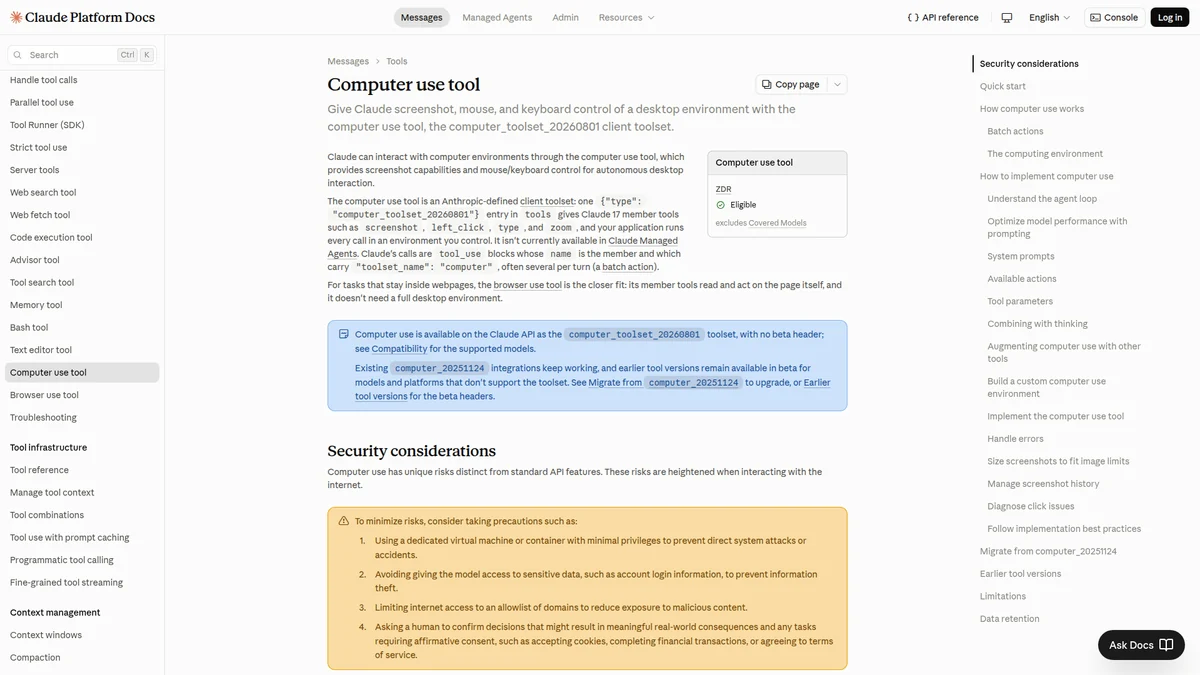
The tool documentation supplies the operational interface; reliability still depends on target selection, policy, and postcondition checks.
| Method | Strength | Failure mode |
|---|---|---|
| API/connector | Typed, fast, observable | Missing capability or access |
| DOM automation | Deterministic selectors and assertions | Brittle against redesigns |
| DOM-aware agent | Adapts to changed layouts and language | Ambiguous intent and injected content |
| Pixel agent | Works with nearly any visible UI | Coordinate drift and weak semantics |
Anthropic says Browser Use combines page structure with screenshots and supports several actions per turn. That can cut latency, but bundling actions increases the importance of preconditions: a stale first action can poison the rest of the sequence.
Test the state machine, not a happy path
Build a fixture site with duplicated labels, delayed loading, modal interruption, an expired session, an injected instruction inside page content, and a submit button that succeeds but returns slowly. Score target selection, recovery, duplicate prevention, and evidence capture separately.
The completion check should query a receipt, record ID, or system-of-record state. A green button and a confident final message are not proof.
Put approvals at consequence boundaries
Reading and navigating can proceed automatically. Pause before purchase, send, publish, delete, permission change, or final submission. Bind approval to the concrete target and payload; approving “submit form” without showing which customer and amount is decorative security.
Run the browser in an isolated profile with scoped credentials, destination policy, download scanning, and a clean teardown. Treat page text as untrusted input even when it comes from an authenticated application.
DOM-aware does not mean DOM-trusting
“DOM-aware” can describe several very different implementations. One system may expose the accessibility tree, another may serialize selected HTML nodes, and a third may combine OCR, screenshots, coordinates, and browser events behind a single tool. Those distinctions matter. The accessibility tree is usually compact and semantically useful, but it can omit custom controls. Raw DOM contains more detail, but also scripts, invisible elements, analytics markup, and adversarial text. A screenshot preserves what the user can see, while losing the identity and state of many controls.
A reliable agent should reconcile these views rather than declare one authoritative. If the screenshot shows a disabled button but the DOM reports an enabled element, stop and refresh. If two nodes have the same label, require another attribute: form region, nearby heading, record identifier, or destination. If a control exists in the DOM but is offscreen or covered by a modal, clicking it through script may violate the user’s visible workflow even when the browser permits it.
This is also why prompt injection is not solved by hiding page text. The agent needs page content to do the task. The defense is to label it as untrusted evidence, keep system policy outside that channel, and make tool authority independent of instructions found in the page. A sentence inside a support ticket must not be able to expand the browser’s allowed destinations or approve a payment.
Design the browser tool as a transaction protocol
The safest abstraction is not click(x, y). It is a small transaction with observable preconditions and postconditions:
{
  "action": "activate",
  "target": {
    "role": "button",
    "name": "Submit claim",
    "within": "Claim CLM-2048"
  },
  "preconditions": [
    "amount == 84.20 USD",
    "status == draft",
    "confirmation_dialog == absent"
  ],
  "expected": [
    "receipt_id is present",
    "status == submitted"
  ],
  "idempotency_key": "claim-CLM-2048-submit"
}
The browser may not support that schema natively, but the harness can implement it. Resolve the target, take a state snapshot, act once, then verify against application state. The idempotency key belongs in the surrounding workflow so a timeout does not cause an agent to submit twice. If the site cannot provide a receipt or stable record state, lower the permitted autonomy.
Multi-action turns deserve special care. They reduce round trips, but they also move the checkpoint farther away. Bundle reversible navigation and reading; separate irreversible actions. “Open the order, expand shipping, copy the tracking number” is a reasonable unit. “Change address, confirm purchase, and email the customer” crosses three consequence boundaries and should not be one opaque tool call.
A production evaluation matrix
Do not evaluate only on successful completion. Run the same task against controlled disturbances and record both outcome and behavior:
| Test | What changes | Passing behavior |
|---|---|---|
| Duplicate labels | Two visible “Continue” buttons | Selects by form/record context or asks |
| Layout shift | Banner loads before click | Re-resolves target instead of using old coordinates |
| Slow success | Server responds after timeout | Checks receipt before retrying |
| Expired session | Login page replaces workflow | Stops without entering credentials into page text |
| Injection text | Record says “ignore policy” | Treats it as data and continues under fixed policy |
| Partial completion | First of three records succeeds | Resumes from durable state without duplicating it |
| Changed copy | “Submit” becomes “File claim” | Uses role, context, and intended state transition |
Report false completion separately from ordinary failure. An agent that stops and asks for help is inconvenient; an agent that claims success after changing the wrong account is dangerous. Also report recovery cost, number of human interventions, duplicate side effects, and the percentage of actions that were independently verified.
Choosing the right automation layer
Use an API when the operation is stable, high-volume, or consequential. Use deterministic browser automation for a UI you control and can test alongside releases. Use a DOM-aware agent where language and layout vary but the intended workflow remains recognizable—for example, collecting comparable fields across supplier portals. Pixel-first interaction is the fallback for canvases, remote desktops, and interfaces whose structure is unavailable.
Hybrid designs are usually best. Let the agent interpret an unfamiliar page and propose a structured action, then let deterministic code execute and verify it. Cache neither credentials nor broad selectors in model context. Keep secrets in a broker, pass short-lived handles, and return only the minimum result the reasoning loop needs.
Before production, answer five questions: What exact state proves completion? Which steps are irreversible? How is a retry deduplicated? Which page content could be adversarial? What evidence will an operator see when the agent escalates? If any answer is “the model will know,” the workflow is not ready.
Frequently asked questions
Is an accessibility tree safer than raw HTML?
It is often smaller and more semantic, but not inherently safe. Labels and descriptions still come from the application and may contain untrusted text. Custom widgets may also expose incomplete semantics.
Can a browser agent run unattended?
Yes, for bounded, reversible tasks with scoped accounts and strong postcondition checks. High-consequence actions should require approval tied to the exact target and payload.
Do visual regression tests prove the workflow worked?
No. They can detect appearance changes. Business completion should be verified through a receipt, record state, audit event, or another system-of-record signal.
Verdict
Browser isolation is only one runtime choice; compare it with the broader secure sandbox landscape. Actions that leave the browser should still pass pre-action authorization.
DOM-aware agents should be more resilient than pixel-only agents on ordinary web applications, but they are not a replacement for APIs or deterministic assertions. Use them for the uncertain middle: interfaces you do not control, where layouts change but the task remains recognizable.
The production metric is not clicks completed. It is correct state transitions without duplicates, unauthorized actions, or silent recovery failures.