Cursor vs Windsurf vs Claude Code: Which to Pick (2026)
Cursor vs Windsurf vs Claude Code compared in 2026. IDE integration, agent autonomy, model flexibility, multi-file editing, MCP support, and pricing — with a verdict per use case.
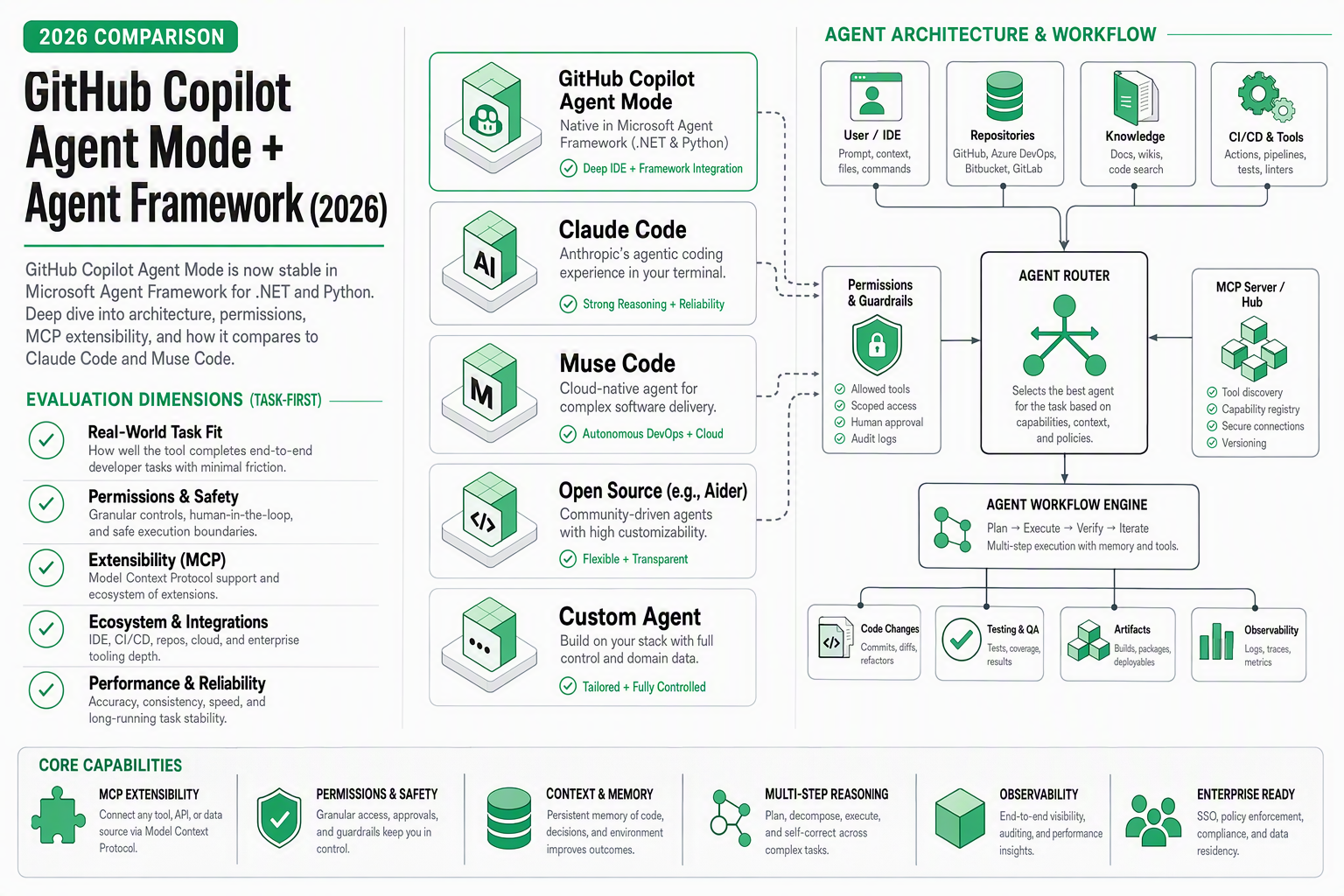
TL;DR — Cursor gives you the most model flexibility and a polished VS Code experience. Windsurf’s Cascade agent handles multi-file edits with less friction and costs $5/mo less. Claude Code throws out the IDE entirely and gives you raw agentic power in the terminal. The right choice depends on whether you want a GUI copilot, an IDE agent, or a terminal-first autonomous coder.
I Spent a Month Switching Between All Three
Last month I ran a real experiment: I used Cursor for week one, Windsurf for week two, and Claude Code for weeks three and four. The project was a mid-size TypeScript monorepo — about 180 files across three packages, with a NestJS backend, a React frontend, and a shared types library.
The goal wasn’t benchmarking. It was understanding which tool let me think less about the tool and more about the problem. After four weeks, I have strong opinions — backed by the specific moments each tool either saved me or frustrated me.
Here’s what I found.
Quick Comparison Table
| Dimension | Cursor | Windsurf | Claude Code |
|---|---|---|---|
| Interface | IDE (VS Code fork) | IDE (VS Code fork) | Terminal (CLI) |
| Core Paradigm | Completions + Chat + Agent | Cascade Agent + Chat | Pure Agentic (plan/execute) |
| Models | GPT-4, Claude, custom models | Codeium proprietary + Claude | Claude Sonnet 5 / Opus 5 |
| Model Flexibility | ★★★★★ (swap any model) | ★★★☆☆ (limited choices) | ★★☆☆☆ (Anthropic only) |
| Multi-file Editing | Good (agent mode) | Excellent (Cascade) | Excellent (autonomous) |
| Agent Autonomy | Medium (user-guided) | High (Cascade flows) | Very High (plan → execute) |
| Terminal Integration | Built-in VS Code terminal | Built-in + terminal agent | Is the terminal |
| MCP Support | Yes (plugin ecosystem) | Yes (growing) | Native (deep integration) |
| Free Tier | Limited (2-week trial) | Yes (generous free tier) | No (API usage or Max plan) |
| Pro Pricing | $20/mo | $15/mo | $20/mo (Max) or pay-per-use |
| Best For | Flexible model power users | Seamless multi-file agent work | Autonomous large refactors |
Cursor: The Swiss Army Knife IDE
Cursor has been the default “AI IDE” recommendation for over a year now, and for good reason. It’s a VS Code fork that feels familiar from the first minute — your extensions, keybindings, and settings all carry over. The AI layer is deeply integrated but not intrusive.
What Makes Cursor Different
Model flexibility is the killer feature. You can switch between GPT-4, Claude Sonnet 5, Claude Opus 5, and even custom fine-tuned models on the fly. Working on something that needs strong reasoning? Switch to Opus. Need fast autocomplete? Drop to a lighter model. No other tool gives you this level of control.
The three interaction modes work well together:
- Tab completions — fast inline suggestions as you type
- Chat — Cmd+K for questions and inline edits
- Agent mode — multi-step tasks with file creation/editing
Agent mode has improved significantly in 2026. It can now plan across multiple files, run terminal commands, and iterate on errors. But it still feels guided — you’re in the loop more than with Windsurf or Claude Code.
Where Cursor Frustrated Me
The agent mode sometimes gets stuck in a loop. During my test week, it tried to fix a TypeScript type error three times with the same incorrect approach before I intervened. The completions also occasionally suggest code that conflicts with patterns established elsewhere in the codebase — something that gets worse in larger monorepos.
Context management is manual. You need to explicitly reference files with @file annotations or it won’t consider relevant code outside your current file. Compare this to Claude Code, which reads your entire repo structure automatically.
Cursor Pricing
- Pro: $20/month — includes fast completions, 500 agent requests/month, model switching
- Business: $40/month — team features, admin controls, privacy mode
- No meaningful free tier (2-week trial only)
Windsurf: The Cascade Agent That Just Works
Windsurf (by Codeium) is the tool that surprised me most. I went in expecting a Cursor clone — what I got was a fundamentally different philosophy about how AI should interact with your code.
What Makes Windsurf Different
Cascade is the standout. It’s Windsurf’s multi-step agent that doesn’t just edit one file — it flows through your project, understanding dependencies and making coordinated changes. When I asked it to “add pagination to the users API,” it:
- Modified the database query layer
- Updated the route handler with page/pageSize params
- Added pagination metadata to the response type
- Updated the frontend hook to accept pagination params
- Added UI pagination controls
All without me pointing it at specific files. That’s the Cascade difference — it discovers what needs to change.
The terminal agent is another standout. Unlike Cursor’s standard VS Code terminal, Windsurf’s terminal agent can interpret errors, suggest fixes, and execute commands contextually. When a build failed due to a missing dependency, it offered to install it and re-run — without me switching to a chat panel.
Where Windsurf Frustrated Me
Model flexibility is limited. You’re mostly working with Codeium’s proprietary models, with Claude available for some operations. You can’t swap in GPT-4 or a custom model the way you can in Cursor. For most developers this is fine — Codeium’s models are good. But if you have strong model preferences, it’s a constraint.
The Cascade agent occasionally over-edits. In one case, I asked it to rename a function, and it also “helpfully” refactored the surrounding code into a pattern it deemed better. The refactoring was actually good — but I didn’t ask for it. Predictability matters in production code.
Windsurf Pricing
- Free tier: Generous — unlimited basic completions, limited Cascade uses
- Pro: $15/month — full Cascade, more model access, priority
- Enterprise: Custom pricing — SSO, audit logs, on-prem options
The free tier makes Windsurf the easiest to try with zero commitment.
Claude Code: Raw Power, No GUI
Claude Code is the outlier here. There’s no IDE. No GUI. You open your terminal, run claude, and talk to an agent that reads your entire codebase and makes autonomous changes. It’s the most different tool in this comparison — and for certain workflows, it’s the best.
For a deeper look at how Claude Code works, see our complete guide to Claude Code in 2026.
What Makes Claude Code Different
True agentic autonomy. Claude Code doesn’t wait for you to point it at files. It explores your project structure, reads relevant code, formulates a plan, and executes. The plan/execute loop is explicit — you see what it intends to do and can approve or redirect before it acts.
Powered by Claude Sonnet 5 and Opus 5. No model selection needed — you get Anthropic’s best. Sonnet 5 for most operations (fast, cheap, good), Opus 5 for complex reasoning tasks. The intelligence ceiling is extremely high.
MCP integration is native and deep. Claude Code was built around the Model Context Protocol from day one. Connecting external tools, databases, and APIs is first-class, not bolted on. This matters for workflows that extend beyond pure code editing.
No UI overhead. For developers who live in the terminal — SSH sessions, tmux panes, headless servers — Claude Code works where IDEs can’t. It’s the only tool on this list that works over a bare SSH connection.
Where Claude Code Frustrated Me
No visual diff preview. When Claude Code proposes changes to 12 files, you see the plan in text. In Cursor or Windsurf, you’d see a side-by-side diff. For large refactors, I sometimes piped output to a separate tool for visual review.
The learning curve is real. If you’re used to clicking buttons and seeing syntax-highlighted suggestions, Claude Code’s terminal-first approach takes adjustment. The first few sessions feel slow. By week two, I was faster than with either IDE.
Cost can surprise you. On the API usage model, complex sessions with Opus 5 can burn through $10–$15 in tokens. The $20/mo Max plan adds predictability, but has usage limits for heavy sessions.
Claude Code Pricing
- Max plan: $20/month — bundled with Claude subscription, usage limits apply
- API usage: Pay per token — Sonnet 5 is affordable ($0.50–$3 per session), Opus 5 gets expensive for long sessions
- No free tier
Model Context Protocol (MCP) Support
MCP has become the de facto standard for connecting AI coding tools to external systems. All three support it, but differently:
- Cursor: MCP via plugin ecosystem. Many community-built servers. Configuration requires some setup.
- Windsurf: Growing MCP support. Fewer servers than Cursor’s ecosystem, but the built-in ones work seamlessly.
- Claude Code: MCP is native architecture. Deepest integration. Most MCP servers work out of the box. The tool was designed around MCP from inception.
If your workflow relies heavily on external tool connections (databases, APIs, deployment systems), Claude Code has the clear edge.
The New Entrant: Meta Muse Code
Worth noting: Meta Muse Code launched just yesterday as another terminal-native coding agent. Powered by Meta’s Muse Spark 1.2 model, it brings async background agents and 24-hour GPU kernel optimization sessions. It’s too early to rank against the established three, but the approach — particularly background agents that work while you sleep — could reshape the category. One to watch.
Verdict: Which Should You Pick?
Pick Cursor if:
- You want VS Code familiarity with no learning curve
- Model flexibility matters (you want to switch between GPT-4, Claude, and custom models)
- You prefer staying in the IDE loop and guiding the AI
- Your team needs standardized tooling with admin controls
Pick Windsurf if:
- Multi-file agent editing is your primary need
- You want the lowest entry cost ($15/mo or free tier)
- You prefer an agent that discovers what to change without explicit file references
- Terminal agent integration matters for your build/test workflow
Pick Claude Code if:
- You work primarily in the terminal (SSH, tmux, headless)
- You need maximum agent autonomy for large refactors
- Deep MCP integration with external tools is critical
- You’re comfortable with a CLI-first workflow and want the highest intelligence ceiling
The Honest Answer
Most senior developers I know use more than one. Cursor or Windsurf for daily coding (completions, quick edits, visual diffs), and Claude Code for heavy refactoring sessions and complex multi-file reasoning. They’re not competitors as much as complements.
FAQ
Can I use Claude Code inside Cursor or Windsurf?
Not directly. Claude Code runs in the terminal, while Cursor and Windsurf are IDE applications. However, you can run Claude Code in Cursor’s or Windsurf’s built-in terminal — it works, though you lose some IDE integration benefits.
Which has the best autocomplete?
Cursor, by a meaningful margin. Its tab completions are the fastest and most context-aware inline suggestions. Windsurf is close behind. Claude Code doesn’t do autocomplete — it’s a different paradigm (you describe tasks, it executes them).
Do any of them work offline?
No. All three require internet connectivity for model inference. There are no local model options for the full-featured versions of these tools.
Which handles the largest codebases best?
Claude Code. Its ability to read and reason about entire repository structures — without manual context annotations — gives it a clear edge on repos with 500+ files. Cursor requires more manual context management for large codebases. Windsurf’s Cascade is good but can slow down on very large monorepos.
Can I use my own API keys?
- Cursor: Yes — bring your own OpenAI or Anthropic keys
- Windsurf: Limited — some model access with your own keys
- Claude Code: Yes — uses your Anthropic API key directly (or Max subscription)
Is Windsurf really free?
The free tier is real and usable for individual developers. You get unlimited basic completions and a limited number of Cascade agent actions per day. For hobby projects or trying the tool, it’s genuinely sufficient. Pro unlocks unlimited Cascade and faster models.
Which supports the most programming languages?
All three are language-agnostic — they work with any language you throw at them. The quality of suggestions varies by language based on training data, but none are limited to specific ecosystems.